Why Your Azure OpenAI Bill Surprised You: Tokens, Provisioned Throughput and Pay-As-You-Go
Azure OpenAI in Microsoft Foundry Models has three billing shapes: pay per token, reserve capacity in provisioned throughput units, or accept a 24-hour target turnaround for half price with Batch. This guide explains where tokens come from in an agent turn, how PTU sizing and reservations work, when spillover helps, and how to monitor spend, with every claim checked against Microsoft's documentation in September 2026.
Published 27 September 2026. Every product claim, price and availability status below was checked against Microsoft's own documentation on 19 September 2026. Where sources disagree, I say so rather than pick one. Pricing in this area changes often, so check the linked pages before you commit budget.
Most surprising Azure OpenAI bills I have reviewed have the same cause. The team estimated cost from the user's question and the visible answer. The bill charged for everything else: the system prompt, the retrieved documents, the tool definitions, the conversation history, the retries, and the reasoning the user never sees.
The second cause is choosing a deployment type by habit rather than by workload. A naming note: Microsoft Learn now calls the service Azure OpenAI in Microsoft Foundry Models, while the pricing page is still titled "Azure OpenAI Service".
The one idea that organizes the choice
Standard bills the tokens you use. Provisioned bills the capacity you hold. Batch bills tokens at half price in exchange for waiting.
Every cost decision below follows from that. With Standard, token volume is the risk. With Provisioned, idle capacity is the risk. With Batch, latency is the price.
Where do the tokens come from?
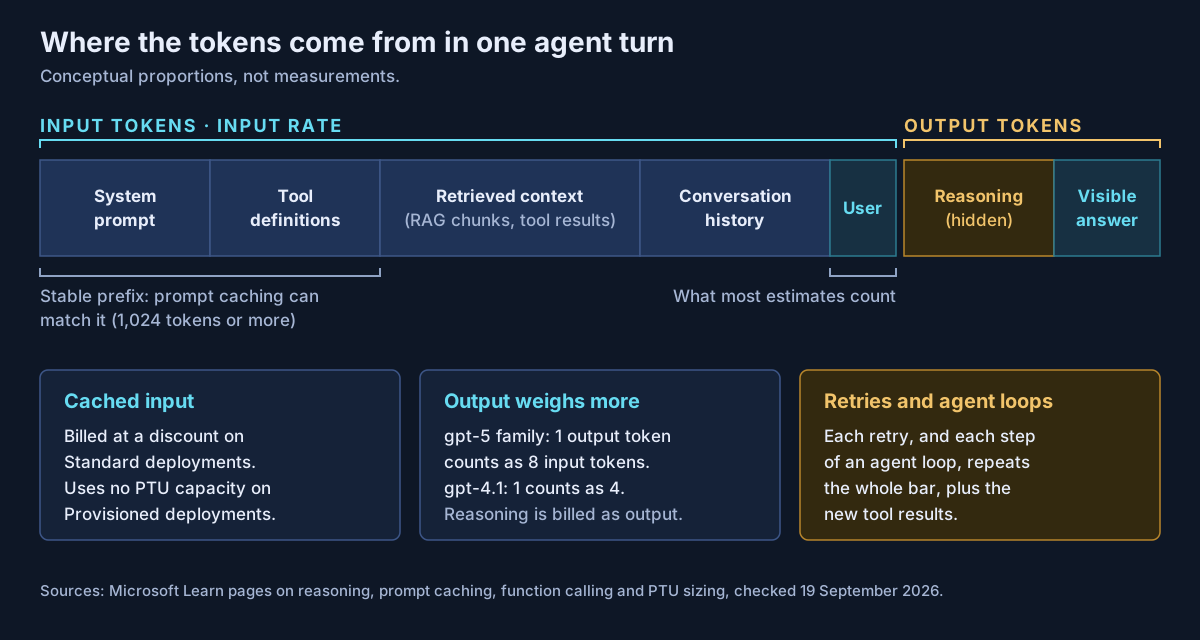
| Source | Billed as | What Microsoft documents |
|---|---|---|
| System prompt and instructions | Input | Resent on every call; eligible for prompt caching if it forms a stable prefix |
| Tool and function definitions | Input | Definitions "are injected into the system message", so "functions consume tokens in your prompt" |
| Retrieved (RAG) context | Input | Every retrieved chunk is prompt text |
| Conversation history | Input | Whatever history the application carries forward; the Responses API offers compaction to trim it |
| Reasoning | Output | "Reasoning tokens are billed as output tokens", although they never appear in the reply |
| Visible answer | Output | Output is priced higher than input (see below) |
Two multipliers sit on top. A retry after a timeout or a validation failure repeats the whole call. An agent loop repeats it for every step, with the previous step's tool results added to the input each time.
How much dearer is output? Microsoft does not state it directly, but its provisioned throughput documentation says that for GPT-4.1 and later models, the capacity ratio between output and input tokens "matches the model's global standard pricing ratio." The sizing table lists that ratio as 8 for the gpt-5 family and 4 for gpt-4.1. On those models, one output token costs as much as eight or four input tokens.
Prompt caching is the main relief. It is on by default for supported models, needs a prompt of at least 1,024 tokens whose first 1,024 tokens are identical, and bills cache reads "at a discount on input token pricing for Standard deployment types and up to 100% discount on input tokens for Provisioned." Caches usually clear after 5 to 10 minutes of inactivity. One change to watch: on GPT-5.6 and later models, Microsoft says "cache writes can incur charges in addition to discounted cache reads."
The deployment types, as of September 2026
| Shape | Deployment types | Billing | Data processing | Notes |
|---|---|---|---|---|
| Standard | Global Standard, Data Zone Standard, Standard (regional) | Per token | Any region; US, EU or APAC zone; or one geography | Best effort. Priority processing available on some types |
| Provisioned | Global, Data Zone and Regional Provisioned | Per PTU per hour, whether used or not | As above | Guaranteed throughput, "lower latency variance" |
| Batch | Global Batch, Data Zone Batch | Per token, 50% below Global Standard | Any region or data zone | 24-hour target, no real-time SLA, separate quota |
Microsoft's own pages differ on one point. The deployment types page says Data Zone Standard supports priority processing, while the priority processing page limits it to "Data Zone standard (US)". Priority requests can also be downgraded to standard processing during traffic ramps or peaks, and are then billed at standard rates.
I cannot give you token prices. On 19 September 2026 the official pricing page showed placeholder values instead of figures, with a note that new model prices were being published. I have not quoted prices from other sites. Use the pricing calculator or your agreement.
How provisioned throughput is actually billed
A provisioned throughput unit is "a fixed amount of model processing capacity." All provisioned types are billed hourly per PTU "regardless of the number of tokens consumed", prorated for partial hours. Deployments cannot be paused. Billing stops only when the deployment is deleted.
Sizes. For gpt-5.2, gpt-5.1, gpt-5, gpt-4.1 and gpt-4o, Global and Data Zone Provisioned start at 15 PTUs in steps of 5. Regional Provisioned starts at 50 in steps of 50. PTU quota is shared across models in a region and deployment type, so you do not buy PTUs for one model.
Reservations. A one-month or one-year Azure reservation gives a discounted hourly rate. Three details catch people out:
- A reservation does not reserve capacity. Microsoft says to create the deployment first, then buy the reservation.
- Global, Data Zone and Regional reservations are not interchangeable.
- Deployed PTUs above the reservation are billed at the hourly rate.
Sizing. Microsoft's formula is: normalized tokens per minute = input TPM × (1 − cache rate) + output ratio × output TPM, divided by the model's input TPM per PTU. The capacity calculator (opens in a new tab) in the Foundry portal applies it for you.
Here is an illustrative calculation, not a measured workload. The assumptions are gpt-5.2 on Data Zone Provisioned (3,400 input TPM per PTU, ratio 8), a peak of 100 requests per minute, a 4,000-token prompt and a 500-token visible answer. The results are rounded up to the next 5-PTU step.
| Case | Normalized TPM | PTUs |
|---|---|---|
| No caching | 400,000 + 8 × 50,000 = 800,000 | 240 |
| 50% of input cached | 200,000 + 400,000 = 600,000 | 180 |
| 50% cached, plus 1,500 reasoning tokens per answer | 200,000 + 8 × 200,000 = 1,800,000 | 530 |
The last row assumes reasoning tokens load capacity at the output ratio. Microsoft's sizing page does not say so explicitly, so test it with the calculator. The lesson holds either way: output and reasoning, not the prompt, drive the size.
Spillover: useful, but it has a cost
Spillover sends requests a provisioned deployment cannot serve to a standard deployment of the same model and version in the same Foundry resource. It triggers on a 429 when PTUs are used up, on some long-context 400 errors, and on 500 or 503 errors. It has been generally available since August 2025, and Microsoft recommends enabling it for all global and data zone provisioned deployments.
Spilled requests are billed at standard token rates. That keeps you online during a peak, but a deployment that spills every afternoon is undersized and paying twice.
Choosing a deployment type
This table is my own construct, guidance I propose rather than Microsoft documentation.
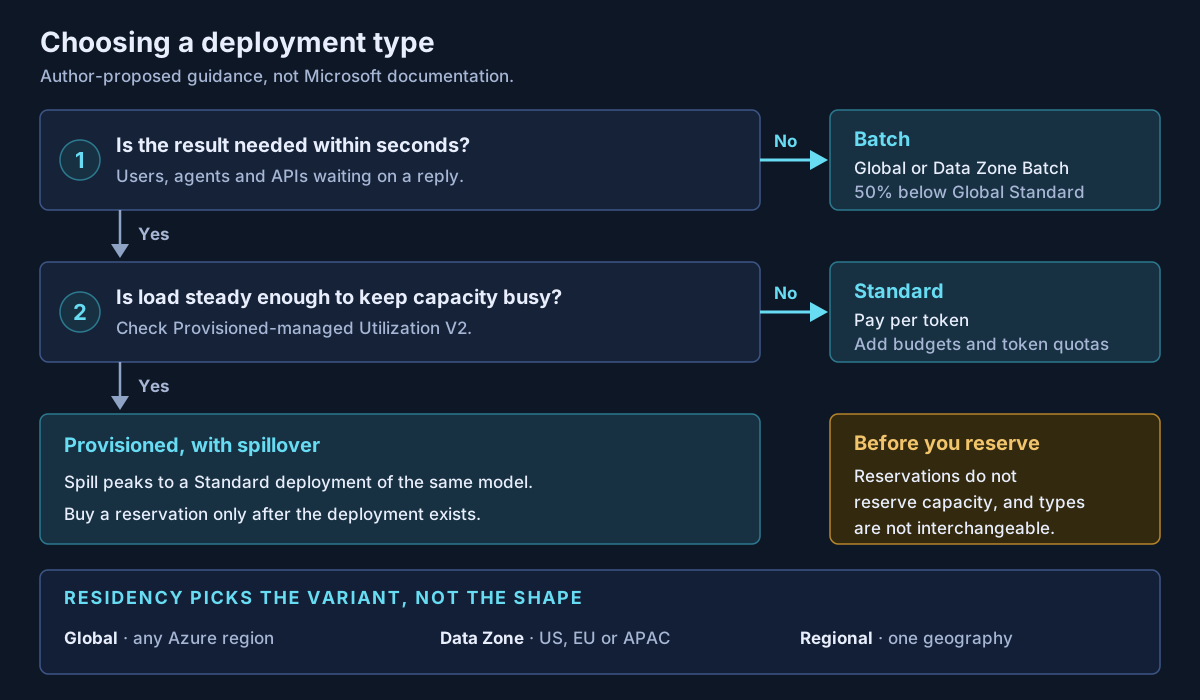
| Workload | Deployment type | Why |
|---|---|---|
| Nightly document summarization or classification | Batch | Half price; the 24-hour target fits |
| New pilot, unknown traffic | Global Standard (or Data Zone Standard) | No idle capacity to pay for |
| Spiky internal assistant | Standard, with budgets and token quotas | Peaks are cheaper to buy per token than to reserve |
| Steady, customer-facing agent with latency targets | Provisioned, with spillover | Guaranteed throughput; spillover absorbs peaks |
| Same, after a month of stable utilization | Provisioned plus reservation | The discount pays off only on capacity you keep |
| Data must stay in the EU or US boundary | Data Zone variant of any shape | Residency picks the variant, not the shape |
How to see what is actually happening
- Azure Monitor metrics, split by
ModelDeploymentName: Processed Prompt Tokens, Generated Completion Tokens, Prompt Token Cache Match Rate and Provisioned-managed Utilization V2, which returns 429s at 100%. - Cost Management: Azure OpenAI appears under Cognitive Services. Filter on the Azure OpenAI service tier and group by Meter. Foundry automatically tags usage with a
projecttag for models sold by Azure. - Response usage fields: log
cached_tokensandreasoning_tokensper call.
There is no hard limit. Microsoft states that Azure OpenAI "doesn't currently provide" spending caps. Budgets only alert. To enforce a limit, put Azure API Management in front of the model and use the llm-token-limit policy, which sets per-caller token rates and monthly quotas.
What I would actually do
Start every workload on Global or Data Zone Standard, and log token usage by component from the first day. Before scaling, cut what inflates the input: trim tool definitions, cap retrieved context, compact history, and put stable content first so the cache can match it. Set an explicit reasoning effort and an output cap for reasoning models.
Move to Provisioned only when utilization data shows steady load, with spillover enabled from the start. Buy the reservation last, after the deployment has run for long enough to show what you really use. Move everything that can wait to Batch.
For the platform decisions around these deployments, see Microsoft Foundry enterprise AI agent architecture and Copilot Studio vs Microsoft Foundry.
If your Azure OpenAI spend is growing faster than your usage, or you are deciding whether to commit to provisioned throughput, that is work Avalon does: token cost breakdowns by agent component, PTU sizing and reservation timing, spillover and quota design, and cost monitoring with Azure Monitor and API Management. It is part of my cloud and AI architecture practice, and the contact page is the best place to start.
Sources
All checked on 19 September 2026. Where two Microsoft pages disagree, the text names the disagreement.
Deployment types — Deployment types in Microsoft Foundry Models (opens in a new tab) · Priority processing (opens in a new tab) · Batch (opens in a new tab) · Quotas and limits (opens in a new tab) · Azure OpenAI pricing (opens in a new tab)
Provisioned throughput — Provisioned throughput concepts (opens in a new tab) · PTU sizing (opens in a new tab) · Provisioned throughput billing (opens in a new tab) · Foundry provisioned throughput reservations (opens in a new tab) · Spillover (opens in a new tab) · What's new (spillover GA, August 2025) (opens in a new tab)
Token accounting — Reasoning models (opens in a new tab) · Prompt caching (opens in a new tab) · Function calling (opens in a new tab) · Responses API (opens in a new tab)
Monitoring and control — Plan and manage costs (opens in a new tab) · Azure OpenAI monitoring data reference (opens in a new tab) · API Management llm-token-limit policy (opens in a new tab)
Published 27 September 2026; sources checked on 19 September 2026. Prices, deployment types and PTU minimums change often, so check Microsoft Learn and the pricing calculator before committing. The decision map, the deployment table and the illustrative PTU calculation are my own guidance and arithmetic, not Microsoft documentation. No client, employer or engagement is named in this article, and any scenario described is an illustrative composite rather than a description of specific customer work.
- #Azure OpenAI
- #Microsoft Foundry
- #Foundry Models
- #Provisioned Throughput
- #PTU
- #Token Costs
- #Prompt Caching
- #Batch API
- #Azure Cost Management
- #FinOps
- #Reasoning Models
- #Azure Reservations
Related articles
Designing a V2V Migration That Survives Contact With a 24/7 Clinical Workload
A field-tested strategy for moving a VMware estate to Azure without pretending lift-and-shift is easy: how to run the provider evaluation, design waves around downtime tolerance, protect data integrity, plan a rollback you can actually execute, and validate the result — in a regulated, always-on environment.
16 min read
Prompt Injection Is a Data Problem, Not a Model Problem
Indirect prompt injection arrives through the documents, email, web pages and tool results an AI system reads, not through the user. OWASP's 2026 Top 10 now says no reliable prevention exists and that defence is architectural. This article explains where injected instructions enter, what model-level defences can and cannot do, and the trust boundaries on data that still hold when the model is fooled.
10 min read
NIST AI RMF and ISO/IEC 42001 in Practice: A One-Page Map to Microsoft Controls
NIST's AI Risk Management Framework is voluntary and ISO/IEC 42001 is certifiable, but they describe the same management cycle. This guide lines the two up, maps each theme to the Microsoft controls that produce evidence for it (Purview, Entra Agent ID, Agent 365, Defender for Cloud and Foundry), and is clear about what no tool can do for you. Checked against NIST, ISO and Microsoft documentation in September 2026.
10 min read