Entra ID for Non-Human Identities: Governing Service Principals, Managed Identities and Agent Identities
Service principals, managed identities and now Entra agent identities are all non-human identities in the same directory, and they multiply faster than anyone reviews them. This guide explains what each type is, which credential each should use, what Workload ID Premium and Agent 365 actually add, and which identity to choose for which workload, with every claim checked against Microsoft's documentation in September 2026.
Published 3 October 2026. Every product claim, price and availability status below was checked against Microsoft's own documentation on 19 September 2026. Where two Microsoft pages disagree, I say so rather than pick one. Identity features for agents are changing monthly, so check the linked source before you plan around anything here.
In many tenants, nobody can say how many non-human identities exist, who owns them, or which of them still hold a client secret. That was a manageable problem when the population was pipelines and integrations. It is not manageable now that every Copilot Studio agent and every published Foundry agent brings its own identity into the directory.
This is the identity layer beneath the controls in Designing Zero Trust beyond a product checklist. Govern it before it multiplies.
The one idea
A non-human identity is governed when three things are true: nobody can steal its credential, nobody would question its permissions, and a named person answers for it.
Everything below is one of those three: credential, permission, accountability.
Four identities, one object underneath
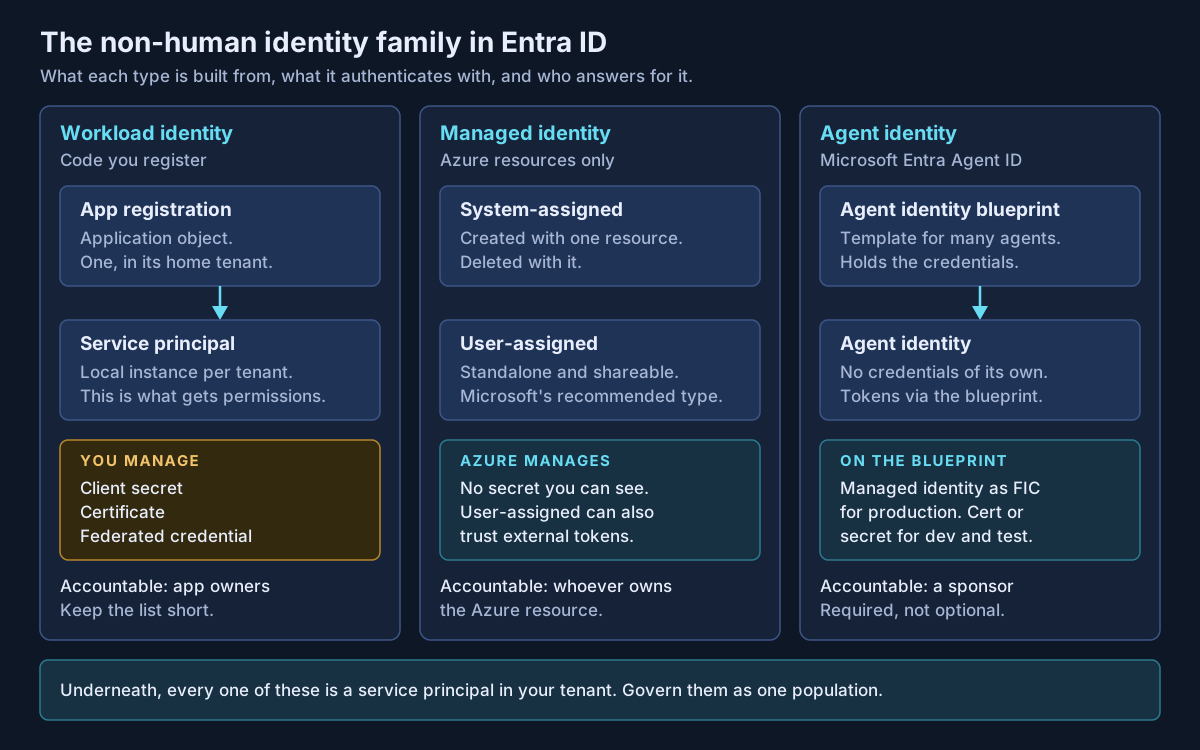
| App registration and service principal | Managed identity | Agent identity | |
|---|---|---|---|
| What it is | Application object (home tenant) plus a service principal per tenant | Service principal of a special type, with no application object | "A special service principal", created from a blueprint |
| Credential | Secret, certificate or federated credential, all managed by you | Managed by Azure; "credentials aren't even accessible to you" | None of its own; the blueprint holds them |
| Where it runs | Anywhere | Azure compute only | Any agent platform, Microsoft or not |
| Accountable party | Owners; keep the list short | Owner of the Azure resource | Sponsor, required |
| Status | GA | GA | Entra Agent ID GA; see below |
Two details matter for governance. A system-assigned managed identity lives and dies with its resource, while a user-assigned one is a standalone resource that must be deleted explicitly, which is why orphaned user-assigned identities appear. And agent identities can only be issued tokens in the tenant where they were created.
On status, Microsoft's own pages disagree. The Entra Agent ID "What's new" page says the service "is now generally available", yet the same page labels the create-blueprint and create-agent-identity articles as preview, and the Workload ID product page on microsoft.com still says "Microsoft Entra Agent ID Preview". I treat the platform as GA and check each specific capability.
Credentials: climb the ladder
Microsoft's app registration guidance is blunt: "Don't use password credentials, also known as secrets." It then gives an order of preference, which Figure 2 draws.
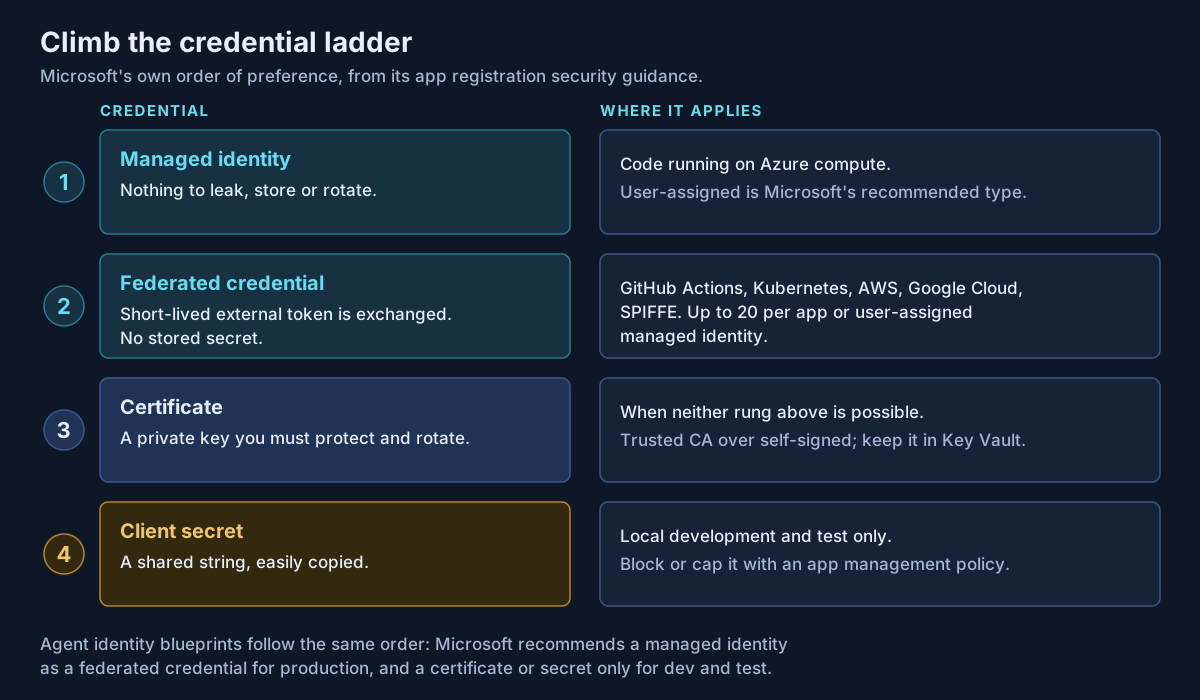
Workload identity federation is the rung most organizations underuse. An app registration or user-assigned managed identity trusts tokens from an external identity provider, such as GitHub Actions, any Kubernetes cluster, AWS, Google Cloud or SPIFFE, and swaps them for Entra tokens. Nothing is stored. The limits are modest: 20 federated credentials per app or identity, and issuer, subject and audience must match exactly, including case.
App management policies enforce the ladder. They can block new secrets, cap secret and certificate lifetimes, and require certificates from trusted authorities, tenant-wide or per app. Two warnings. A policy with restrictForAppsCreatedAfterDateTime leaves older apps "unaffected", so your legacy estate needs its own clean-up. And licensing is unclear: Microsoft's Workload ID FAQ marks app management policies as available in both the free and Premium columns, and the configuration page lists no licence. Confirm in your tenant before promising custom per-app policies.
Agent identities: credentials on the blueprint, accountability on a sponsor
Agent identities change the ladder in one way. The credential sits on the blueprint, not the agent, and one blueprint can mint many agent identities. Microsoft recommends "a managed identity as a federated identity credential (FIC) for production deployments." Secrets and certificates are "supported, but not recommended for production." A leaked blueprint secret is a leak for every agent built from it.
Sponsors are the accountability piece app registrations never had. Owners are technical administrators. Sponsors are "business representatives accountable for the agent's purpose and lifecycle," and every agent identity and blueprint must have one. A sponsor can disable or soft-delete an agent, but cannot restore it or change its authentication.
Where agent identities come from, as of September 2026:
| Platform | Identity it creates |
|---|---|
| Copilot Studio, agents created after May 2026 | An Entra Agent ID per agent, automatically; no opt-out; deleted with the agent |
| Copilot Studio, older agents | App registrations until Microsoft migrates them ("in the future", automatically) |
| Microsoft Foundry | Shared project identity until publish; publishing creates a dedicated blueprint and agent identity, and RBAC roles "don't carry over" |
| Agent Builder in Microsoft 365 Copilot | "Currently don't use or require app registration IDs or Agent IDs" |
The Foundry row catches people: an agent that worked in testing loses access on publish until someone reassigns its roles. Agentic AI security architecture covers what those roles should be.
What the premium licences actually buy
| Capability | Covers | Licence, as of 19 September 2026 |
|---|---|---|
| Conditional Access for workload identities | Single-tenant service principals only; not multitenant, SaaS or managed identities. Block is the only control | Workload ID Premium |
| ID Protection for workload identities | Single-tenant, multitenant and SaaS apps; not managed identities. Detects leaked credentials, anomalous activity | Detections for all; full detail needs Premium |
| Access reviews of service principals in privileged roles | Includes managed identities | Workload ID Premium plus Entra ID P2 or ID Governance |
| Conditional Access for agents | Agent identities, blueprints, agent user accounts; agent risk | Entra ID P1 or P2 plus Agent 365 per user, "enforcement coming soon" |
Workload ID Premium is $3 a month; the FAQ says "per workload identity" and the product page says "user", and the FAQ adds that one licence unlocks the features for every workload identity. Agent 365 is $15 per user per month paid yearly, or included in Microsoft 365 E7, and is what Microsoft says extends Entra security features to agents. A policy assigned to a group containing a service principal is not enforced, so target service principals directly.
Least privilege for Graph application permissions
Microsoft calls application permissions "highly privileged": Files.Read.All as an application permission reads every file in the organization. Two scoping tools cut most of that exposure. Selected scopes such as Sites.Selected start with no access until someone grants a specific site, list or file. RBAC for Applications in Exchange Online limits an app to named mailboxes and replaces application access policies. Only Privileged Role Administrators and Global Administrators can consent to application permissions, so make the consent request carry the justification.
Monitoring and clean-up
Service principal and managed identity sign-ins have separate logs, and Entra now adds agent logs. Entra recommendations flag unused apps (no tokens for 90 days), unused credentials (30 days) and expiring credentials. All four carry a "Preview" label, and Microsoft's FAQ lists app health recommendations as a Premium feature. The unused-app recommendation excludes managed identities, so orphaned user-assigned identities need their own query.
Which identity for which workload
This table is my own construct, not Microsoft documentation.
| Workload | Identity | Credential |
|---|---|---|
| App or function on Azure calling Azure or Graph | Managed identity (user-assigned if shared or long-lived) | None to manage |
| CI/CD from GitHub Actions or Azure Pipelines | App registration or user-assigned managed identity | Federated credential |
| Workload on Kubernetes, AWS or Google Cloud | App registration or user-assigned managed identity | Federated credential |
| On-premises service with no federation option | App registration | Certificate from a trusted CA, in Key Vault |
| SaaS integration you consent to | Multitenant service principal | Vendor's; review permissions and owners |
| AI agent built in Copilot Studio or published from Foundry | Agent identity, created for you | Managed identity FIC on the blueprint |
| Custom or third-party agent | Agent identity from your own blueprint | Managed identity FIC; certificate if off Azure |
| Anything | Client secret | Local development and test only |
What I would actually do
Inventory first: every service principal, managed identity, blueprint and agent identity, with an accountable person. An identity with no owner or sponsor is a finding.
Then block new secrets with a tenant default app management policy, and run a separate project for secrets the policy's date cut-off leaves untouched. Move pipelines to federated credentials.
Buy Workload ID Premium where privileged service principals exist; one licence unlocks the features. Treat sponsors as seriously as owners, and check that someone reassigns sponsorship when a sponsor leaves. Put Agent 365 in the budget before the agent count grows, not after.
If your tenant has more service principals than anyone can explain, or agents arriving faster than your identity team can review them, that is work Avalon does: non-human identity inventories, credential and permission reviews, app management policy design, and governance models that give every agent a sponsor. It sits within my cloud and security architecture practice, and the contact page is the best way to start a conversation.
Sources
All checked on 19 September 2026. Where two Microsoft pages disagree, the text names the disagreement.
Identity types — Application and service principal objects (opens in a new tab) · Managed identities overview (opens in a new tab) · Agent identities (opens in a new tab) · Agent identity blueprint (opens in a new tab) · What is Microsoft Entra Agent ID (opens in a new tab) · What's new in Entra Agent ID (opens in a new tab)
Credentials — Security best practices for app registration (opens in a new tab) · Workload identity federation (opens in a new tab) · Federation considerations and limits (opens in a new tab) · Configure app management policies (opens in a new tab) · Enforce secret standards (opens in a new tab) · Create an agent identity blueprint (opens in a new tab)
Accountability and agent platforms — Owners, sponsors and managers (opens in a new tab) · Entra Agent IDs in Copilot Studio (opens in a new tab) · Govern Copilot Studio agent identities (opens in a new tab) · Foundry agent identity (opens in a new tab)
Premium controls and licensing — Workload identities FAQ (opens in a new tab) · Workload ID product page (opens in a new tab) · Conditional Access for workload identities (opens in a new tab) · Workload identity risk (opens in a new tab) · Access reviews of roles, including service principals (opens in a new tab) · Conditional Access for agents (opens in a new tab) · Agent 365 pricing (opens in a new tab) · Agent 365 overview (opens in a new tab)
Permissions and monitoring — Microsoft Graph permissions overview (opens in a new tab) · Selected permissions in SharePoint and OneDrive (opens in a new tab) · RBAC for Applications in Exchange Online (opens in a new tab) · Sign-in logs (opens in a new tab) · Service principal sign-ins (opens in a new tab) · Entra recommendations (opens in a new tab) · Remove unused applications (opens in a new tab) · Remove unused credentials (opens in a new tab)
Published 3 October 2026; sources checked on 19 September 2026. Licensing and availability for Entra workload and agent identities change often, so check Microsoft Learn before making a commitment. The decision table is guidance I propose, not Microsoft documentation. No client, employer or engagement is named in this article, and any scenario described is an illustrative composite rather than a description of specific customer work.
- #Microsoft Entra ID
- #Workload Identities
- #Service Principals
- #Managed Identities
- #Entra Agent ID
- #Agent Identity Blueprints
- #Workload Identity Federation
- #Conditional Access
- #Agent 365
- #Microsoft Graph Permissions
- #Identity Governance
- #Zero Trust
Related articles
Microsoft Copilot Studio vs Microsoft Foundry: Which AI Agent Platform Should Your Business Choose?
Copilot Studio and Microsoft Foundry are not competitors — they sit at different levels of abstraction, and three changes in 2026 have quietly retired most of the advice written about choosing between them. A decision framework built on who owns the runtime, where the data already lives, and who operates the agent on day ninety, with the cost shapes, governance asymmetries and interop paths verified against Microsoft's own documentation.
15 min read
Designing Zero Trust Beyond a Product Checklist
Zero Trust fails when it is treated as a shopping list. A durable design starts from identity, device health, and explicit policy — and earns its rollout with evidence.
2 min read
Practical Cloud Landing Zone Security Considerations
Landing zone security is mostly decided before the first workload arrives. The guardrails, identity boundaries, and logging defaults that matter — and the ones that just add friction.
2 min read