An Azure Landing Zone for AI Workloads: Networking, Private Endpoints, Identity and Policy Before the First Model
Microsoft's guidance is clear that AI workloads belong in ordinary application landing zones. What changes is the order of work. Some Foundry networking choices are fixed the moment the resource is created, so they have to be settled before the first model is deployed. This guide covers placement, private endpoints and DNS, agent network isolation, keyless identity, the renamed Foundry roles, policy, the AI gateway, quotas and regions, checked against Microsoft's documentation in September 2026.
Published 2 October 2026. Every product claim, name and availability status below was checked against Microsoft's own documentation on 19 September 2026. Where two Microsoft pages disagree, I say so rather than pick one. Foundry networking in particular changes month to month, so check the linked source before you build.
In practical cloud landing zone security considerations I covered the general foundations: identity, segmentation, logging and guardrails before workloads arrive. This article adds the AI-specific layer: the work to finish before anyone deploys the first model into Microsoft Foundry.
Microsoft's position is simple. The Cloud Adoption Framework says that if your organization uses a platform landing zone accelerator, you "deploy your AI workloads to regular workload landing zones, as you would any other workload." There is no separate AI landing zone to buy. What is different is the order of the work.
The one idea that decides the order
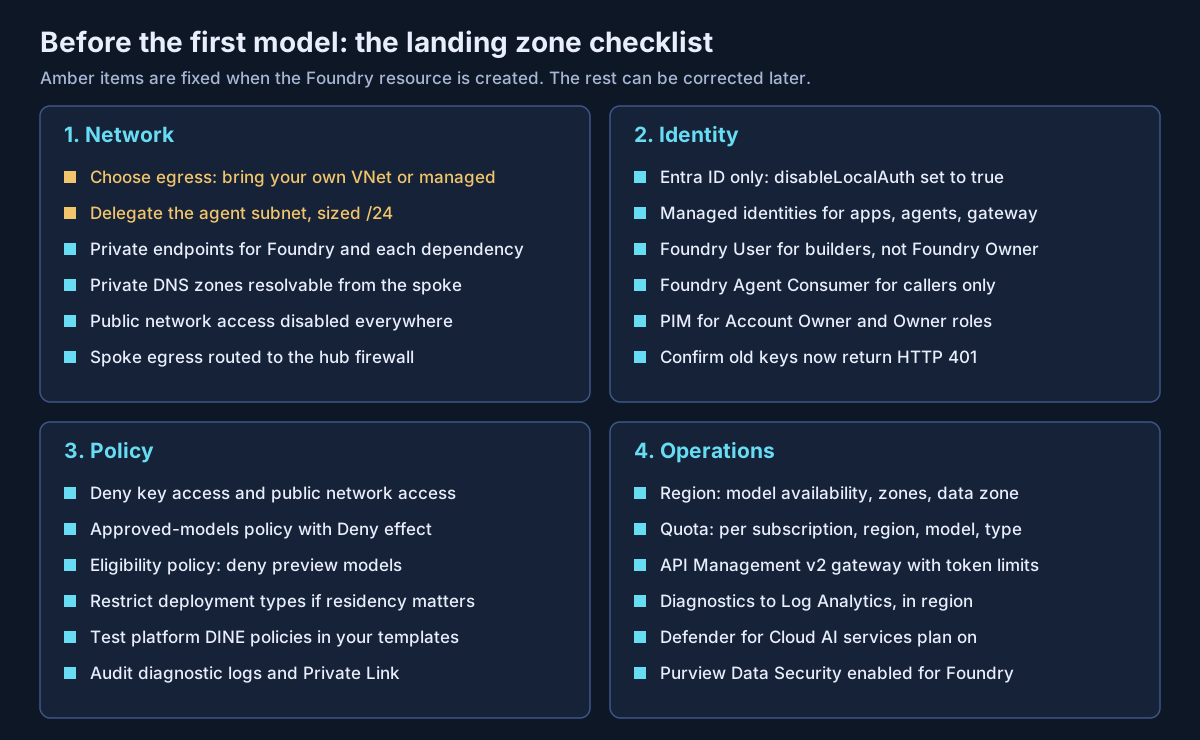
Some AI landing zone decisions are fixed the moment the Foundry resource is created. Make those first. Everything else can be enforced with policy and fixed later.
Microsoft states that virtual network injection for Foundry Agent Service "is part of the create-resource flow and can't be added to an existing account." The delegated subnet cannot be changed, and outbound networking settings cannot be updated after deployment. If a team creates a Foundry resource with public networking to "just try a model," the fix later is a redeployment, not a setting.
Where the AI workload sits
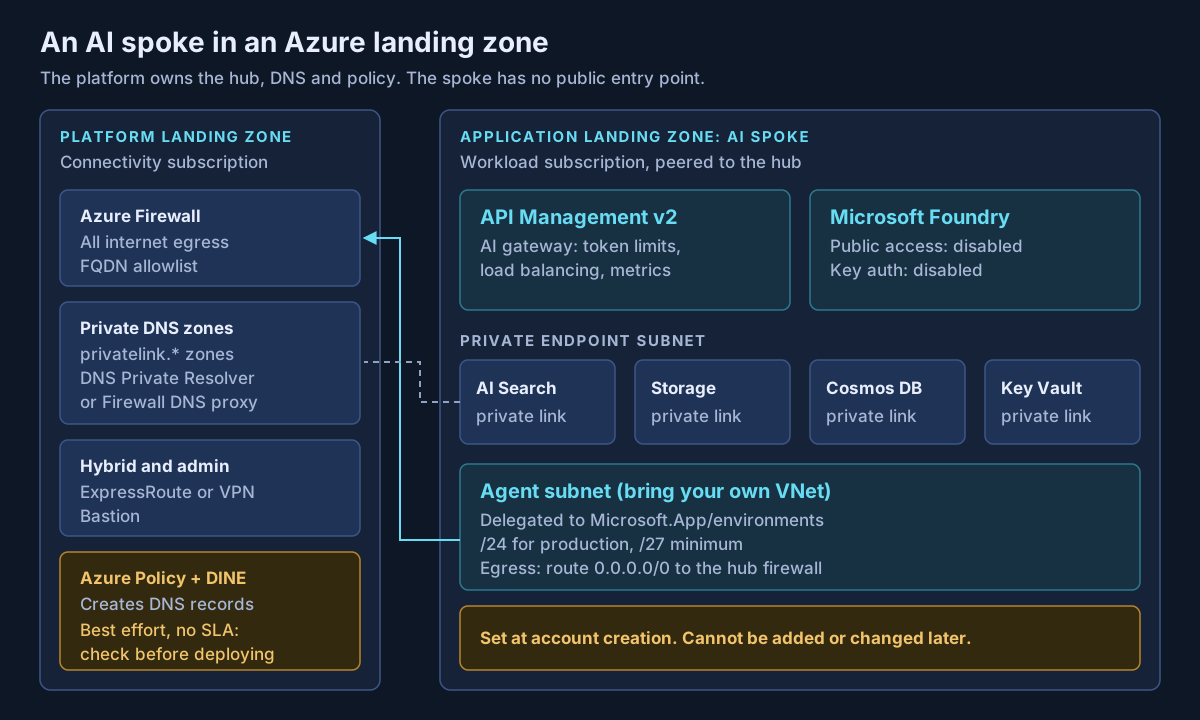
The Azure Architecture Center's Baseline Microsoft Foundry chat reference architecture in an Azure landing zone splits ownership cleanly, and I would copy its split into your operating model.
| Owned by the platform team | Owned by the workload team |
|---|---|
| Hub network, Azure Firewall, Bastion | Foundry resource and projects |
| The spoke network itself and its routes | Subnets, NSGs and private endpoints |
| Private DNS zones and DNS resolution | AI Search, Storage, Cosmos DB, Key Vault |
| Azure Policy, including DeployIfNotExists | App front end, gateway, monitoring |
| ExpressRoute or VPN, DDoS protection | Agent Service in the standard setup |
The reference architecture uses a hub-and-spoke topology. The Cloud Adoption Framework also supports Virtual WAN for landing zones, but the Foundry baseline describes hub and spoke only, so treat a Virtual WAN design as your own adaptation and test it.
Networking: the decisions you cannot take back
Pick the agent egress model first. Microsoft now documents three: public egress (the default), bring your own virtual network, and a managed virtual network. Neither isolated option carries a preview label on its documentation page, and Microsoft's Foundry general availability overview lists virtual network integration among the generally available enterprise capabilities. By default, Microsoft notes, the Foundry endpoint is reachable from the internet by "any caller with a valid credential and the endpoint URL."
| Bring your own VNet | Managed VNet | |
|---|---|---|
| Who controls egress | Your hub firewall, through routes | Microsoft-managed network, with its own rules |
| Subnet | Delegated to Microsoft.App/environments, one Foundry resource only | None of yours |
| Sizing | /27 minimum, /24 recommended for production with hosted agents | Not your problem |
| Region coverage | Same region as the Foundry resource | Limited list of regions |
| Can you change it later? | No: set at create time | Only one way: approved-only cannot go back to internet outbound |
In a landing zone that already sends every spoke's traffic through a hub firewall, I would choose bring your own VNet, because it keeps AI egress on the same controls as everything else. Size the subnet at /24. Each hosted agent consumes an IP address, and the subnet cannot be resized after it is assigned.
Get DNS right before the first deployment. The baseline lists the private DNS zones the platform team must provide, including privatelink.services.ai.azure.com, privatelink.openai.azure.com, privatelink.cognitiveservices.azure.com, and the zones for AI Search, Blob Storage, Cosmos DB and Key Vault. Two warnings from the same page matter. DeployIfNotExists policies for DNS zones "operate on a best-effort basis and don't include an SLA." And if you deploy Agent Service before the private records resolve from inside the subnet, "the deployment fails."
Know which agent tools leave your network. Microsoft's isolation page lists Bing grounding, web search and SharePoint grounding as reaching their destination over a public endpoint, even when the Foundry resource is isolated. Logic Apps, browser automation, computer use and image generation are not supported with network isolation at all. If no AI traffic may cross the internet, those tools are out of scope.
Identity: keyless from the first call
Microsoft is direct about keys: they "provide full access to the resource and can't be scoped to specific users or actions." Agent Service and evaluations already require Microsoft Entra ID. Set disableLocalAuth to true and back it with policy. Microsoft warns that disabling keys can take up to several hours to propagate, and recommends checking that an old key returns HTTP 401.
Use managed identities for the app, the gateway and the agents. For people, note that the Foundry roles have been renamed. Azure AI User is now Foundry User, and the same applies to Owner, Account Owner and Project Manager. Role IDs are unchanged, so existing assignments keep working, but your documentation and access reviews should use the new names.
| Who | Role |
|---|---|
| Applications and people that only call agents | Foundry Agent Consumer |
| Developers building and testing agents | Foundry User |
| Project leads who assign developer access | Foundry Project Manager |
| Platform staff managing deployments | Foundry Account Owner, through PIM |
Foundry Owner is the only built-in role with both control-plane and data-plane rights. Keep it out of standing assignments.
Policy: guardrails before the first deployment
The built-in definitions cover most of the baseline. I would assign these at the landing zone management group:
| Built-in policy | Effect I would use |
|---|---|
| Azure AI Services resources should have key access disabled (disable local authentication) | Deny |
| Azure AI Services resources should restrict network access | Deny |
| Foundry model deployments should only use approved models | Deny, with an allow-list |
| Foundry model deployments should meet eligibility requirements | Deny preview models in production |
| Diagnostic logs in Azure AI services resources should be enabled | AuditIfNotExists |
| Azure AI Services resources should use Azure Private Link | Audit |
Both model deployment policies are generally available, and Microsoft says to allow at least 15 minutes after assignment before testing. The Azure landing zone library also ships guardrail initiatives such as Enforce-Guardrails-CognitiveServices. Note that the Cloud Adoption Framework's AI governance page labels that link "Azure AI Search," which does not match the initiative's name, so check the definitions before you rely on the label.
Test platform policies against your templates early. The baseline's example: a Key Vault secret-expiry policy conflicts with secrets Foundry stores without one.
Operations: region, quota and the gateway
Region and data zone. Model availability varies by region. Deployment type decides where inference runs: Global types may process data in any Azure region, Data Zone types stay in the US, EU or Asia Pacific zone, and Standard stays in the geography. Microsoft recommends starting with Global Standard. If residency matters, restrict the deployment type with Azure Policy.
Quota. Quota is assigned per subscription, per region, per model and per deployment type, in tokens per minute, and is shared by every resource in that subscription and region. One subscription per workload keeps one team from consuming another's capacity.
The AI gateway. API Management provides llm-token-limit, llm-emit-token-metric, load balancing across backends and a circuit breaker, on all tiers. Foundry can attach an existing v2 instance or create one. Two cautions. The instance Foundry creates is Basic v2 and, per the isolation page, "automatically public"; a private Foundry needs Standard v2 or Premium v2 with a private endpoint, or Premium v2 in a virtual network. And the documentation disagrees on status: the API Management page titles the Foundry integration "(preview)," while the Foundry configuration and token-limit pages carry no preview label.
Monitoring. Turn on the Defender for Cloud AI services plan for the subscription, send diagnostics to Log Analytics in an allowed region, and expect to enable Microsoft Purview Data Security for Foundry. The baseline says you are likely to be required to.
An accelerator, with a caveat
Microsoft's AI Landing Zone repository describes itself as a "reference architecture and reference implementation in the form of bicep, terraform and portal," built on Azure Verified Modules. It can be deployed with or without a platform landing zone, and it is marked as preview. Read it for patterns, and deploy it into a sandbox before a governed platform.
What I would actually do
This sequence is my own recommendation, not Microsoft documentation.
- Agree ownership first. Use the table above, and write down who creates DNS records and how fast.
- Build the spoke before the Foundry resource. Create the delegated /24 subnet, the private endpoint subnet and the route to the hub firewall, and confirm DNS resolves from inside the spoke.
- Assign policy before anyone has access. Deny keys, deny public access, and set an approved-model list, so the first deployment is already compliant.
- Create Foundry with isolation on, in the standard agent setup, so threads, files and vector stores sit in your own Cosmos DB, Storage and AI Search.
- Put a gateway in front before the second team arrives. Token limits are much easier to set before usage exists than to take away afterwards.
For how agents behave once this foundation exists, see Microsoft Foundry enterprise AI agent architecture.
If you are preparing an Azure landing zone for Foundry, or already have AI resources running with public endpoints and API keys, that is work Avalon does: landing zone readiness reviews for AI workloads, private networking and DNS design, Foundry identity and policy baselines, and AI gateway design. It sits within my enterprise architecture and cloud security practice, and the contact page is the best way to start a conversation.
Sources
All checked on 19 September 2026. Where two Microsoft pages disagree, the text names the disagreement.
Landing zone placement — AI Ready (Cloud Adoption Framework) (opens in a new tab) · What is an Azure landing zone? (opens in a new tab) · Baseline Microsoft Foundry chat reference architecture in an Azure landing zone (opens in a new tab) · Define an Azure network topology (opens in a new tab) · AI Landing Zones repository (opens in a new tab)
Networking — Secure networking for Azure AI platform services (opens in a new tab) · Networking options for Foundry Agent Service (opens in a new tab) · Configure network isolation for Microsoft Foundry (opens in a new tab) · Configure managed virtual network for Microsoft Foundry (opens in a new tab) · Standard agent setup (opens in a new tab)
Identity — Role-based access control for Microsoft Foundry (opens in a new tab) · Authentication and authorization in Microsoft Foundry (opens in a new tab) · Disable local authentication in Foundry Tools (opens in a new tab)
Policy — Govern Azure platform services for AI (opens in a new tab) · Built-in policy definitions for Foundry Tools (opens in a new tab) · Built-in policies for model deployment (opens in a new tab) · Deployment types in Foundry Models (opens in a new tab)
Operations — AI gateway capabilities in API Management (opens in a new tab) · Configure AI Gateway in Foundry (opens in a new tab) · Enforce token limits for models (opens in a new tab) · Manage Azure OpenAI quota (opens in a new tab) · Enable threat protection for AI services (opens in a new tab)
Published 2 October 2026; sources checked on 19 September 2026. Foundry networking, role names and gateway status change often, so check Microsoft Learn before you build. The ownership split follows Microsoft's baseline architecture; the checklist and the sequence in "What I would actually do" are guidance I propose, not Microsoft documentation. No client, employer or engagement is named in this article, and any scenario described is an illustrative composite rather than a description of specific customer work.
- #Azure Landing Zones
- #Microsoft Foundry
- #Cloud Adoption Framework
- #Private Endpoints
- #Private DNS
- #Foundry Agent Service
- #Azure Policy
- #Managed Identity
- #Azure API Management
- #AI Gateway
- #Network Isolation
- #Enterprise Architecture
Related articles
Azure Cost Guardrails That Work: Budgets, Policy, Tags and Anomaly Alerts Before the Spending Starts
Azure budgets alert, they do not stop spending, and every cost alert in Azure works on data that is hours or days old. This guide separates preventive guardrails (Azure Policy, quotas, subscription vending) from detective ones (budgets, anomaly alerts, Advisor), shows the latency gap between them, and proposes a baseline that puts each control at the right scope. Checked against Microsoft's documentation in September 2026.
10 min read
Seven Azure Cost Leaks I Keep Finding (and How to Close Each One)
Most Azure waste is not a bad architecture decision. It is a meter that kept running after its reason ended: a disk left behind by a deleted VM, a public IP nobody released, an empty App Service plan, a reservation nobody watches. This list covers seven common leaks, with how to find each one, how to fix it, and whether policy can stop it coming back, checked against Microsoft's documentation in September 2026.
10 min read
Why Your Azure OpenAI Bill Surprised You: Tokens, Provisioned Throughput and Pay-As-You-Go
Azure OpenAI in Microsoft Foundry Models has three billing shapes: pay per token, reserve capacity in provisioned throughput units, or accept a 24-hour target turnaround for half price with Batch. This guide explains where tokens come from in an agent turn, how PTU sizing and reservations work, when spillover helps, and how to monitor spend, with every claim checked against Microsoft's documentation in September 2026.
10 min read