Azure Cost Guardrails That Work: Budgets, Policy, Tags and Anomaly Alerts Before the Spending Starts
Azure budgets alert, they do not stop spending, and every cost alert in Azure works on data that is hours or days old. This guide separates preventive guardrails (Azure Policy, quotas, subscription vending) from detective ones (budgets, anomaly alerts, Advisor), shows the latency gap between them, and proposes a baseline that puts each control at the right scope. Checked against Microsoft's documentation in September 2026.
Published 29 September 2026. Every product claim, price and availability status below was checked against Microsoft's (or the standard body's) own documentation on 19 September 2026. Where sources disagree, I say so rather than pick one. Cost Management behaviour depends on your agreement type, so check the linked page for your own before you rely on anything here.
Most Azure cost conversations start with a budget. That is a reasonable first step and a poor last one. Microsoft's budget documentation is plain about it: when a threshold is exceeded, "resources aren't affected, and your consumption isn't stopped." A budget is an alarm, not a brake.
This article sorts Azure's cost controls by when they act, and shows why that matters more than which ones you have turned on.
The one idea that organizes the guardrails
Preventive controls act on the request. Detective controls act on the bill, and the bill is always late.
Azure Policy can refuse a deployment in the same second it is requested. A budget can only tell you about spending once cost data has arrived, which is hours or days later. Everything between those two points is spending nobody can see yet.
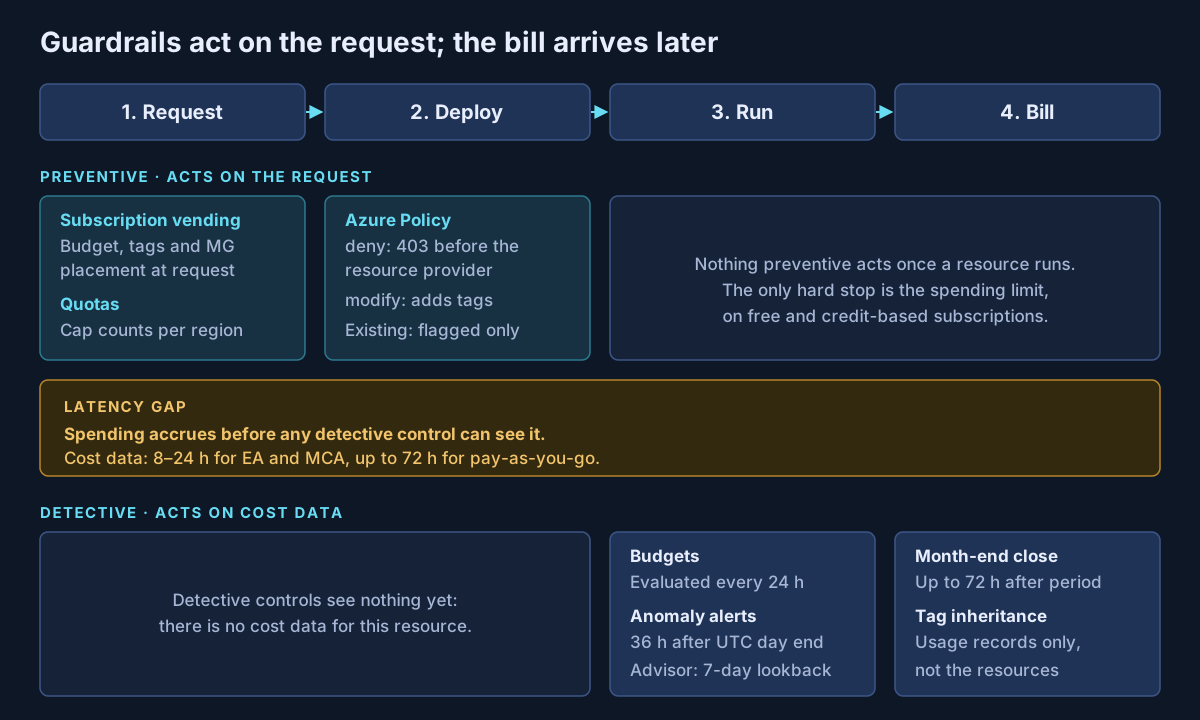
How late is "late"?
Microsoft publishes the timings, and they are worth putting in front of anyone who thinks a budget will catch a runaway deployment.
| Signal | Published timing | Source |
|---|---|---|
| Cost data available | 8–24 hours for EA and MCA; up to 72 hours for pay-as-you-go | Cost Management data |
| Budget evaluation | Every 24 hours; email normally within an hour after | Budgets tutorial |
| Anomaly detection | Runs 36 hours after the end of the UTC day | Anomaly detection |
| Month-end figures | Billing period closes up to 72 hours after it ends; charges can change until the fifth day | Cost Management data |
| Policy on a new deployment | Deny happens at request time; compliance status about 15 minutes later | Policy compliance data |
As of 19 September 2026.
One inconsistency is worth naming. The budgets tutorial gives a flat "8-24 hours" for cost data. The Cost Management data page gives the same figure only for EA and MCA, and says pay-as-you-go can take up to 72 hours. If you run pay-as-you-go subscriptions, plan for the longer figure.
Preventive controls: stop it before it exists
Azure Policy with deny. Deny "prevents the request before being sent to the Resource Provider" and returns a 403. For cost, the useful built-ins are Allowed locations, Allowed virtual machine size SKUs and the Require a tag on resources family. Deny does not remove anything that already exists. During evaluation, existing resources that match are simply marked non-compliant.
Azure Policy with modify. Modify adds, replaces or removes tags on create or update. The built-ins include Inherit a tag from the resource group if missing and Inherit a tag from the subscription if missing. Existing resources are not changed by evaluation; they need a remediation task, and the assignment needs a managed identity.
Quotas. Quotas cap countable resources, such as virtual machines, per subscription and region. Microsoft describes them as protection against "inaccurately resourced deployments and mistaken consumption," but it is clear they are not a pricing lever: "Costs are based on resource usage, not the quotas themselves." They are still one of the few hard ceilings you have, so treat a quota increase request in a sandbox subscription as a cost decision, not a formality.
Subscription vending. The Cloud Adoption Framework describes vending as "a platform mechanism for programmatically issuing subscriptions to application teams." It says the deployment should create a subscription budget, assign tags "for cost management and reporting purposes," and place the subscription in the management group hierarchy. That makes the budget, the tags and the policy inheritance part of the request, not an afterthought. I covered the wider landing zone design in practical cloud landing zone security considerations.
Detective controls: know it is happening
Budgets. Budgets support actual and forecasted alerts, up to five thresholds per budget, and reset periods aligned either to the calendar or to your billing period. At subscription and resource group scope they can trigger an action group. Microsoft documents a scenario where a budget calls a Logic App and an Automation runbook that stops VMs in an "Optional" resource group at 80% and everything else at 100%, for "a noncritical workload." That is the closest Azure comes to a budget that acts, and it inherits the budget's latency.
Cost anomaly alerts. Cost Management compares each day's usage with a forecast from the previous 60 days. Alert rules exist only at subscription scope, with a maximum of five per subscription, and each alert email is sent once. They are not available to Azure Government customers.
Azure Advisor. Advisor's cost recommendations cover right-sizing or shutting down underused resources, reservations, savings plans and idle resources. Several right-sizing checks look at the past seven days, so Advisor finds waste that has settled in, not a spike.
Tag inheritance in Cost Management. This one is often misunderstood. Tag inheritance applies subscription, resource group and billing tags "to child resource usage records and not the resources themselves." It is available for EA, MCA and Microsoft Partner Agreement Azure plan subscriptions, and it rewrites the current month's records when enabled. It fixes reporting. It does not tag anything, so it cannot replace a policy.
The spending limit most estates do not have
Azure does have a hard stop. The spending limit stops and de-allocates VMs and makes storage read-only when credit runs out. It exists on the Azure free account and on subscriptions with monthly credits, such as Visual Studio subscriptions. Microsoft states it "isn't available for subscriptions with commitment plans or with pay-as-you-go pricing." If your production estate runs on either of those, a hard cap is not an option you are forgoing. It is not on offer.
Where each guardrail lives
Scope decides what each control can reach, and the scopes are uneven.
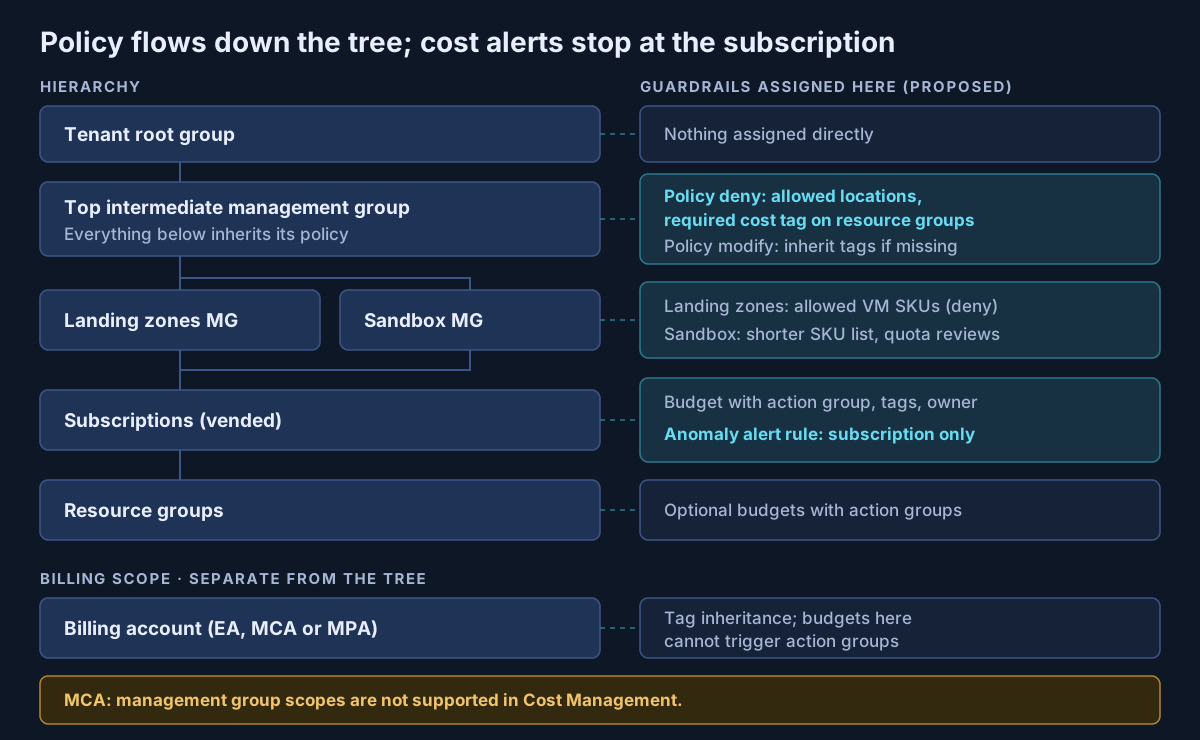
Management groups allow up to six levels of depth, and governance applied to them cascades "by inheritance to all associated subscriptions." That suits policy. It does not suit Cost Management in every case. The budgets tutorial lists management groups as a budget scope with no qualifier, but the scopes page states that management groups "aren't currently supported in Cost Management features for Microsoft Customer Agreement subscriptions." Action groups work only at subscription and resource group scope either way.
The guardrail table
| Control | Type | Scope | What it cannot do |
|---|---|---|---|
| Policy deny (locations, SKUs, required tags) | Preventive | Management group, subscription, resource group | Remove or change existing resources |
| Policy modify (tags) | Preventive | Same | Fix existing resources without a remediation task |
| Quotas | Preventive | Subscription and region | Limit cost; they limit counts |
| Subscription vending | Preventive | Subscription request | Enforce anything after handover by itself |
| Spending limit | Preventive (hard stop) | Free and credit-based subscriptions | Apply to pay-as-you-go or commitment plans |
| Budgets | Detective | Management group, subscription, resource group, billing scopes | Stop spending; act within the same day |
| Budget + action group | Detective, automated | Subscription, resource group | Act faster than budget evaluation |
| Anomaly alerts | Detective | Subscription only | See a spike until about 36 hours after the day ends |
| Advisor cost recommendations | Detective | Individual resources | Catch short spikes |
| Tag inheritance | Reporting | EA, MCA, MPA billing scopes | Tag actual resources |
A baseline you can adopt
This section is my own construct: a baseline I propose, not Microsoft guidance.
- Deny first. Assign Allowed locations and a required cost-centre tag on resource groups at a top intermediate management group. Start in audit for a sprint, then switch to deny.
- Tag by inheritance. Add Inherit a tag from the resource group if missing with modify, and run the remediation task once.
- Tighten sandboxes. A short VM SKU list on the sandbox management group, and a named approver for quota increases in sandbox subscriptions.
- Vend with a budget. Every subscription arrives with a forecasted and an actual budget alert, an owner email, and an anomaly alert rule.
- Automate only what you would do anyway. Wire action groups to shut down non-production resources, never production.
- Turn on tag inheritance at the billing scope, if your agreement supports it.
- Review Advisor monthly with the workload owners, not only the platform team.
For the operating model around this, the FinOps Foundation's framework (phases Inform, Optimize and Operate) and Microsoft's open-source FinOps toolkit are the references I use. The toolkit's FinOps hubs run on Azure Data Explorer or Microsoft Fabric and align with the FOCUS cost data specification. Microsoft estimates hubs start at $120 a month plus $10 per $1M of monitored spend, as of September 2026.
What I would actually do
Put the money into prevention. A deny policy that stops one oversized deployment in the wrong region is worth more than a month of budget emails, because it acts before the meter starts.
Then treat every detective control as a statement about yesterday. Tell finance and workload owners the real latency, in writing, so nobody assumes a budget is a cap. The most common failure I see is an organization that believes it has a spending limit because it has a budget. It has an alarm with a day's delay.
If your Azure estate relies on budgets alone, or you are building a landing zone and want cost guardrails designed in from the start, that is work Avalon does: policy baselines for locations, SKUs and tags, subscription vending with budgets and anomaly alerts built in, and cost governance standards that are honest about latency. It sits within my cloud architecture and security practice, and the contact page is the best way to start a conversation.
Sources
All checked on 19 September 2026. Where two Microsoft pages disagree, the text names the disagreement.
Budgets and alerts — Create and manage budgets (opens in a new tab) · Budget automation scenario (opens in a new tab) · Cost alerts (opens in a new tab) · Anomaly detection (opens in a new tab) · Spending limit (opens in a new tab)
Cost data and scopes — Understand Cost Management data (opens in a new tab) · Cost Management scopes (opens in a new tab) · Tag inheritance (opens in a new tab)
Azure Policy and hierarchy — Deny effect (opens in a new tab) · Modify effect (opens in a new tab) · Effect basics (opens in a new tab) · Tag policies (opens in a new tab) · VM built-in policies (opens in a new tab) · Create and manage policies (opens in a new tab) · Azure Policy overview (opens in a new tab) · Policy evaluation timing (opens in a new tab) · Management groups (opens in a new tab) · Quotas (opens in a new tab) · Subscription vending (opens in a new tab)
Optimization and FinOps — Advisor cost recommendations (opens in a new tab) · FinOps Framework (opens in a new tab) · FinOps toolkit (opens in a new tab) · FinOps hubs (opens in a new tab)
Published 29 September 2026; sources checked on 19 September 2026. Cost Management features vary by agreement type and change without much notice, so check Microsoft Learn before relying on a timing or scope. The baseline and guardrail placement are guidance I propose, not Microsoft documentation. No client, employer or engagement is named in this article, and any scenario described is an illustrative composite rather than a description of specific customer work.
- #Azure Cost Management
- #Azure Budgets
- #Azure Policy
- #Cost Anomaly Alerts
- #Tag Inheritance
- #Management Groups
- #Subscription Vending
- #Azure Landing Zones
- #Azure Advisor
- #FinOps
- #FinOps Toolkit
- #Cloud Governance
Related articles
Seven Azure Cost Leaks I Keep Finding (and How to Close Each One)
Most Azure waste is not a bad architecture decision. It is a meter that kept running after its reason ended: a disk left behind by a deleted VM, a public IP nobody released, an empty App Service plan, a reservation nobody watches. This list covers seven common leaks, with how to find each one, how to fix it, and whether policy can stop it coming back, checked against Microsoft's documentation in September 2026.
10 min read
An Azure Landing Zone for AI Workloads: Networking, Private Endpoints, Identity and Policy Before the First Model
Microsoft's guidance is clear that AI workloads belong in ordinary application landing zones. What changes is the order of work. Some Foundry networking choices are fixed the moment the resource is created, so they have to be settled before the first model is deployed. This guide covers placement, private endpoints and DNS, agent network isolation, keyless identity, the renamed Foundry roles, policy, the AI gateway, quotas and regions, checked against Microsoft's documentation in September 2026.
11 min read
Why Your Azure OpenAI Bill Surprised You: Tokens, Provisioned Throughput and Pay-As-You-Go
Azure OpenAI in Microsoft Foundry Models has three billing shapes: pay per token, reserve capacity in provisioned throughput units, or accept a 24-hour target turnaround for half price with Batch. This guide explains where tokens come from in an agent turn, how PTU sizing and reservations work, when spillover helps, and how to monitor spend, with every claim checked against Microsoft's documentation in September 2026.
10 min read