FinOps for Microsoft 365 Copilot and Agents: Seats, Copilot Credits and Chargeback
Microsoft 365 Copilot and its agents are paid for in three different ways, and each one bills to a different place: per-user seats on the Microsoft 365 invoice, prepaid Copilot Credits allocated to Power Platform environments, and pay-as-you-go charges on an Azure subscription. This guide explains the three cost shapes, the controls Microsoft provides for each, and a chargeback model built on them, checked against Microsoft's documentation in September 2026.
Published 28 September 2026. Every product claim, price and availability status below was checked against Microsoft's own documentation on 19 September 2026 and re-checked on 27 September 2026. Where sources disagree, I say so rather than pick one. Prices are US list prices; check the linked pages before you set a budget.
Most Copilot business cases I review price one thing: the seat. The seat is the easy part. Once agents arrive, the same organization is paying through three separate channels that land on two different invoices, and the finance team usually finds out when an Azure bill shows a meter nobody recognizes.
This article sets out how the money moves, and how to charge it back. It follows Copilot Studio vs Microsoft Foundry and the extensibility paths guide, which cover what to build. This one covers who pays.
The one idea that organizes the problem
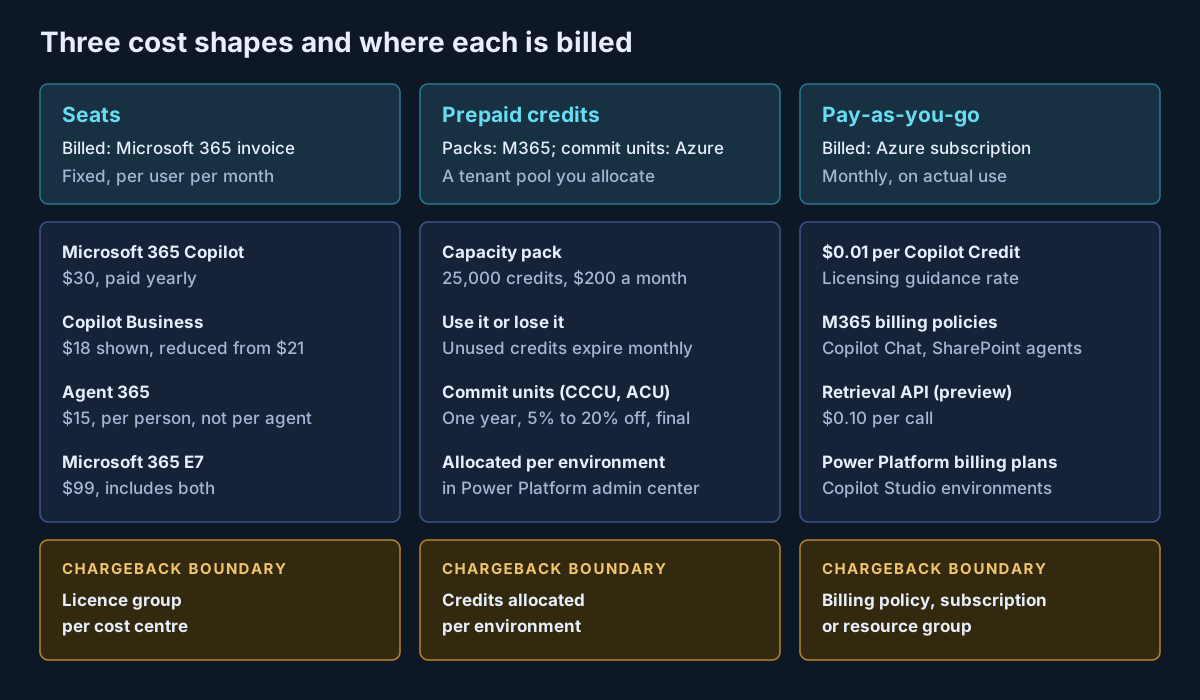
Copilot has three cost shapes, and each one bills to a different place: seats on the Microsoft 365 invoice, prepaid credits as a tenant pool you allocate, and pay-as-you-go on an Azure subscription. Chargeback works only when each one has a boundary that matches a cost owner.
Shape one: seats
Seats are the familiar part. As of 19 September 2026, Microsoft lists:
| Licence | List price | What it covers |
|---|---|---|
| Microsoft 365 Copilot | $30 per user per month, paid yearly ($31.50 billed monthly) | Copilot in the apps, work-grounded Copilot Chat, agents |
| Microsoft 365 Copilot Business | $18 per user per month, paid yearly (shown as reduced from $21) | The same add-on for Business plans |
| Microsoft Agent 365 | $15 per user per month | The agent control plane, licensed to the people who use, own or sponsor agents |
| Microsoft 365 E7 | $99 per user per month, paid yearly | E5, Microsoft 365 Copilot, Agent 365 and Entra Suite |
Two details matter for finance. The Business price page shows $18 as a reduction from $21 without an end date, so I would budget at $21 until Microsoft says otherwise. And Agent 365 is licensed per human, not per agent: Microsoft's licensing FAQ states that "agents do not require their own licenses."
A naming note, because it confuses procurement. Microsoft's pricing pages say "Microsoft 365 Copilot" and "Microsoft 365 Copilot Business". The Learn licensing page and the admin usage report now say "Microsoft Copilot" and "Microsoft Copilot Business". They describe the same licences.
Seat chargeback is the simplest of the three. Assign licences through groups that map to cost centres, and bill the cost centre for its group's seats.
Shape two: prepaid Copilot Credits
On 1 September 2025 Microsoft renamed Copilot Studio "messages" to Copilot Credits, with no change to pack size or rate. Credits are now the common currency for agent usage. The rates that matter most:
| Agent feature | Copilot Credits | Copilot-licensed user |
|---|---|---|
| Classic answer | 1 | No charge |
| Generative answer | 2 | No charge |
| Agent action | 5 | No charge |
| Tenant graph grounding | 10 | No charge |
| Agent flow actions (per 100) | 13 | No charge |
The "no charge" column is the biggest cost lever in the whole model. A licensed employee using an internal agent costs nothing extra in credits. The same agent used by an unlicensed employee, or by a customer, is metered.
A capacity pack is 25,000 credits a month for $200. It is a tenant licence, not a user licence, and it does nothing until an admin allocates credits to specific Power Platform environments. Unused credits expire at the end of each month. If consumption passes 125% of prepaid capacity with no pay-as-you-go fallback, Microsoft disables custom agents until capacity is added.
For larger commitments there are two pre-purchase plans, both bought in the Azure portal for one year, auto-renewing by default, with no cancellation:
- Copilot Credit Commit Units cover Copilot Credit costs, with discounts of 5% to 20% by tier.
- Agent Commit Units, under the Microsoft Agent Pre-Purchase Plan, cover Foundry, Copilot Studio, Copilot Credits, GitHub, Fabric and Dynamics 365 first-party agents. Where both exist, Microsoft applies the Copilot Credit plan first.
Shape three: pay-as-you-go on Azure
Pay-as-you-go is where the surprises come from, because it arrives on an Azure invoice rather than the Microsoft 365 one. There are two entry points, and they are managed in different admin centers.
Billing policies in the Microsoft 365 admin center cover Microsoft Copilot Chat (agents used by unlicensed users), SharePoint agents, and the Retrieval API, which is in preview at $0.10 per call. Microsoft describes a billing policy as "a unique billing identifier that you can associate with a group responsible for the incurred cost." You add users or groups, point the policy at an Azure subscription and resource group, and can create up to 50 policies per tenant. One dated change to plan for: a Partner Center announcement on 16 September 2026 says that from 2 November 2026, new Microsoft 365 Copilot Business licences bought through CSP, standalone and in bundles, arrive with usage-based billing configured by default, including the Azure subscription setup and a preset monthly limit. The announcement scopes this to new purchases and does not state the limit amount.
Billing plans in the Power Platform admin center link Copilot Studio environments to an Azure subscription. Each environment belongs to one plan at a time, and each plan creates a resource in the subscription where its charges appear.
Agent usage through either route is billed in Copilot Credits at $0.01 each, according to Microsoft's Copilot Studio licensing guidance. Three documentation problems are worth knowing before you build a forecast:
- The meter name is stale in places. The Microsoft 365 pay-as-you-go meters page, updated in August 2026, still describes a "Copilot Studio message" at "$0.01 per message". The Retrieval API page calls the same meter "Pay as you go Copilot Credit". Your Azure invoice may use either wording.
- The rate is not on the Azure pricing page. The Copilot Studio page on the Azure pricing site shows no per-credit price and sends you to the calculator. The $0.01 figure comes from the licensing guidance.
- Budgets do not mean the same thing everywhere. A billing-policy budget "doesn't enforce the budget or prevent your organization from exceeding it"; it only sends email. The newer spending policies, currently for Cowork and the Work IQ API, do block users at their limit. Per-agent limits in the Power Platform admin center can do either.
A chargeback model
This section is my own construct, not Microsoft guidance. It uses only controls Microsoft documents, arranged so that each business unit owns a boundary for each cost shape.
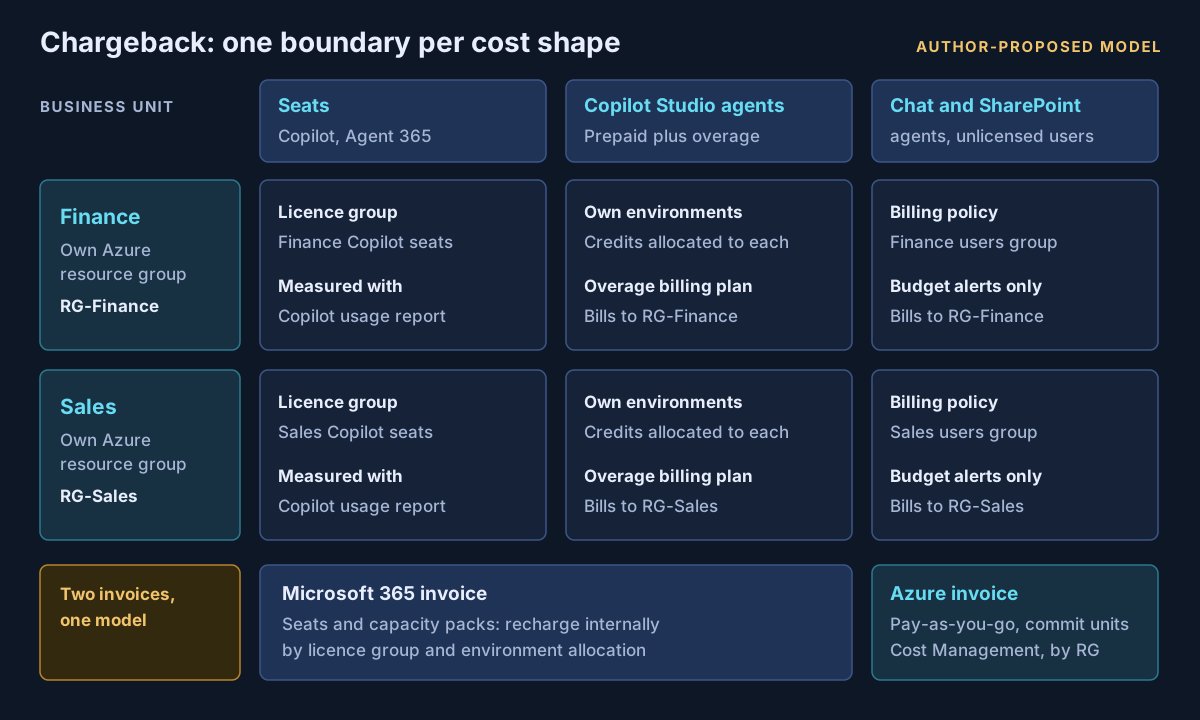
| Cost shape | Chargeback boundary | Measured with | Who approves growth |
|---|---|---|---|
| Copilot and Agent 365 seats | Licence group per cost centre | Copilot usage report, Copilot Analytics | Business unit budget holder |
| Capacity packs and commit units | Credits allocated per environment | Power Platform admin center consumption reports | Central platform team, recharged by allocation |
| Copilot Studio overage | Environment's billing plan to the unit's resource group | Azure Cost Management | Environment owner |
| Copilot Chat and SharePoint agents, unlicensed users | Billing policy per unit | Azure Cost Management, billing-policy budget alerts | Business unit budget holder |
| Retrieval API (preview) | Billing policy of the calling application's owner | Azure Cost Management | Application owner |
Two limits on this model. Microsoft does not document whether one user can sit in more than one billing policy for the same service, so keep the groups in different policies separate. And prepaid credits appear on the Microsoft 365 invoice as a single tenant purchase, so their recharge is an internal allocation, not something Azure will split for you.
Right-sizing seats
The Copilot usage report shows enabled users, active users and each user's last activity date by app, over periods of up to 180 days. Names are hidden by default; an admin has to turn that off to act on individual seats. Copilot Analytics in Viva Insights adds department views through Entra ID attributes and uploaded HR data.
The decision this data supports is not only "remove the seat." For a light user who mainly uses one agent, the question is whether a $30 seat or metered credits cost less. At 10 credits per tenant-grounded answer, $30 buys 3,000 credits at pay-as-you-go rates, or about 300 uses of tenant graph grounding a month before any other feature is counted. That is my arithmetic from Microsoft's published rates, and it ignores what the seat gives beyond agents, but it is the right comparison to make.
What I would actually do
Name an owner for each of the three shapes before the first agent reaches production. Give every business unit its own Azure subscription or resource group for Copilot pay-as-you-go, and its own billing policy and environments pointing at it, so the invoice already carries the chargeback.
Put hard per-agent limits on anything unlicensed users or customers can reach, because billing-policy budgets will not stop spending. Review seat activity every quarter against the 90-day report. And treat pre-purchase plans as the last step: they are final, so buy them only after three months of real consumption data.
If your Copilot and agent costs are spread across a Microsoft 365 invoice and several Azure subscriptions without a model that connects them, that is work Avalon does: Copilot Credit cost models, billing policy and environment design, seat utilization reviews and chargeback structures that finance teams can audit. It is part of my enterprise cloud and AI practice, and the contact page is the best way to start a conversation.
Sources
All checked on 19 September 2026, and re-checked on 27 September 2026. Where two Microsoft pages disagree, the text names the disagreement.
Seats — Microsoft 365 Copilot enterprise pricing (opens in a new tab) · Microsoft 365 Copilot Business pricing (opens in a new tab) · Microsoft 365 E7 (opens in a new tab) · Agent 365 licensing FAQ (opens in a new tab) · Licence options for Microsoft Copilot (opens in a new tab)
Copilot Credits and prepaid capacity — Copilot Studio licensing (opens in a new tab) · Billing rates and management (opens in a new tab) · Copilot Studio licensing guidance (opens in a new tab) · Copilot Studio pricing (opens in a new tab) · Capacity packs vs pay-as-you-go for Copilot Chat (opens in a new tab) · Manage Copilot Credits and capacity (opens in a new tab) · Copilot Credit pre-purchase plan (opens in a new tab) · Microsoft Agent Pre-Purchase Plan (opens in a new tab)
Pay-as-you-go — Partner Center: usage-based billing default on for new Copilot Business licences from 2 November 2026 (opens in a new tab) · Copilot pay-as-you-go overview (opens in a new tab) · Set up pay-as-you-go (opens in a new tab) · Pay-as-you-go meters (opens in a new tab) · Retrieval API pay-as-you-go (preview) (opens in a new tab) · Power Platform pay-as-you-go overview (opens in a new tab) · Azure pricing: Copilot Studio (opens in a new tab) · Usage-based billing for Copilot Credits (opens in a new tab) · Spending policies (opens in a new tab)
Utilization — Copilot usage report (opens in a new tab) · Copilot Analytics introduction (opens in a new tab)
Published 28 September 2026; sources checked on 19 September 2026 and re-checked on 27 September 2026. Microsoft changes Copilot pricing and billing mechanics often, so check the linked pages before committing budget. The chargeback model and the seat-versus-credits comparison are my own analysis, not Microsoft guidance. No client, employer or engagement is named in this article, and any scenario described is an illustrative composite rather than a description of specific customer work.
- #Microsoft 365 Copilot
- #Copilot Credits
- #FinOps
- #Chargeback
- #Copilot Studio
- #Billing Policies
- #Pay-as-you-go
- #Agent 365
- #Power Platform
- #Azure Cost Management
- #Licensing
- #Cost Control
Related articles
Declarative Agents, Custom Engine Agents or Copilot Connectors? Choosing a Microsoft 365 Copilot Extensibility Path
Once you have decided to extend Microsoft 365 Copilot, there are three ways to do it, and they are not interchangeable. Copilot connectors change what Copilot knows, declarative agents change how it behaves, and custom engine agents replace its engine. This guide compares the three on licensing, governance and who carries the risk, with every claim checked against Microsoft's documentation in September 2026.
15 min read
Microsoft Copilot Studio vs Microsoft Foundry: Which AI Agent Platform Should Your Business Choose?
Copilot Studio and Microsoft Foundry are not competitors — they sit at different levels of abstraction, and three changes in 2026 have quietly retired most of the advice written about choosing between them. A decision framework built on who owns the runtime, where the data already lives, and who operates the agent on day ninety, with the cost shapes, governance asymmetries and interop paths verified against Microsoft's own documentation.
15 min read
The Microsoft AI Stack Explained: Copilot, Copilot Studio, Foundry, Agent 365 and Security Copilot
Microsoft's AI portfolio is not five versions of the same product — it is a layered enterprise architecture with an experience layer, two build platforms, a control plane, and the identity, data and threat controls underneath. A practical architecture guide to what each platform is for, which workloads belong where, how agent identity and authority actually flow, and what has to be true before an organization scales any of it.
47 min read