The Microsoft AI Stack Explained: Copilot, Copilot Studio, Foundry, Agent 365 and Security Copilot
Microsoft's AI portfolio is not five versions of the same product — it is a layered enterprise architecture with an experience layer, two build platforms, a control plane, and the identity, data and threat controls underneath. A practical architecture guide to what each platform is for, which workloads belong where, how agent identity and authority actually flow, and what has to be true before an organization scales any of it.
Originally published 6 June 2026. Last reviewed and updated 17 August 2026 — product names, availability states and licensing in this article were re-verified against Microsoft's own documentation on that date, and material changes since June are marked inline. This is a fast-moving portfolio; anything you read about it, including this, has a shelf life.
Ask five people in the same organization what Microsoft's AI strategy is and you will get five answers, all of them partly right. Someone will say Copilot. Someone else will say Copilot Studio, because that is where their department built a chatbot. A developer will say Foundry. An administrator who has recently opened the Microsoft 365 admin center will say Agent 365, with a slightly haunted expression. The security lead will say Security Copilot.
None of them are wrong. All of them are describing one layer of a stack and mistaking it for the whole thing.
That confusion has a cost, and it is not academic. It shows up as a department building a production workflow in a tool designed for departmental prototypes. It shows up as an engineering team building a custom platform for something that three connectors would have solved. It shows up — most expensively — as an organization discovering it has several hundred agents in production, holding real credentials, that nobody inventoried, nobody owns, and nobody can switch off in a hurry.
This article is the map I use when a client asks the question directly: what are all these things, and which one do we actually need?
The short version
Microsoft's AI portfolio makes sense the moment you stop reading it as a product catalog and start reading it as a layered architecture.
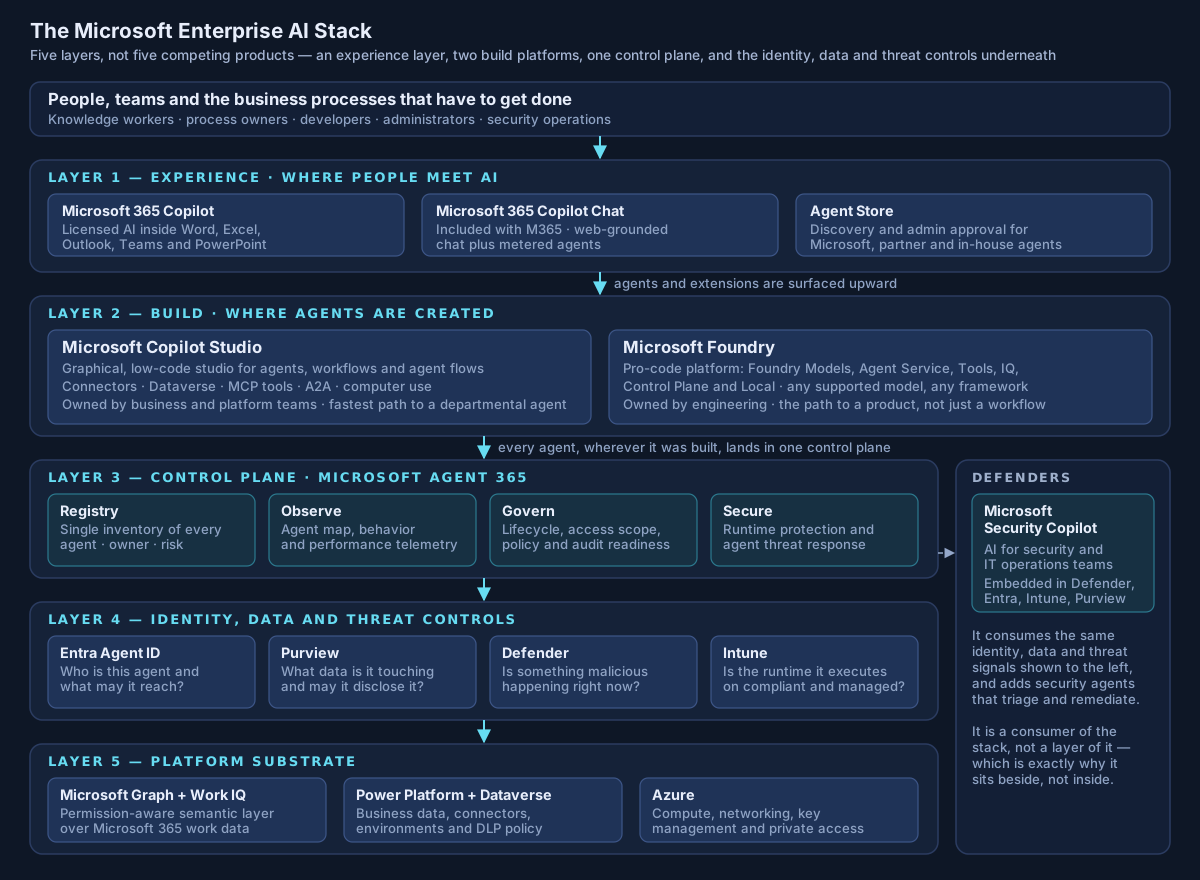
| Layer | Platform | What it is for | Who owns it | What it is not |
|---|---|---|---|---|
| Experience | Microsoft 365 Copilot and Copilot Chat | Bringing AI into the applications people already work in | Workplace / digital experience teams | Not an application development platform |
| Build (low-code) | Microsoft Copilot Studio | Business agents, workflows and agent flows over Microsoft 365, Dataverse and connectors | Business and platform teams | Not a substitute for software engineering |
| Build (pro-code) | Microsoft Foundry | Custom AI applications and engineered agents with model choice, evaluation and tracing | Engineering | Not the fastest way to automate a form |
| Control plane | Microsoft Agent 365 | Discovering, governing, observing and securing the agent estate | IT, identity and security administration | Not primarily a place to build agents |
| Security operations | Microsoft Security Copilot | AI for the people defending the organization, including the agents | Security operations and IT operations | Not an employee productivity tool |
| Foundation | Entra, Purview, Defender, Intune, Graph and Work IQ, Power Platform, Azure | Identity, data protection, threat defense, device and runtime posture, and the data substrate | Existing platform owners | Not optional because AI is involved |
One sentence carries most of the architectural weight: Copilot is an experience, Copilot Studio and Foundry are creation platforms, Agent 365 is a control plane, and Security Copilot is a specialized consumer of the whole stack. Everything else in this article is detail hanging off that distinction.
Why this is genuinely confusing — and it is not your fault
Two things happened at once, and they compounded.
The first is that the products genuinely overlap at the edges. Several of them create agents. Several connect to enterprise data. Several claim governance capabilities. If you evaluate them feature-by-feature on a comparison sheet, they blur, because feature lists do not capture the thing that actually separates them: the level of abstraction they operate at and the audience they are built for.
The second is that Microsoft renamed and repositioned a significant part of this portfolio inside a twelve-month window. If your mental model was formed in 2025, several of its load-bearing assumptions are now wrong.
| What you may believe | What is actually true as of August 2026 |
|---|---|
| The platform is called Azure AI Foundry | It is Microsoft Foundry. The rename surfaced around Ignite 2025 and Microsoft's own docs now carry an "Evolution of Foundry" table showing the old and new brands. A separate Microsoft Foundry (classic) doc set covers the prior experience — they are not the same thing |
| Agent 365 is a preview announcement | It went generally available on 1 May 2026, licensed per user — standalone on top of an eligible Microsoft 365 base license, or bundled in the new Microsoft 365 E7 |
| Semantic Kernel is Microsoft's agent framework | Microsoft Agent Framework is the successor, built by the same teams from Semantic Kernel and AutoGen, and shipped version 1.0 in April 2026. Semantic Kernel v1.x continues to receive critical fixes but is no longer where new capability lands |
| DSPM for AI is the current Purview posture product | The DSPM for AI page is now explicitly labeled the classic version, superseded by a unified Purview DSPM covering both traditional applications and AI apps and agents |
| Copilot Studio and Foundry agent security ride on existing Defender licensing | From 1 July 2026, AI agent security capabilities for Copilot Studio and Foundry agents require a Microsoft Agent 365 license and are no longer covered by Defender for Cloud Apps or Defender for Cloud |
| Security Copilot means buying provisioned Security Compute Units | Eligible Microsoft 365 E5 and E7 customers now receive an allocation — Microsoft documents 400 SCUs per month for every 1,000 paid user licenses, up to 10,000 SCUs, with no hourly provisioned capacity under that inclusion model |
The question changed, and most organizations have not noticed
The first generation of enterprise generative AI was easy to reason about. A person asked a question; a model produced text; the person decided what to do with it. The security question was essentially a content question: could the model say something wrong, embarrassing or confidential?
Agentic systems break that framing. An agent may now search enterprise information, retrieve documents and mail, call APIs, trigger workflows, update business records, drive a browser, operate a desktop application, hand work to another agent, keep state between runs, and execute a multi-step process without a person in the loop at each step.
That is not a bigger chatbot. It is a new class of enterprise principal — and the questions that matter change accordingly:
Who is using this? What identity is the agent acting under? On whose behalf? What data can it reach? What actions can it take without asking? Who owns it? Who is watching it? How fast can we switch it off? And what is the maximum damage if it is wrong or compromised?
Notice that not one of those is a question about which model to use. Model selection is a real decision with real cost and quality implications, but it is nowhere near the top of the risk stack. I have made this argument at length in Agentic AI Security Architecture; the short form is that the model is rarely the dangerous component. The authority attached to the model is.
The reason the Microsoft portfolio has grown the way it has is that Microsoft appears to have reached the same conclusion. Agent 365, Entra Agent ID and the agent-specific extensions to Purview and Defender are not model features. They are the machinery of treating an agent as a governed enterprise entity with an identity, an owner, a permission set, a telemetry stream and a lifecycle.
Layer 1 — Microsoft 365 Copilot: the experience, not the architecture
Microsoft 365 Copilot is the part of the stack most people have actually touched: generative AI inside Word, Excel, Outlook, Teams and PowerPoint, plus a conversational surface for working across organizational content.
The first distinction worth getting right is between the two Copilots, because they are frequently conflated in budget conversations:
| Microsoft 365 Copilot Chat | Microsoft 365 Copilot (licensed) | |
|---|---|---|
| Inclusion | Included with an eligible Microsoft 365 subscription | Paid per-user add-on |
| Grounding | Web-grounded chat, with enterprise data protection | Both web and work grounding through Microsoft Graph |
| Agents | Pay-as-you-go agents, billed on a metered basis | Built-in and custom agents |
| Typical use | Broad population, general assistance | Roles where work-data grounding changes the answer |
The permission model, stated precisely
This is where most Copilot programs succeed or quietly fail, so it is worth quoting Microsoft's own documentation rather than paraphrasing it. Microsoft's privacy documentation states that Microsoft 365 Copilot "only surfaces organizational data to which individual users have at least view permissions" and "presents only data that each individual can access using the same underlying controls for data access used in other Microsoft 365 services." The semantic index "honors the user identity-based access boundary so that the grounding process only accesses content that the current user is authorized to access."
Read that carefully, because the operational implication is the opposite of reassuring.
Copilot does not create a new security boundary around your information. It inherits the one you already have. If SharePoint sites are broadly permissive, if Teams have accumulated members who left the project two years ago, if a finance workbook was shared with "everyone except external users" in 2019 and nobody revisited it — Copilot did not break anything. It made an existing authorization decision dramatically easier to exercise.
That is the honest framing: Copilot is an extremely effective discovery tool for permissions you forgot you granted. Microsoft's own guidance points the same way, noting that it is important to use the permission models available in Microsoft 365 services "to help ensure the right users or groups have the right access to the right content."
The oversharing controls, and one that is widely misread
Microsoft has built out real tooling here, and a Microsoft 365 Copilot license now includes most SharePoint Advanced Management capability — content management assessments, block download policies, restricted access control, restricted content discovery, "everyone except external users" insights, permission state reports and site access reviews among them. A small number of features, such as restricted site creation by apps, still require the separate add-on.
One control deserves a specific warning, because I have seen it presented in remediation plans as something it is not. Restricted Content Discovery limits discovery, not access. Microsoft's documentation is unambiguous: it "doesn't change existing permissions. Users who already have access to content can continue to access that content directly," and "the feature doesn't remove content from the Microsoft 365 search index." It suppresses the site from organization-wide search and Copilot responses and removes AI entry points.
That makes RCD an excellent containment measure while you fix permissions. It is not the fix. If your Copilot readiness plan lists RCD in the "oversharing remediated" column, the plan is wrong.
Work IQ — the piece most commentary still misses
The newest and, architecturally, the most interesting element of this layer is Work IQ. Microsoft defines it as "a workplace intelligence layer that enables agents to access and reason over organizational data, context, and tools," continuously building "a semantic understanding across Microsoft 365 and external systems with built-in, permission-aware governance."
The Work IQ APIs were announced on 2 June 2026 and reached general availability later that month, exposing four domains — Chat, Context, Tools and Workspaces — over A2A, MCP and REST, with usage-based billing that is independent of Microsoft 365 Copilot licensing.
Why an architect should care: Work IQ is positioned as a permission-aware substrate that other agents call, not merely an internal Copilot component. That is a structural statement. It means the durable investment is not "we bought Copilot licenses" but "our work data is classified, permissioned and reachable through a governed semantic layer that any approved agent can query under the right identity." The first is a subscription. The second is an architecture.
Where Microsoft 365 Copilot fits
Use it when the job is to help a person do their own work faster inside the tools they already use: drafting, summarizing, analyzing, searching their own content, preparing for a meeting, making sense of a thread. Use the Agent Store to surface approved specialist agents into that same surface.
Do not use it as the place to engineer a business process. That is the next layer.
Layer 2a — Copilot Studio: the low-code agent factory
When the generic experience does not understand your organization's specific process, Copilot Studio is where you teach it one.
Microsoft describes it as "a graphical, low-code studio for building and managing AI-powered agents and workflows," where you "build agents and workflows, connect them to your organization's data and systems, and publish them to the channels where your users already work."
Worth noting for anyone whose knowledge dates from the Power Virtual Agents era: the current product organizes around three primitives — agents, workflows (a drag-and-drop designer combining agents, tools and logic) and agent flows (Power Automate-style authoring). Topic-first authoring is no longer how Microsoft leads the story.
Typical shapes it fits well:
- An HR agent. "How many vacation days do I have left, and can you submit leave for next Friday?" — identify the employee, retrieve the balance, evaluate policy, submit the request, confirm.
- An IT support agent. "My laptop cannot connect to the VPN." — collect device state, query endpoint management, check known incidents, walk through troubleshooting, raise a ticket, escalate if needed.
- A finance agent. "Show me invoices from this customer more than thirty days overdue" — retrieve from the ERP through a governed connector, reason over the result, trigger an approved follow-up.
What these have in common is that the process is known, the systems are reachable through connectors, and the owner is a business team rather than an engineering team. That is Copilot Studio's sweet spot, and it is a genuinely large space.
Computer use: the capability that changes the risk conversation
The single most consequential Copilot Studio capability from a security architecture standpoint is computer use — a tool that lets an agent "interact with and automate tasks on a Windows computer," working "with websites and desktop apps by selecting buttons, choosing menus, and entering text into fields on the screen," driven by a vision-plus-reasoning model. It requires generative orchestration, and it is billed per step in Copilot Credits.
It solves a real problem: automation where no suitable API exists, which in most enterprises is a depressingly large surface. It also moves the agent from saying things to doing things through the same interface a human uses, with the same authority the signed-in account holds.
Microsoft's own documentation contains three caveats that belong in every architecture review of this feature, and I will quote them because paraphrase softens them:
- "Access control only prevents the model from taking actions on websites or applications that aren't in the allow list. It doesn't stop the model from opening them."
- "If you share an agent with this setting, anyone using it can act with the original author's access on the configured machine."
- On the human-review escalation path: "If you choose a reviewer other than the person running the computer-use agent, they likely don't see the activity because they didn't initiate the run. Therefore, they can't properly verify or act on the request."
Read together, those describe an oversight model that only works if you deliberately design around it. Microsoft's accompanying guidance — dedicated isolated machines, a least-privilege account, an allow-list of trusted sites, only essential applications installed, credentials held in platform storage or Key Vault — is sound, and should be treated as a floor rather than a suggestion.
My own position is narrower than the product's capability: computer use belongs on a dedicated, isolated, minimally privileged runtime, driving a small set of explicitly allow-listed applications, and it should not perform irreversible actions without a deterministic gate outside the agent. An agent that can generate text has one risk profile. An agent that can navigate a bank portal and click "confirm" has another, and the difference is not incremental.
The rest of the platform, briefly
- Multi-agent. Child agents, connections to other Copilot Studio agents in the environment, and A2A-protocol agents are generally available. Connecting to agents built with Microsoft Foundry, Microsoft Fabric and the Microsoft 365 Agents SDK is in public preview at the time of writing.
- MCP. Copilot Studio supports MCP tools and resources. The shared-responsibility line in Microsoft's docs is worth keeping in front of makers: "when you connect to a non-Microsoft product, including an external MCP server, you're responsible for the tools and resources you access."
- Bring your own model. Prompts can call models deployed through Microsoft Foundry. There are limits — the endpoint must be a chat-completions endpoint, and the GPT-5 family is not currently supported for this path.
- Licensing. The unit is Copilot Credits (which replaced "messages" in September 2025), available as prepaid subscriptions, pay-as-you-go through an Azure billing policy, or pooled prepurchase commit units. The detail most architecture write-ups miss: for users with a Microsoft 365 Copilot license, classic answers, generative answers and Microsoft Graph tenant grounding are zero-rated.
- Governance. Data policies in the Power Platform admin center govern authentication, knowledge sources, actions and connectors, HTTP requests, publication channels, Application Insights and triggers. Microsoft's current security and governance guidance for Copilot Studio has been rewritten around Agent 365 — which tells you where the strategic center of gravity has moved.
Layer 2b — Microsoft Foundry: the engineering platform
Copilot Studio does not replace software engineering, and it is not trying to. For teams building AI systems that will be operated, versioned, evaluated and shipped as products, Microsoft's platform is Microsoft Foundry — the renamed and substantially rebuilt Azure AI Foundry.
Microsoft describes it as "a unified platform to build, ground, and govern AI apps and agents that understand your business context," unifying "agents, models, and tools under a single management grouping with built-in enterprise-readiness capabilities including tracing, monitoring, evaluations, and customizable enterprise setup configurations."
The current components are:
| Component | What it does |
|---|---|
| Foundry Models | The model catalog and serving layer across many providers |
| Foundry Agent Service | A managed runtime for building, deploying and scaling agents |
| Foundry Tools | Prebuilt capabilities for audio, video, images, documents and text (formerly Azure AI Services) |
| Foundry IQ | A managed, permission-aware knowledge layer over enterprise data, built on Azure AI Search |
| Foundry Control Plane | Inventory, observability, compliance and security for the Foundry agent fleet — parts generally available, parts in preview |
| Foundry Local | On-device inference |
On the model catalog, and a number worth not repeating
A claim circulating widely in commentary — and present in the draft that prompted this article — is that Foundry offers "more than 1,900 models." That figure is on a live Microsoft Learn page, so it is not invented. But Microsoft's more recently updated Foundry Models overview states the catalog "includes over 10,000 models, with approximately 50 new models published each month," and the Azure product page says more than 11,000.
I am not going to pick a number, and neither should your architecture. The point is not the count. The point is the architectural consequence of multi-model: the interesting question stopped being "are we an OpenAI organization or an Anthropic organization" and became "which model suits this workload's reasoning depth, latency budget, risk profile, data residency requirement and unit cost."
Anthropic's Claude models, for the record, launched in Foundry in November 2025 and reached general availability there in June 2026 — which is a reasonable proxy for how quickly the catalog's composition changes.
The design instruction that follows is simple and durable: models change quickly; enterprise controls should not. Keep the model behind an interface. Keep identity, authorization, egress control, logging and evaluation outside it. An architecture that has to be redesigned when a better model appears was not an architecture; it was an integration.
Foundry Agent Service and the part architects should read twice
Foundry Agent Service is "a managed platform for building, deploying, and scaling AI agents," using "any framework, any supported model from the Foundry model catalog, and the Responses API as a single entry point." The current, Responses-API-based service was announced generally available in March 2026 — distinct from the classic Agent Service that reached GA back in May 2025, a distinction worth being precise about when reading older material.
It supports Microsoft Agent Framework, LangGraph, the OpenAI Agents SDK, the Anthropic Agent SDK, the GitHub Copilot SDK and custom code, and it connects to MCP servers, including remote and custom ones. A2A connectivity is in preview.
The section of the documentation that matters most for an enterprise architecture review is not the model list. It is the authentication options for tools and MCP servers:
- key-based access;
- Microsoft Entra, using the agent's managed identity or the project's;
- OAuth identity passthrough (on-behalf-of);
- unauthenticated access, where appropriate.
And, critically: "Each agent can have a dedicated Microsoft Entra identity, enabling secure, scoped access to resources and APIs without sharing credentials." For hosted agents, that dedicated identity is automatic.
Those four options are not equivalent, and the choice between them is an architecture decision with a long tail. Key-based access is convenient and produces a credential that outlives the task, is hard to attribute and is easy to copy. On-behalf-of preserves the human's authority and is the right answer when the agent should be able to do exactly what the requesting user could do — no more. A dedicated managed identity is the right answer when the agent needs a distinct, independently governable authority that is not a person's.
Getting this wrong is the single most common way an otherwise well-built agent becomes an audit finding.
Where Foundry fits
Reach for Foundry when developers need real application control; when custom APIs, private networking or non-Microsoft data planes are involved; when retrieval is sophisticated enough to need evaluation rather than assertion; when model choice materially affects the outcome; when the AI capability is becoming part of a product; or when you need tracing, evaluation and red-teaming as first-class parts of the delivery pipeline rather than a spreadsheet of manual test prompts.
Copilot Studio or Foundry? The question is usually wrong
This is the most common point of confusion, and it is worth being precise about something: Microsoft does not publish an either/or decision document that pits the two platforms against each other. Its Cloud Adoption Framework guidance describes a shared build-and-secure process in which both appear, assigned to different stages and different kinds of work. Copilot Studio can call models deployed in Foundry. Foundry agents can be surfaced into Copilot Studio. They are designed to compose.
So the useful question is not which platform do we standardize on but which workloads belong in each. That is a portfolio decision, and it deserves an explicit, written answer rather than an accident of whoever built the first thing.
| Decision factor | Points toward Copilot Studio | Points toward Microsoft Foundry |
|---|---|---|
| Who owns and changes it | A business or platform team, changing it weekly | An engineering team, with source control and a release process |
| Where the data lives | Microsoft 365, Dataverse, connector-reachable SaaS | Custom APIs, private data planes, non-Microsoft services |
| How well the process is understood | Well enough to draw it | Well enough to spec it, but it needs real logic |
| Model requirements | The built-in model is fine, or one Foundry model via prompts | Model choice, routing or evaluation genuinely affects the outcome |
| Retrieval sophistication | Point at approved knowledge sources | Engineered retrieval that needs measurement |
| Delivery expectations | Speed to a working thing | Testability, observability, versioning, rollback |
| Who consumes it | Employees, in Microsoft 365 channels | Employees, customers, or another system |
| Failure tolerance | A wrong answer is an annoyance | A wrong answer is an incident |
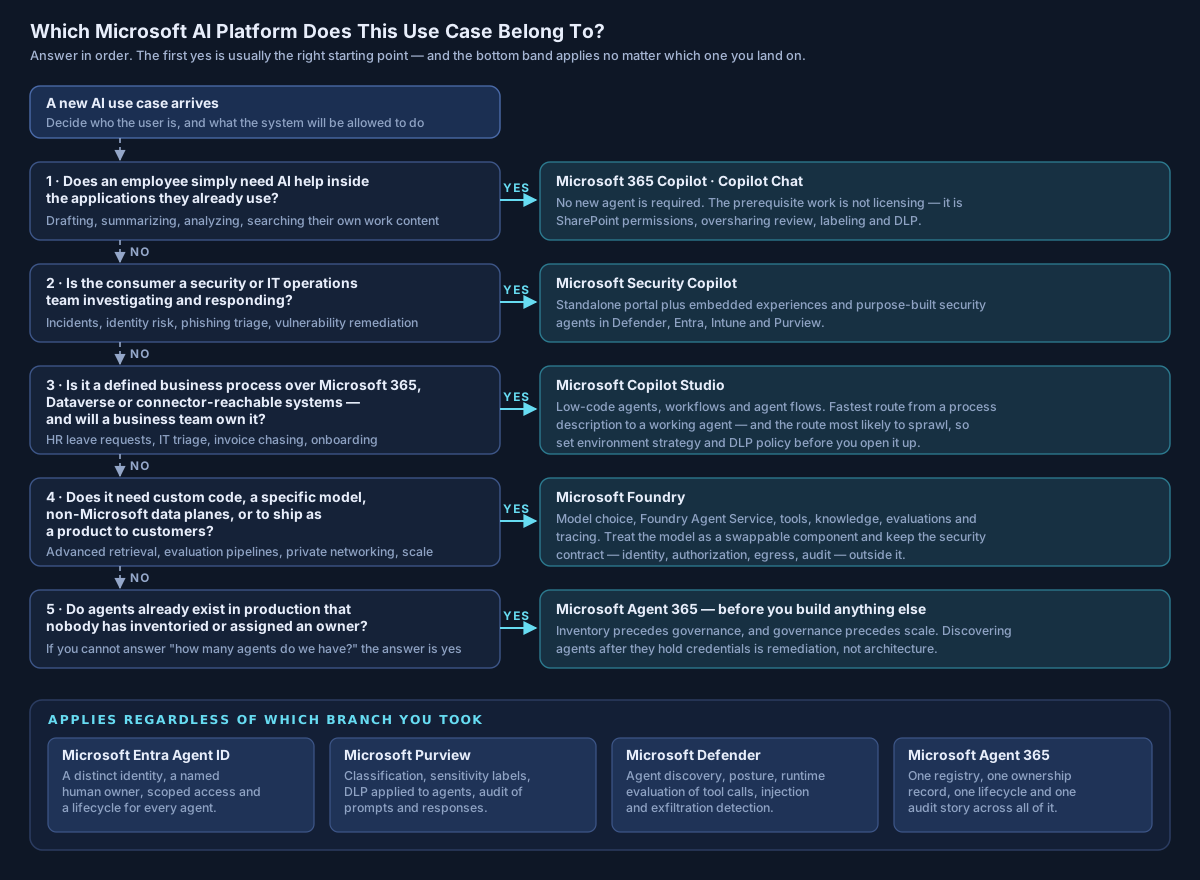
A realistic enterprise ends up with both: a customer-facing application engineered in Foundry, dozens of internal workflows in Copilot Studio, and one governance model over the lot. That last clause is the layer most organizations discover late.
Layer 3 — Microsoft Agent 365: the control plane
Once an organization builds more than a handful of agents, a different class of problem appears, and it is not a technical one. It is an inventory problem.
How many agents exist? Who created them? Who owns them — not which team, which person? What can each one reach? What permissions does it hold? Are people using third-party agents nobody approved? Which agents are actually running, as opposed to built and forgotten? And if one of them starts behaving badly at three in the morning, who is called, and what do they press?
These are exactly the questions enterprises already answer for users, applications, devices and cloud workloads. Agent 365 is Microsoft's attempt to answer them for agents.
Microsoft's own framing: Agent 365 is "the control plane for agents, extending the infrastructure you trust to manage your people to agents," and its service description defines it as "a Microsoft 365 service that provides a centralized control plane for AI agents" enabling organizations "to discover, manage, govern, and secure agents across their environments," working "with agents built on Microsoft platforms and with agents built or acquired from third-party sources."
The most important sentence about Agent 365 is one Microsoft does not need to write, because it follows from the definition:
Agent 365 is not primarily another place to build agents. It is the place you find out what you already have.
Availability and packaging
Agent 365 reached general availability on 1 May 2026, sold on a per-user basis. Microsoft's published pricing lists it standalone at USD 15 per user per month on annual commitment, and it is included in the new Microsoft 365 E7 bundle alongside Microsoft 365 E5, Microsoft 365 Copilot and the Entra Suite.
Be careful with the prerequisite story: Microsoft's Agent 365 overview describes Microsoft E5 as what it "works best" with, while the Entra Agent ID documentation describes it as "included with Microsoft 365 E7 and available as an add-on to Microsoft E5/A5/Business Premium (or Microsoft Defender Suite + Microsoft Purview Suite)." Those are not identical statements, and the ambiguity is visible in Microsoft's own Q&A forums. If licensing is load-bearing in your plan, get it confirmed in writing by your licensing desk rather than from any article.
The registry, and the two numbers that will tell you something uncomfortable
The agent registry lives in the Microsoft 365 admin center and "provides a centralized view of all agents available for your organization," administered under the AI Administrator role. It classifies agents into four types: Microsoft agents; external partner-built agents; agents published by your organization (line-of-business agents); and agents "created and shared by individual users or developers at your organization."
That fourth category is where the interesting conversations start.
The registry surfaces tenant-wide metrics including total agents, agents without owners — "the number of agents that no longer have owners at your organization" — and unmanaged agents, "the number of agents created or managed outside of Agent 365, without its risk protection and observability."
If you deploy nothing else from this article, deploy something that produces those two numbers. In my experience, the first honest inventory in an organization that has been enthusiastic about AI for a year is consistently larger than the executive sponsor expects, and the ownerless count is rarely zero. Microsoft's own internal deployment gives a sense of the scale this is built for: its engineering team reports visibility into more than 500,000 agents across Microsoft.
It is not Microsoft-only, and that matters
An agent control plane that only sees Microsoft-built agents would be a partial inventory, which is close to useless. Microsoft has addressed this three ways:
- The Agent 365 SDK connects agents you already own and run — Microsoft explicitly names LangChain, Microsoft Agent Framework, Semantic Kernel, the OpenAI Agents SDK, the Claude Agent SDK "or custom code" — and adds Entra-backed identity, observability, notifications and governed access to Microsoft 365 data through managed Work IQ MCP servers. The SDK, in Microsoft's words, "doesn't build agents. Extends an agent that already exists."
- Pre-integrated partner agents and agent factories, where platforms that integrate with Agent 365 mean "every agent these platforms create automatically gets a governed Microsoft Entra Agent ID, appears in the admin center, and inherits the same identity, compliance, and observability controls."
- Registry sync with other clouds — documented for Amazon Bedrock, Google Vertex AI, Salesforce Agentforce and Databricks Genie. Note that Microsoft's Learn documentation marks this a preview feature, even though the GA announcement blog presents multicloud sync more confidently. Treat it as preview until the doc says otherwise.
The strategic point for an architect: Microsoft is not asking you to run a separate governance universe for AI. It is extending the identity, data-protection and threat-defense platforms you already operate. That is the right instinct, and it is the reason I would rather see an organization extend Entra, Purview and Defender than stand up a bespoke AI governance tool that shares nothing with the rest of the estate.
From IAM to agent IAM
Traditional identity and access management answers one question well: who is this user, and what may they access?
Agentic IAM has to answer a longer one, and every clause is load-bearing:
- What agent is this, as a distinct principal?
- Which named human owns it?
- On whose behalf is it acting right now?
- What may it access for this task, as opposed to in general?
- Which credentials may it use, and for how long?
- Which actions may it take without asking anyone?
- How is that authority revoked, and how fast?
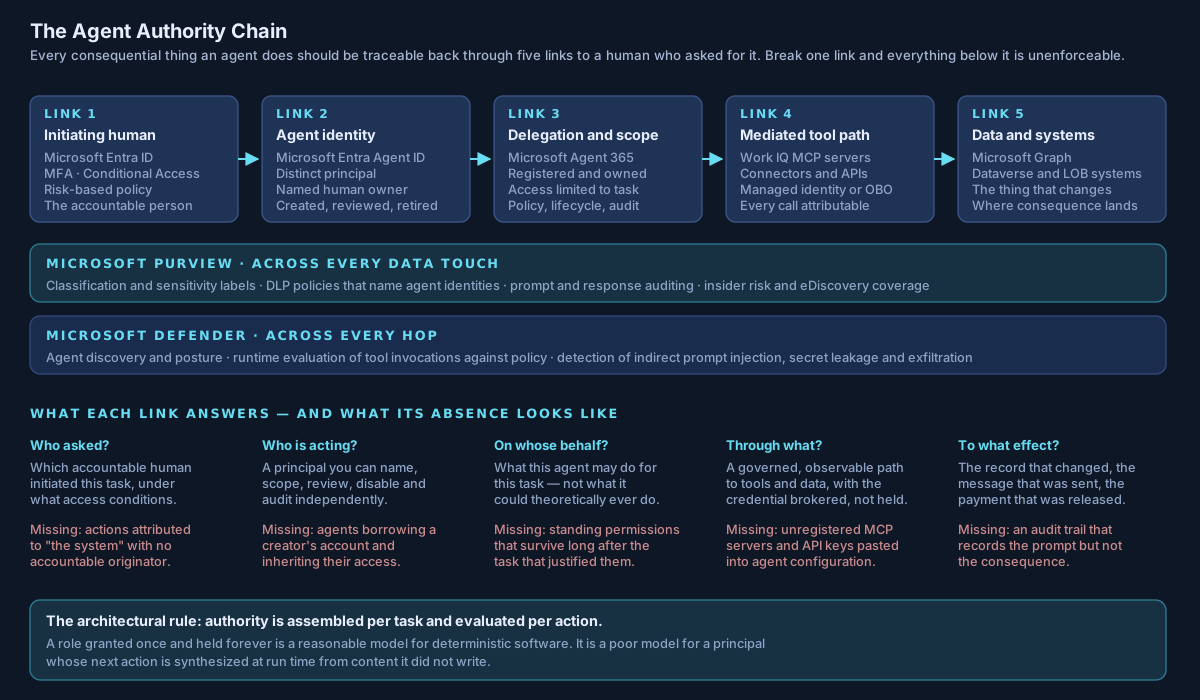
Microsoft's answer to the identity link is Entra Agent ID, described as "an identity and security framework that extends Microsoft Entra capabilities to AI agents," bringing "identity management, access protection, governance, and compliance for AI agents" so that agents receive "the same identity-driven protections as users and workloads, including adaptive access policies, real-time risk detection, lifecycle management, and network-level controls," with all agent authentication and activity logged.
There is a licensing subtlety worth knowing: Agent ID is available to all Entra customers, but extending Entra's security features to agents requires Agent 365. Microsoft has also converged what used to be two registry experiences — Agent 365 becomes the unified registry and control plane, while Entra "continues to provide the identity foundation through Agent ID."
The anti-pattern this is designed to kill is worth naming, because it is everywhere: an agent running on a person's account. It is fast, it works immediately, and it inherits that person's access, their Conditional Access posture, their audit identity and their blast radius. Every action the agent takes is indistinguishable from an action the human took. When the human changes role, the agent silently changes authority. When the human leaves, either the agent breaks or — worse — it does not.
Layer 4 — where Entra, Purview, Defender and Intune actually fit
The five headline products get the attention. These four decide whether any of it is defensible.
| Platform | The question it answers for agents | What Microsoft documents for agents specifically |
|---|---|---|
| Microsoft Entra | Who is acting, and what may they reach? | Entra Agent ID as a distinct identity per agent, with adaptive access policies, risk detection, lifecycle management, network controls, and logging of all agent authentication and activity |
| Microsoft Purview | What data is being touched, and may it be disclosed? | Prompts and responses captured in the unified audit log; classification and trainable classifiers over prompts and responses; sensitivity labels (with encrypted labels needing explicit VIEW and EXTRACT rights for the agent instance); DLP policies that name agent instances directly, as you would a user; a Risky AI usage template in Insider Risk Management covering prompt injection; eDiscovery, retention and Compliance Manager coverage |
| Microsoft Defender | Is something malicious happening, now? | Agent discovery; posture management for misconfiguration, risky settings and excessive permissions; runtime protection that "evaluates tool invocations and responses against security policies"; detection of indirect prompt injection, evasion, malicious content propagation, secret leakage and reconnaissance |
| Microsoft Intune | Is the runtime it executes on trustworthy? | Device compliance and policy-controlled runtime environment for agents, and blocking of unsanctioned agents |
Three observations that are worth more than the table.
First, Purview is a prerequisite, not a companion. An AI system can only protect sensitive information if the organization has decided what is sensitive. Classification and labeling are unglamorous, slow and political, and they are the gate on everything else. An organization that has not done this work cannot meaningfully answer "may the agent disclose that?" because nobody has said which "that" matters.
Second, DLP that names agent identities is a genuinely new capability, and it changes design. Once an agent is a principal you can write policy about, you can separate its read rights from its disclosure rights — the agent may read a document to reason over it while being prevented from reproducing its contents into a channel. That distinction is one of the more useful ideas in agentic data security, and it only works if the agent has its own identity. Which brings you back to Entra.
Third, watch the licensing boundary Microsoft moved. From 1 July 2026, AI agent security capabilities for Copilot Studio and Foundry agents require an Agent 365 license rather than riding on Defender for Cloud Apps or Defender for Cloud. Microsoft documents concrete consequences — an inventory table rename, blocking rules ceasing to block at cutover, and third-party cloud agents no longer being discoverable through Defender for Cloud connectors. If your agent security controls were configured before that date, verify they still do what you think they do.
Layer 5 — Security Copilot: AI for the people defending all of this
Security Copilot occupies a different position from everything above. It is neither an employee productivity surface nor a development platform. Microsoft describes it as "a generative AI-powered security solution that helps increase the efficiency and capabilities of defenders to improve security outcomes at machine speed and scale."
It runs as a standalone portal and as embedded experiences inside Defender XDR, Sentinel, Entra, Intune and Purview, and it now ships a set of purpose-built agents that automate specific, repetitive security and IT work.
The commercial model changed materially and is frequently described out of date. Alongside the original provisioned Security Compute Unit model, Microsoft now documents an inclusion model for eligible Microsoft 365 E5 and E7 customers: 400 SCUs per month for every 1,000 paid user licenses, up to 10,000 SCUs, with no hourly provisioned capacity, covering chat, promptbooks and agentic scenarios across Entra, Intune, Purview, Defender and the standalone portal — with overage available on a pay-as-you-go basis. If your last look at Security Copilot ended at "we would have to buy SCUs," it is worth looking again.
The agent catalog is spread across product documentation rather than one page, so here is a consolidated view — with the health warning that these statuses move, and this table reflects Microsoft's documentation as of 17 August 2026:
| Agent | Product surface | Documented status |
|---|---|---|
| Security Alert Triage Agent (the same agent as the Phishing Triage Agent, extended to a broader alert set) | Microsoft Defender | Preview |
| Threat Intelligence Briefing Agent | Microsoft Defender | Generally available |
| Threat Hunting Assistant | Microsoft Defender | Generally available |
| Security Analyst Agent | Microsoft Defender | Documentation is inconsistent — treat as preview and verify |
| Dynamic Threat Detection Agent | Microsoft Defender | Generally available |
| Conditional Access Optimization Agent | Microsoft Entra | Generally available |
| Identity Risk Management Agent | Microsoft Entra ID Protection | Preview |
| Access Review Agent | Microsoft Entra ID Governance | Preview |
| Vulnerability Remediation Agent | Microsoft Intune | Public preview |
| DLP Triage Agent | Microsoft Purview | Generally available |
| Insider Risk Management Triage Agent | Microsoft Purview | Generally available |
| Data Security Posture Management posture agent | Microsoft Purview | Preview |
| Data Security Investigations posture agent | Microsoft Purview | Preview |
There is also a detail in Security Copilot's own agent identity model that deserves a raised eyebrow. Microsoft documents two options: create an Entra Agent ID for the agent, or connect an existing user account, in which case "it inherits your access and permissions while it's active." The second option is convenient and it is the wrong default for anything that touches production. If you take one configuration decision from this section, take that one.
AI defending AI, with a boundary
There is a real and unavoidable logic to security AI: as organizations deploy autonomous systems, security operations increasingly need machine-speed capability to investigate machine-speed activity. A human-paced SOC watching an agent estate is not a fair fight.
That is not, however, an argument for handing unbounded remediation authority to an AI system. My position — the same one I apply to every agentic architecture — is this:
Probabilistic AI should reason inside deterministic security boundaries.
AI can classify, summarize, correlate, hunt, investigate, explain and recommend, and it is very good at all of those. Identity systems should authenticate. Policy engines should authorize. Security controls should enforce. Approval systems should govern high-impact actions. Audit systems should preserve evidence the AI cannot edit.
The failure mode to avoid is subtle and seductive: letting the AI become the security boundary rather than a participant inside it. The moment "the agent decided it was fine" is the last line of your control narrative, you have replaced an enforcement mechanism with an opinion.
An operating model, not a deployment
Most organizations approach this as a rollout. The ones that stay out of trouble approach it as an operating model — the same six-stage lifecycle they already run for applications and identities, with the Microsoft product that owns each cell made explicit.
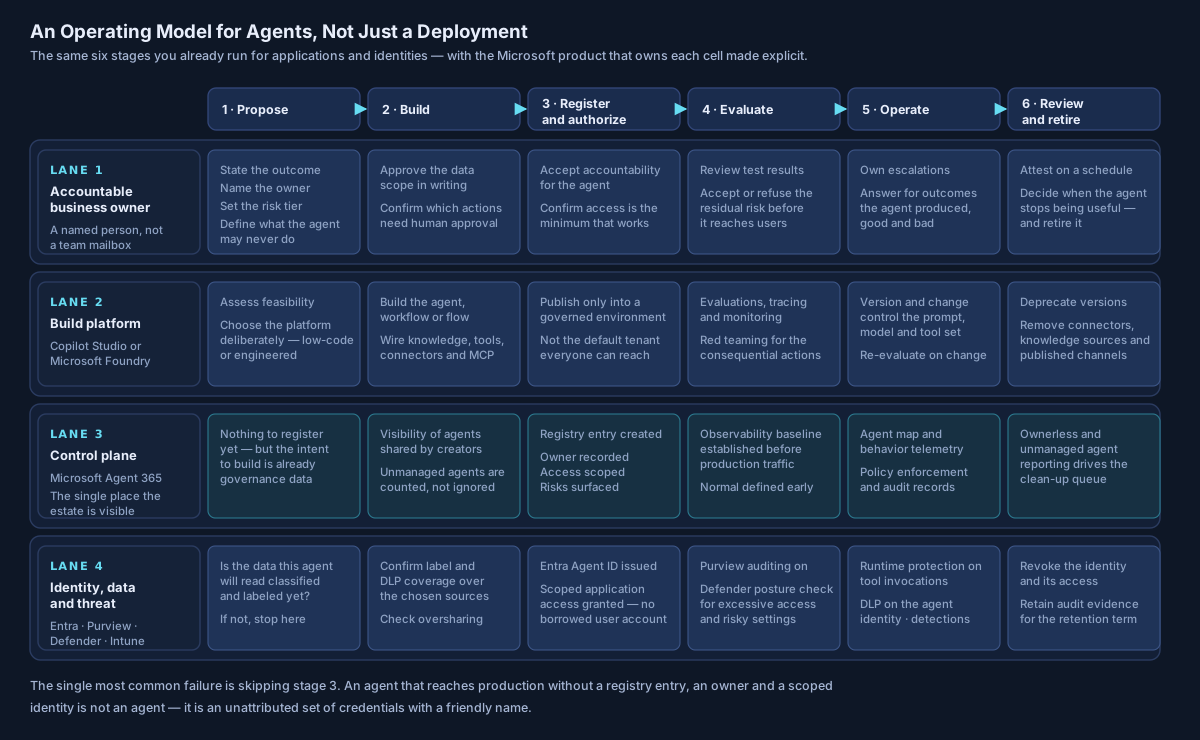
The written artifacts this produces are short, and they are what an auditor, a regulator or an incident responder will ask for:
- An agent record — purpose, owner, risk tier, data in scope, tools and connectors, model, environment, autonomy level, and the actions that require human approval.
- An authority statement — what identity it acts under, on whose behalf, with what scope and what lifetime.
- A "never" list — the actions this agent may not take under any circumstances, enforced somewhere other than the prompt.
- An evaluation record — what was tested before production and what the residual risk was, signed by the owner.
- A containment plan — how it is suspended, how its credentials are revoked, who does it, and how long it takes. Tested, not documented.
That last one is the one I would build first. Build the switch-off before you grant write access, not after the first incident. It is a two-hour exercise before production and a very long night afterwards.
One question, five platforms: a worked example
Abstractions convince nobody. Here is the same request traveling through the whole stack.
A financial-services firm wants to reduce the time analysts spend chasing refund failures. An employee types: "Why has customer 4821 not received their refund?"
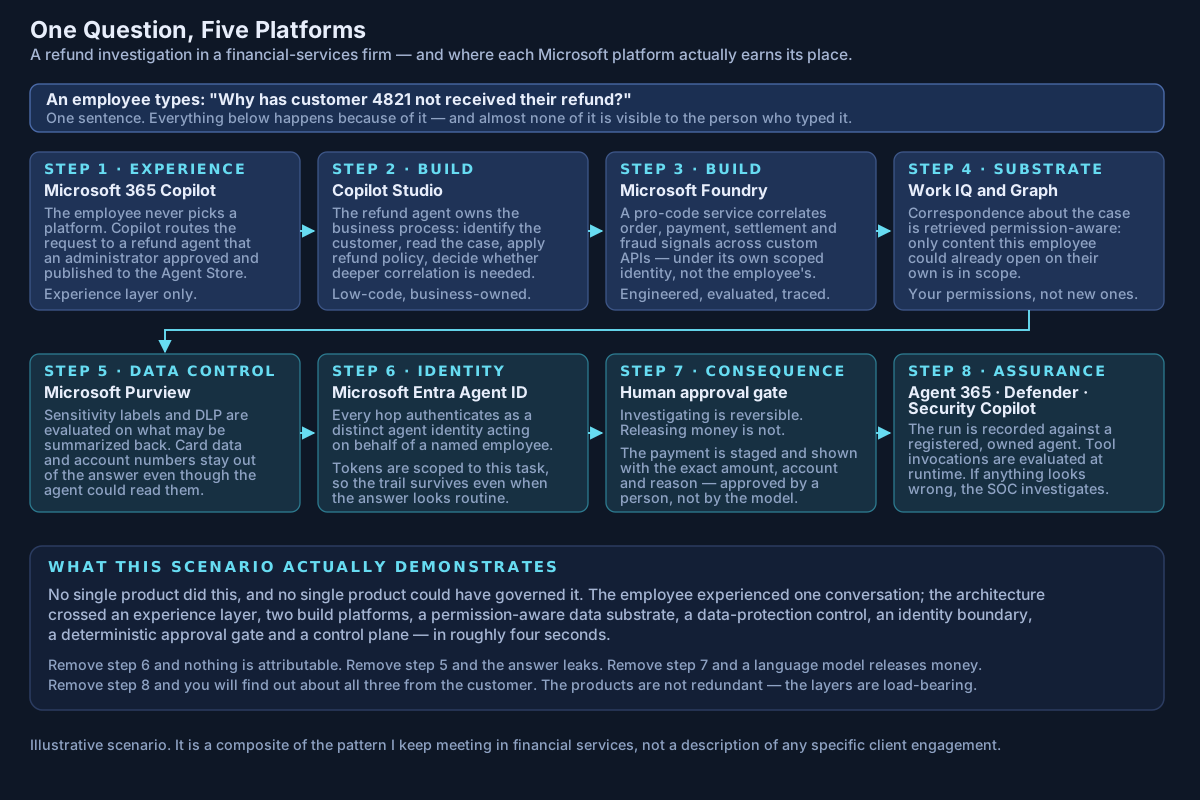
Read from the bottom up and the portfolio stops looking redundant. Microsoft 365 Copilot supplied the surface. Copilot Studio owned the process. Foundry did the reasoning that needed engineering. Work IQ and Graph enforced the permission boundary. Purview decided what could be said back. Entra Agent ID made every hop attributable. A deterministic gate — not the model — released the money. Agent 365, Defender and Security Copilot made the whole thing observable and defensible afterwards.
Remove any one layer and you do not get a simpler architecture. You get the same architecture with a hole in it, and the hole has a name: unattributable action, leaked disclosure, or an unapproved payment.
Five principles I apply before scaling any of this
1. Fix identity before adding autonomy
An agent must never become a shortcut around enterprise IAM. Distinct identities, explicit ownership, least privilege, short-lived and audience-scoped credentials, and authorization decided by policy rather than convenience. If the fastest way to ship an agent in your organization is to run it on a person's account, that is the finding — not the agent.
2. Fix data governance before deploying Copilot broadly
Copilot makes information easier to discover, which means it makes bad permissions easier to discover. Oversharing review, SharePoint permissions, sensitivity labeling and DLP are the prerequisite work. Restricted Content Discovery is a good containment measure while you do it, and a poor substitute for having done it.
3. Separate reasoning from enforcement
A model may conclude that an action is appropriate. A deterministic policy system decides whether it is permitted. These are different components, owned by different teams, changed on different cadences, with different assurance requirements. Collapsing them feels efficient right up until the first time it matters.
4. Treat every tool as a trust boundary
The dangerous part of an agent is rarely what it can say. It is what it can do. API calls, database writes, email sending, browser automation, code execution and computer use each deserve their own security review, their own credential, their own limits and their own log. "It can access the CRM" is not a scope statement; "it may read these three objects for the duration of this task" is.
5. Build the agent inventory before you need it
Shadow AI is becoming the agent equivalent of shadow IT, with one important difference: shadow IT rarely held delegated credentials to your mail, files and business systems. If you wait until hundreds of agents exist before establishing ownership, lifecycle and governance, you are no longer doing architecture — you are doing remediation, at the worst possible ratio of effort to outcome.
A readiness check before you buy anything else
If you cannot answer these, more licenses will not help.
| # | Question | Why it decides something |
|---|---|---|
| 1 | How many agents exist in the tenant today, and how many have no owner? | Everything else is theoretical until this is a number |
| 2 | Which of them run under a human's account rather than their own identity? | This is the highest-yield fix in most estates |
| 3 | Which SharePoint sites would embarrass us if their contents were summarized to the wrong person? | Copilot readiness is a permissions project |
| 4 | Is our sensitive data classified and labeled, or only believed to be? | Purview controls have nothing to act on otherwise |
| 5 | For each production agent, what is the single most damaging action it can take unattended? | Defines where approval gates go |
| 6 | Which actions are irreversible, and are any of them currently unattended? | Reversibility is a design decision, not a property |
| 7 | Where do agent credentials come from, and how long do they live? | Distinguishes an architecture from a demo |
| 8 | If an agent misbehaves at 03:00, who is called and what do they press? | If unanswered, containment does not exist |
| 9 | How long does full revocation take, and when was it last tested? | Untested containment is a plan, not a control |
| 10 | Can we reconstruct what an agent did last Tuesday, end to end? | Audit obligation and incident response both depend on this |
| 11 | Which environment do makers build in, and what data policy is attached? | Decides whether sprawl is bounded by design |
| 12 | When the model behind an agent changes, what is re-evaluated? | Behavior changes when models change — silently, if nobody checks |
From copilots to digital workers
The terminology matters less than the direction. Generative AI arrived as an assistant. Agentic AI is becoming an actor. The difference is authority.
A copilot tells an employee: these five invoices appear overdue.
An agent identifies the invoices, validates the customer, drafts the correspondence, updates the CRM, sends the message and schedules the follow-up.
Every one of those arrows is a trust boundary, and every additional capability is an architectural question that someone has to answer deliberately — or that will be answered by default, by whoever configured it fastest.
Microsoft's portfolio is a reasonable reading of where this goes. Agent 365, Entra Agent ID, and the agent-specific work in Purview and Defender are not chatbot features. They are the machinery of treating agents as governed enterprise entities. That is the right architectural instinct, and it is a strong signal about what the next few years of enterprise IT look like.
The opportunity is not deploying five platforms. It is designing the identity, data, security, governance and operating architecture that lets them work together safely — because that is the part that does not come in the box, and the part that decides whether AI in your organization stays a pilot or becomes production.
Frequently asked questions
What is the difference between Microsoft 365 Copilot and Copilot Studio? Microsoft 365 Copilot is an AI experience for employees working across Microsoft 365 applications. Copilot Studio is a low-code development environment used to build specialized agents, workflows and agent flows that connect to organizational data and systems — which can then be surfaced inside Microsoft 365 Copilot.
What is the difference between Copilot Studio and Microsoft Foundry? Abstraction level and audience. Copilot Studio is a graphical, low-code studio aimed at business and platform teams building over Microsoft 365, Dataverse and connectors. Microsoft Foundry is a pro-code platform for engineering teams building custom AI applications and agents with model choice, evaluation, tracing and production operations. Microsoft positions them as complementary rather than alternatives, and they interoperate.
Is "Azure AI Foundry" the same thing as "Microsoft Foundry"? Effectively yes — Azure AI Foundry was renamed Microsoft Foundry, with the rename surfacing around Ignite 2025. Be aware that Microsoft also maintains a separate Microsoft Foundry (classic) documentation set and portal for the prior experience, so "classic" in a URL or doc title is meaningful, not decorative.
How many models does Microsoft Foundry offer? Microsoft's own pages currently give different figures, from "more than 1,900" on one Learn page to "over 10,000" on the more recently updated Foundry Models overview and more than 11,000 on the Azure product page. The number is not the useful part. The architectural point is that model choice is a per-workload decision across many providers, and the model layer should be swappable without redesigning your controls.
What is Microsoft Agent 365? Microsoft's control plane for AI agents — centralized visibility, an agent registry, lifecycle management, observability, policy-driven governance and security across the agent estate, including agents built outside Microsoft. It reached general availability on 1 May 2026 and is licensed per user, standalone or as part of Microsoft 365 E7.
Is Agent 365 a place to build agents? No. Copilot Studio and Microsoft Foundry are where agents are built. Agent 365 is where they are discovered, registered, owned, governed, observed and secured. Its most valuable early output is usually an inventory that surprises somebody.
Does Agent 365 work with agents that were not built on Microsoft platforms? Yes, through three documented routes: the Agent 365 SDK (which names LangChain, Microsoft Agent Framework, Semantic Kernel, the OpenAI Agents SDK, the Claude Agent SDK and custom code), pre-integrated partner agents and agent factories, and registry sync with other platforms including Amazon Bedrock, Google Vertex AI, Salesforce Agentforce and Databricks Genie — with registry sync currently documented as preview.
What is Work IQ? A workplace intelligence layer that lets agents access and reason over organizational data, context and tools with permission-aware governance, building a continuous semantic understanding across Microsoft 365 and external systems. Its APIs became generally available in June 2026 and are accessible over A2A, MCP and REST, billed independently of Microsoft 365 Copilot licensing.
What is Microsoft Security Copilot, and do we have to buy it separately? It is Microsoft's AI platform for security and IT professionals, available standalone and embedded across Defender, Sentinel, Entra, Intune and Purview, with a growing set of purpose-built security agents. Eligible Microsoft 365 E5 and E7 customers now receive a monthly Security Compute Unit allocation under an inclusion model — 400 SCUs per 1,000 paid user licenses, up to 10,000 — with overage available pay-as-you-go.
Does Microsoft 365 Copilot see data that users should not have access to? Microsoft documents that Copilot only surfaces organizational data to which the individual user has at least view permissions, using the same access controls as other Microsoft 365 services. The practical risk is not that Copilot bypasses permissions — it is that existing over-permissive access becomes far easier to exercise. That is a permissions problem, and it should be treated as a prerequisite rather than a Copilot issue.
Can we use Copilot Studio and Microsoft Foundry together? Yes, and most substantial enterprises will. Copilot Studio can call models deployed through Foundry, and Foundry-built agents can be connected into Copilot Studio (currently in preview). The question worth answering is not which platform to standardize on, but which workloads belong in each — written down, before the answer emerges by accident.
Where to start
The technology to build an agent keeps getting easier. The architecture required to operate one safely does not.
Before scaling Microsoft 365 Copilot, Copilot Studio, Microsoft Foundry or autonomous agents, the honest first step is an assessment of the environment they will run in:
- Entra identity and privilege architecture, including how agent identities will be issued and revoked;
- Microsoft 365 permissions and oversharing exposure;
- Purview classification, labeling and DLP coverage over the data agents will touch;
- agent identity, delegation and authorization design;
- AI application and tool security, including MCP and connector governance;
- logging, observability and the ability to reconstruct an agent's actions;
- approval boundaries for consequential and irreversible actions;
- incident response readiness specific to agents, including tested containment.
For most organizations, the first step is not buying more AI licenses. It is finding out what is already running, who owns it, and what it can reach — then deciding how much autonomy the current architecture can safely support.
Avalon exists because of the gap this article describes. Most organizations do not need a bigger AI strategy deck — they need someone to sit between the enthusiasm and the estate: to run the oversharing assessment before Copilot goes wide, to design the agent identity and authorization model before the first agent gets write access, to decide which workloads belong in Copilot Studio and which need to be engineered in Foundry, and to build the inventory and containment plan while it is still a two-hour job.
Our position is that enterprise-grade outcomes should not require enterprise timelines or enterprise price tags. The work spans Microsoft 365 Copilot rollout and governance, retrieval-grounded knowledge assistants, agentic Power Platform workflows, LLM and agent integrations, Entra and Microsoft 365 hardening, Sentinel and Defender XDR, and cloud security assessments — with a particular focus on regulated financial services, where the difference between "the agent decided" and "the policy engine decided" is not a philosophical one.
If you are designing or reviewing an enterprise AI architecture and want a second set of eyes on it — this sits at the center of my AI security and governance practice — the contact page is the best way to reach me.
Sources
Every product claim in this article is drawn from Microsoft's own documentation and announcements, verified on 17 August 2026.
Microsoft 365 Copilot, Copilot Chat and Work IQ
- Microsoft, Microsoft 365 Copilot data, privacy, and security (opens in a new tab)
- Microsoft, Decide which Copilot is right for your organization (opens in a new tab)
- Microsoft, Work IQ overview (opens in a new tab) and Announcing the new Work IQ APIs (opens in a new tab)
- Microsoft, SharePoint Advanced Management features included with a Copilot license (opens in a new tab); Restricted Content Discovery (opens in a new tab)
- Microsoft, Agent Store in Microsoft 365 Copilot (opens in a new tab); Microsoft 365 Copilot extensibility ecosystem (opens in a new tab)
Copilot Studio
- Microsoft, What is Microsoft Copilot Studio? (opens in a new tab)
- Microsoft, Computer use in Copilot Studio (opens in a new tab)
- Microsoft, Add other agents (opens in a new tab); Extend an agent with MCP (opens in a new tab); Bring your own model in prompts (opens in a new tab)
- Microsoft, Standard harness licensing (opens in a new tab); Security and governance (opens in a new tab)
Microsoft Foundry
- Microsoft, What is Microsoft Foundry? (opens in a new tab); Foundry Models overview (opens in a new tab); Microsoft Foundry product page (opens in a new tab)
- Microsoft, What is Microsoft Foundry Agent Service? (opens in a new tab); Foundry Agent Service GA (opens in a new tab)
- Microsoft, What is Foundry IQ? (opens in a new tab); What is Microsoft Foundry Control Plane? (opens in a new tab)
- Microsoft, Microsoft Agent Framework overview (opens in a new tab); Agent Framework version 1.0 (opens in a new tab); Semantic Kernel and Microsoft Agent Framework (opens in a new tab)
- Microsoft, Claude in Microsoft Foundry is now generally available (opens in a new tab)
- Microsoft, Process to build agents with Microsoft Foundry and Copilot Studio (opens in a new tab) (Cloud Adoption Framework)
Agent 365, Entra Agent ID and the control plane
- Microsoft, Microsoft Agent 365 overview (opens in a new tab); Agent 365 service description (opens in a new tab)
- Microsoft, Agent registry in the Microsoft 365 admin center (opens in a new tab); Agent 365 admin overview (opens in a new tab); Registry sync (preview) (opens in a new tab)
- Microsoft, Connect existing agents to Agent 365 (opens in a new tab); Agent 365 SDK overview (opens in a new tab); Third-party agents (opens in a new tab)
- Microsoft, Microsoft Agent 365 now generally available (opens in a new tab); Microsoft Ignite 2025 Book of News (opens in a new tab)
- Microsoft, What is Microsoft Entra Agent ID? (opens in a new tab); Agent registry convergence (opens in a new tab)
- Microsoft, Implementing Agent 365 at Microsoft (opens in a new tab) (Inside Track)
Purview, Defender and Security Copilot
- Microsoft, Use Microsoft Purview to manage data security and compliance for Agent 365 (opens in a new tab); Data Security Posture Management (opens in a new tab)
- Microsoft, How Microsoft Defender supports Agent 365 (opens in a new tab); Secure AI agents at scale using Agent 365 (opens in a new tab); Defender security for AI (opens in a new tab)
- Microsoft, Transition Copilot Studio and Microsoft Foundry agent security to Agent 365 (opens in a new tab)
- Microsoft, What is Microsoft Security Copilot? (opens in a new tab); Security Copilot inclusion with Microsoft 365 E5 and E7 (opens in a new tab); Security Copilot agents overview (opens in a new tab)
- Microsoft, Security Copilot agents in Defender (opens in a new tab); Entra agents (opens in a new tab); Intune Vulnerability Remediation Agent (opens in a new tab); Purview agents (opens in a new tab)
Originally published 6 June 2026; substantially expanded and re-verified 17 August 2026. All product names, availability states, licensing statements and quoted definitions were checked against the linked Microsoft sources on 17 August 2026. Where Microsoft's own documentation is internally inconsistent — the Foundry model count, Agent 365 licensing prerequisites, registry sync availability, and the status of individual Security Copilot agents — that inconsistency is stated in the text rather than resolved by guesswork. Availability in this portfolio changes monthly; verify against Microsoft Learn before making a commitment. No client, employer or engagement is named anywhere in this article, and the refund scenario is an illustrative composite rather than a description of any specific customer.
- #Microsoft 365 Copilot
- #Copilot Studio
- #Microsoft Foundry
- #Agent 365
- #Security Copilot
- #AI Governance
- #Agentic AI
- #Microsoft Entra
- #Microsoft Purview
- #Enterprise Architecture
Related articles
Microsoft Copilot Studio vs Microsoft Foundry: Which AI Agent Platform Should Your Business Choose?
Copilot Studio and Microsoft Foundry are not competitors — they sit at different levels of abstraction, and three changes in 2026 have quietly retired most of the advice written about choosing between them. A decision framework built on who owns the runtime, where the data already lives, and who operates the agent on day ninety, with the cost shapes, governance asymmetries and interop paths verified against Microsoft's own documentation.
15 min read
NIST AI RMF and ISO/IEC 42001 in Practice: A One-Page Map to Microsoft Controls
NIST's AI Risk Management Framework is voluntary and ISO/IEC 42001 is certifiable, but they describe the same management cycle. This guide lines the two up, maps each theme to the Microsoft controls that produce evidence for it (Purview, Entra Agent ID, Agent 365, Defender for Cloud and Foundry), and is clear about what no tool can do for you. Checked against NIST, ISO and Microsoft documentation in September 2026.
10 min read
Who Approved That? Human-in-the-Loop Patterns for AI Agents That Act
Once an AI agent can write to systems, send email or move money, "a human approves it" is not a design. This guide classifies agent actions by consequence and reversibility, maps each class to an approval pattern, and sets out what the audit record must hold to survive a review, grounded in what Microsoft 365 Copilot, Copilot Studio, Microsoft Foundry and Purview actually provide as of September 2026.
9 min read