Who Approved That? Human-in-the-Loop Patterns for AI Agents That Act
Once an AI agent can write to systems, send email or move money, "a human approves it" is not a design. This guide classifies agent actions by consequence and reversibility, maps each class to an approval pattern, and sets out what the audit record must hold to survive a review, grounded in what Microsoft 365 Copilot, Copilot Studio, Microsoft Foundry and Purview actually provide as of September 2026.
Published 20 September 2026. Every product claim and availability status below was checked against Microsoft's, OWASP's and NIST's own documentation on 19 September 2026. Where sources disagree, I say so rather than pick one. Several of the features named here are in preview, so check the linked source before you build a control around one.
In Agentic AI security architecture I set out bounded autonomy as the principle for agents that act. This article is the practical follow-up: how to decide which actions need a person, what kind of approval each one needs, and what the record must contain so that "who approved that?" has an answer six months later.
Most agent designs I review say "a human approves high-risk actions" and stop there. That sentence does not say which actions, which human, what they see, or where the evidence lives.
The one idea that organizes the design
Match the gate to the consequence, and make every gate leave a record that would survive a review.
OWASP names the problem as Excessive Agency (LLM06:2025) and lists three root causes: excessive functionality, excessive permissions and excessive autonomy. Its mitigation is direct: "require a human to approve high-impact actions before they are taken." NIST's AI Risk Management Framework asks for the same thing in governance terms. GOVERN 3.2 wants roles for "human-AI configurations and oversight" defined, and MAP 3.5 wants oversight processes "defined, assessed, and documented." Neither tells you how. The rest of this article is my answer.
Classify actions before choosing a gate
This section is my own construct: guidance I propose, not vendor documentation. Two questions place every action an agent can take:
- Can it be undone, completely and cheaply? Re-tagging a ticket can. An email to a customer cannot. A payment can sometimes be recalled, but not reliably, so treat it as irreversible.
- How far does it reach? One record owned by the requester is low impact. Money, external parties, many records, access rights or regulated data are high impact.
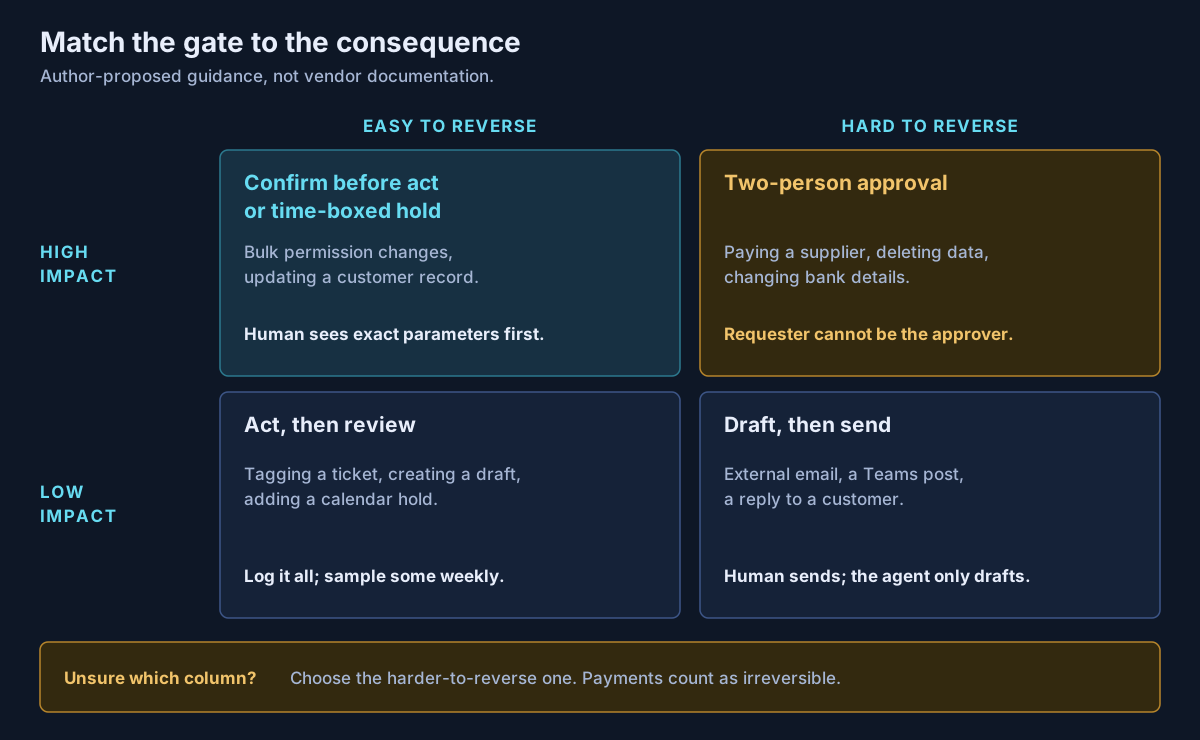
The matrix gives five patterns, because the top-left cell has two options:
| Pattern | Use it for | What the human sees | How it fails |
|---|---|---|---|
| Act, then review | Reversible, low impact | A log, sampled weekly | Nobody reads the sample |
| Draft, then send | Irreversible, low impact | The finished draft, sent by them | The draft is sent unread |
| Confirm before act | Reversible, high impact | Exact tool, target and parameters | Prompt shows a summary, not the payload |
| Time-boxed hold | Reversible, high impact, not urgent | A queue, with a deadline | Nobody decides what happens on expiry |
| Two-person approval | Irreversible, high impact | The proposal plus the requester's identity | Requester and approver are the same person |
Draft-then-send deserves more use than it gets. It turns an irreversible action into a reversible one, because the agent's output is only a draft until a person sends it under their own name.
What the platforms give you, as of September 2026
Microsoft ships approval hooks in three places, and their defaults point in different directions.
| Platform | Mechanism | Default | Status |
|---|---|---|---|
| Microsoft 365 Copilot (declarative agents, API and MCP plugins) | Confirmation prompt showing "the data to be sent" | Asks on first use; after that GET calls run silently, other HTTP operations prompt | Current documented behaviour |
| Copilot Studio tools | "Ask the end user before running" | No | Current documented behaviour |
| Copilot Studio agent flows | Multistage approvals (human and AI stages); request for information | Configured per flow | Preview |
| Power Automate | Standard Approvals connector | Configured per flow | Not preview |
| Microsoft Foundry MCP tools | require_approval returning an mcp_approval_request | always | GA; long-running MCP operations in preview |
Sources: Microsoft Learn pages listed below, checked 19 September 2026.
Four details change designs.
The read-only flag is a security control. In Microsoft 365 Copilot, an MCP tool marked readOnlyHint: true is treated as retrieval and skips the prompt. A tool that writes data but carries that flag removes the user's only chance to stop it. Review it the way you would review a firewall rule.
Copilot Studio confirmation is off unless someone turns it on. Tools also run with end-user credentials by default, but a maker can choose "maker-provided" credentials, where the agent uses its author's credentials. In that case the downstream system records the author as the actor, whoever clicked approve.
Foundry gives you the hook, not the approver. The mcp_approval_request carries the tool name and arguments, and your application returns approve or reject. The approver's screen, the routing and the record are yours to build.
Pending approvals expire. Power Automate counts pending approvals toward a 30-day run limit: "After 30 days, any pending steps time out." A time-boxed hold must define what expiry means, and for a consequential action it should mean "not done."
There is also a status inconsistency. The Learn page for request for information carries no preview label, but the connector reference marks the action "(preview)" and the August 2025 announcement described it as preview. I treat it as preview. Microsoft's own guidance on multistage approvals says that for "financial transactions, legal decisions, personnel actions, or compliance-critical processes," you should "ensure that human approval stages are reached." An AI stage can triage. It should not be the last word.
What the audit record must hold
An approval that cannot be reconstructed did not happen, as far as an auditor is concerned. The record needs five linked parts.
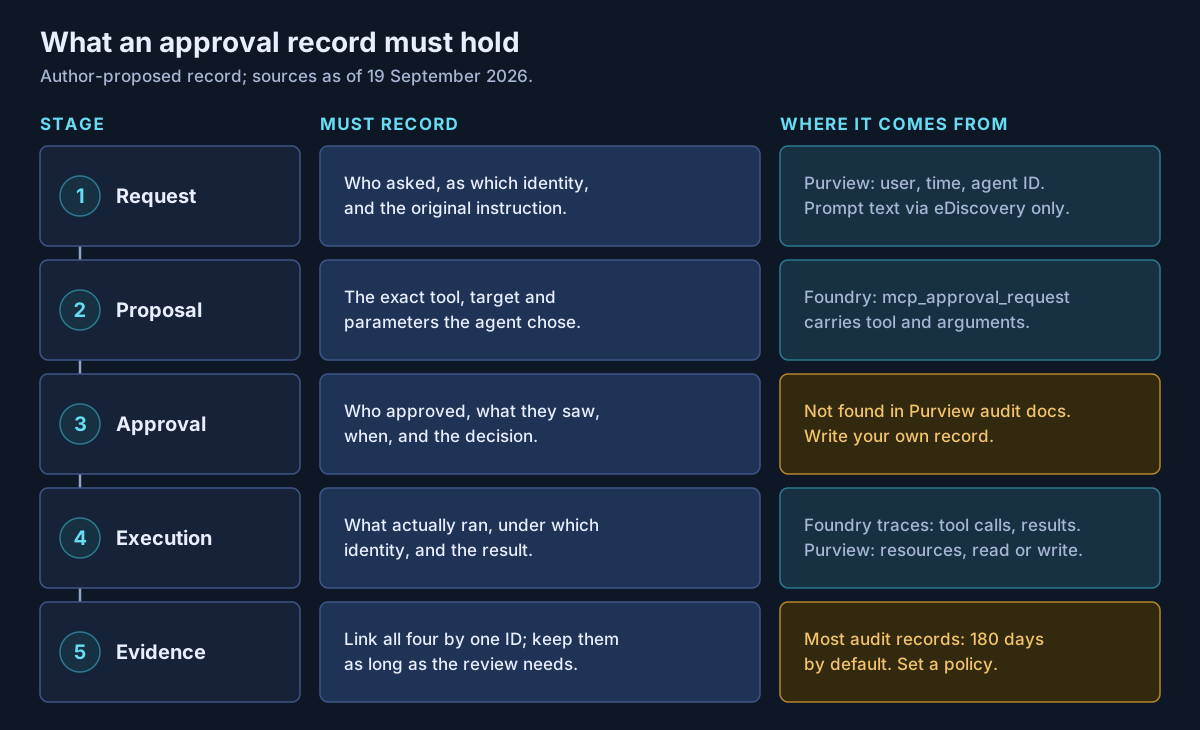
Purview's CopilotInteraction records are a good start. They capture who, when and where, the agent's ID and version, the resources accessed with an action of read, create or modify, and flags for jailbreak and cross-prompt injection detection. They do not contain the prompt or response text, which sits with eDiscovery. And I could not find anything in Microsoft's audit documentation saying the user's confirmation, or the payload they approved, is recorded. Assume it is not, and write the approval yourself.
Foundry traces in Application Insights do capture tool arguments and results, and are GA for prompt and hosted agents. Microsoft warns that traces capture sensitive content and tells you to redact personal data, so a trace is evidence that needs its own access control.
Then check retention. Audit Standard keeps records for 180 days. Audit Premium keeps Entra ID, Exchange, OneDrive and SharePoint records for a year by default, but "all other activities" stay at 180 days unless you set an audit log retention policy. If your review cycle is annual, your evidence is gone before the review unless someone configures it.
Approval fatigue is the failure you will actually get
OWASP's Top 10 for Agentic Applications, published in December 2025, lists ASI09 Human-Agent Trust Exploitation: "Confident, polished explanations misled human operators into approving harmful actions." An approver who clicks through forty prompts a day is not a control.
Four design rules reduce it:
- Prompt less. Use the matrix. If everything asks, nothing is reviewed.
- Show the payload, not the pitch. The approver sees recipient, amount, record and change, not the agent's summary of why.
- Separate the roles. For two-person approval, the requester cannot approve. Copilot Studio's multistage approvals already refuse the same approver in two stages, which helps.
- Measure rejection. An approval queue with no rejections over a long period deserves a look. It may be well-tuned, or nobody may be reading it.
As an illustrative composite, not a specific engagement: a finance agent drafts supplier bank-detail changes. The safe version shows the old and new account side by side, requires a second approver outside the requester's team, and logs both decisions against the change ID.
What I would actually do
Inventory every tool each agent can call, and place each one in the matrix. Anything in the top-right gets two-person approval outside the agent platform's chat prompt.
Turn on "Ask the end user before running" for every Copilot Studio tool that writes, and audit every readOnlyHint in your MCP servers. Keep Foundry's require_approval at its default of always until a tool has earned never.
Build one approval record, owned by you, that links request, proposal, decision, execution and evidence by a single ID. Set audit retention to match your longest review cycle. Then report rejection rates to whoever owns the risk.
If you are putting agents that write, send or pay into production and need approval gates and an audit trail that will hold up, that is work Avalon does: action classification, approval pattern design across Copilot Studio and Foundry, Purview audit and retention configuration, and review-ready evidence. It sits within my enterprise AI and security practice, and the contact page is the best way to start a conversation.
Sources
All checked on 19 September 2026. Where two sources disagree, the text names the disagreement.
Microsoft 365 Copilot and Copilot Studio — Confirmation prompts for MCP and API plugins (opens in a new tab) · Add tools to custom agents (opens in a new tab) · Multistage and AI approvals in agent flows (preview) (opens in a new tab) · Request information from human review in agent flows (opens in a new tab) · Request for information announcement, August 2025 (opens in a new tab) · Human in the loop connector (opens in a new tab) · Standard Approvals connector (opens in a new tab) · Power Automate limits (opens in a new tab)
Microsoft Foundry — MCP tool and require_approval (opens in a new tab) · Agent tracing overview (opens in a new tab)
Microsoft Purview — Audit logs for Copilot and AI applications (opens in a new tab) · Audit solutions overview and retention (opens in a new tab)
Standards — OWASP LLM06:2025 Excessive Agency (opens in a new tab) · OWASP Top 10 for Agentic Applications, December 2025 (opens in a new tab) · NIST AI RMF core (opens in a new tab)
Published 20 September 2026; sources checked on 19 September 2026. Several approval features named here are in preview and their status may change. The action-consequence matrix and the five-part approval record are guidance I propose, not Microsoft, OWASP or NIST documentation. No client, employer or engagement is named in this article, and any scenario described is an illustrative composite rather than a description of specific customer work.
- #Human in the Loop
- #Agentic AI
- #AI Agents
- #Approval Workflows
- #Audit Trail
- #Microsoft 365 Copilot
- #Copilot Studio
- #Microsoft Foundry
- #Microsoft Purview
- #Model Context Protocol
- #OWASP
- #AI Governance
Related articles
Microsoft Copilot Studio vs Microsoft Foundry: Which AI Agent Platform Should Your Business Choose?
Copilot Studio and Microsoft Foundry are not competitors — they sit at different levels of abstraction, and three changes in 2026 have quietly retired most of the advice written about choosing between them. A decision framework built on who owns the runtime, where the data already lives, and who operates the agent on day ninety, with the cost shapes, governance asymmetries and interop paths verified against Microsoft's own documentation.
15 min read
The Microsoft AI Stack Explained: Copilot, Copilot Studio, Foundry, Agent 365 and Security Copilot
Microsoft's AI portfolio is not five versions of the same product — it is a layered enterprise architecture with an experience layer, two build platforms, a control plane, and the identity, data and threat controls underneath. A practical architecture guide to what each platform is for, which workloads belong where, how agent identity and authority actually flow, and what has to be true before an organization scales any of it.
47 min read
Microsoft Foundry Explained: Enterprise Architecture for Production-Grade AI Agents
Microsoft Foundry is no longer a place to call models — it is a platform for hosting, grounding, governing and operating agents. A working architecture guide to prompt and hosted agents, Foundry IQ, Toolbox, MCP and A2A, model choice and Claude, agent identity and RBAC, private networking, evaluation and Agent 365 — with every capability marked GA, Preview or retiring, and the places Microsoft's own documentation contradicts itself named rather than smoothed over.
41 min read