Declarative Agents, Custom Engine Agents or Copilot Connectors? Choosing a Microsoft 365 Copilot Extensibility Path
Once you have decided to extend Microsoft 365 Copilot, there are three ways to do it, and they are not interchangeable. Copilot connectors change what Copilot knows, declarative agents change how it behaves, and custom engine agents replace its engine. This guide compares the three on licensing, governance and who carries the risk, with every claim checked against Microsoft's documentation in September 2026.
Published 19 September 2026. Every product claim, price and availability status below was checked against Microsoft's own documentation on that date. Where two Microsoft pages disagree, I say so rather than pick one. This area changes monthly, so check the linked source before you commit budget to anything here.
In Copilot Studio vs Microsoft Foundry I argued that the platform decision is really a decision about who owns the agent's runtime. This article covers the next decision. Once an organization has decided to extend Microsoft 365 Copilot rather than build beside it, it has three options: Copilot connectors, declarative agents and custom engine agents.
These three are often presented as a menu, and they are not alternatives to each other. They work at different layers, and most real deployments use more than one.
The one idea that organizes the choice
Copilot connectors change what Copilot knows. Declarative agents change how Copilot behaves. Custom engine agents replace Copilot's engine.
Each step down that list gives you more control, and hands back more of the risk Microsoft was carrying for you.
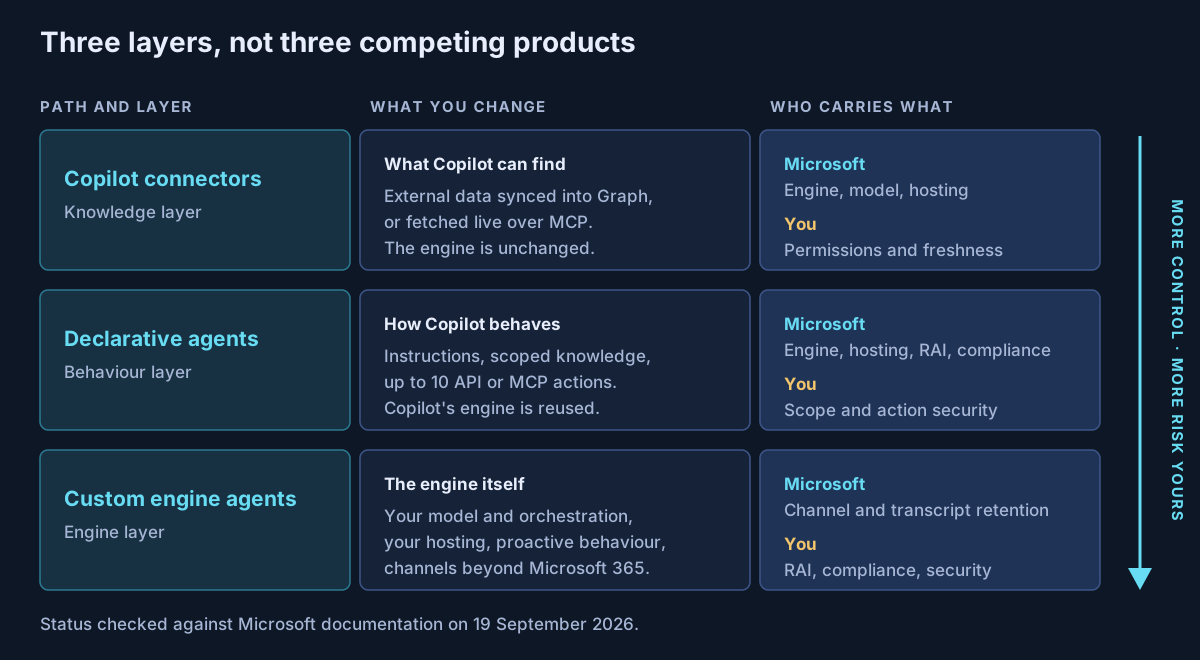
Microsoft's own training module on this choice uses the same order: start by evaluating connectors, build a declarative agent "if connectors alone aren't sufficient," and use a custom engine agent "for advanced scenarios." I agree with the order. Most of the expensive mistakes I see come from starting at the bottom.
What each path is, as of September 2026
| Copilot connectors | Declarative agents | Custom engine agents | |
|---|---|---|---|
| What it changes | What Copilot can find | Copilot's instructions, knowledge scope and actions | The whole engine |
| Orchestrator and model | Copilot's | Copilot's | Yours |
| Hosting | Microsoft 365 | Microsoft 365, "no additional hosting" | Copilot Studio, Azure, Foundry or your own |
| Build tools | Prebuilt gallery (Microsoft says more than 100) or the connectors API | Agent Builder, Copilot Studio, Agents Toolkit, SharePoint | Copilot Studio, Microsoft 365 Agents SDK, Teams SDK, Microsoft Foundry |
| Where it shows up | Copilot, Microsoft Search, and any agent you point at it | Copilot, Teams, Word, Excel, Outlook | Copilot, Teams, and (depending on build tool) web, mobile and partner apps |
| Proactive behaviour | Not applicable | Not supported | Supported |
| Compliance and RAI | Microsoft 365's, with your ACLs | Inherits Microsoft 365's | Microsoft: you "must ensure your own" |
| Status | Synced: GA. Federated: see below | GA; MCP actions GA since Dec 2025 | GA since Jul 2025; Foundry publishing GA since 10 Jun 2026 |
Two renames trip people up when they read older material. Microsoft Graph connectors became Copilot connectors in June 2025, though the declarative agent manifest still calls the capability GraphConnectors. The Teams AI Library is now the Teams SDK, and Teams Toolkit is now the Microsoft 365 Agents Toolkit.
Start with the data, not the agent
A surprising number of agent proposals are really connector requests. Users say Copilot is useless for their work, when the real problem is that Copilot cannot see the system their work lives in. An agent built on top of that gap still cannot see it.
Connectors now come in two kinds, and the difference matters for risk.
- Synced connectors copy and index external content into Microsoft Graph on a schedule. Permissions travel with each item as an access control list.
- Federated connectors fetch content in real time over the Model Context Protocol. They are read-only, index nothing, and run under the signed-in user's own identity.
Federated connectors avoid a second copy of your data, which is the main reason I would reach for them first where a good one exists. Be careful about their status, though. A May 2026 message center post reported them as generally available, but the current Learn overview carries no status label, and a related Microsoft Search page is still titled "early access preview." Check what your own tenant shows before you promise anything.
Synced connectors carry three risks that belong in any design review, all from Microsoft's own pages:
- Microsoft warns that granting access to "Everyone" can lead to oversharing. The admin setup offers exactly that option.
- Permissions cannot be changed after the connection is created. Getting them wrong means deleting and recreating the connection.
- Incremental crawls do not process permission changes. Someone removed from a group in the source system keeps seeing its content in Copilot until the next full crawl.
The third one is the one I would raise with a CISO. Access in Copilot lags behind access in the source system, and nothing in the user interface tells you by how much.
Declarative agents: customize Copilot, keep its engine
A declarative agent is a configuration file, not a program. It gives Copilot instructions (up to 8,000 characters), a scoped set of knowledge, up to ten actions and a few conversation starters. Microsoft describes these agents as running "on the same orchestrator, foundation models, and trusted AI services that power Microsoft 365 Copilot."
That is the whole value. You get Copilot's security, compliance and responsible AI controls without having to build them.
The capability set has grown quickly. Manifest version 1.8, released in July 2026, added email and meeting write actions alongside the long-standing grounding in SharePoint, Teams messages, email, people and connectors. The two changes I would design around are these:
- MCP actions are generally available. Since December 2025 a declarative agent can call a Model Context Protocol server as an action, with Entra single sign-on, OAuth 2.0 or dynamic client registration.
- Read-only tools skip the confirmation prompt. After the first use, Copilot asks before non-GET API calls, but an MCP tool marked
readOnlyHint: trueruns without asking. That flag is a security control. A tool that writes data but is marked read-only takes away the user's last chance to stop it, so review it as carefully as you would a firewall rule.
Microsoft's own guidance on declarative agents also warns that an action returning data from untrusted sources can let an attacker "craft a message payload that causes your agent to behave in a way that the attacker controls." An agent that reads email or external tickets and can also take actions is exactly that shape.
The limits are real too. You cannot choose the model: manifest settings can nudge the response mode, but that is not model choice. Declarative agents cannot act proactively. Agent Builder, the no-code tool inside Copilot, is described by Microsoft as a "subset" of what Copilot supports, and it points you to Copilot Studio when you need actions. Agent-to-agent delegation between declarative agents is still in preview.
Custom engine agents: when you need your own engine
A custom engine agent is software you own. Microsoft describes it as giving "full control over orchestration, AI models, and data integrations," and states the other side of that just as plainly: you must provide the hosting and "ensure that your custom agent is compliant, secure, and adheres to responsible AI (RAI) policies."
You need one when a real requirement forces it:
- a specific model, or your own orchestration logic
- an agent that acts on its own, without being prompted
- channels outside Microsoft 365, such as a website or mobile app
- an existing agent in Foundry, or on another platform, that you want to bring into Copilot rather than rebuild
That last case changed in June. Foundry agents can now be published straight into Microsoft 365 Copilot and Teams, which makes them custom engine agents inside Microsoft 365. Microsoft's documentation lists some gaps worth knowing before you promise a user experience: published agents do not support streaming responses or citations, and file uploads and image generation work in Teams but not in Microsoft 365 Copilot. Missing citations matter in regulated work, where "where did this answer come from" is a compliance question.
A custom engine agent does not get Copilot's view of your tenant for free. To ground in Microsoft 365 content it calls the Retrieval API, which is generally available, respects Microsoft 365 permissions, and returns up to 25 results per query with a limit of 200 requests per user per hour. Microsoft's documentation disagrees with itself on licensing here. The Copilot APIs overview says each user needs a Copilot licence. A separate page describes a pay-as-you-go preview for unlicensed users at $0.10 per call, covering SharePoint and connectors but not OneDrive. Design for the first reading and treat the second as a bonus.
Who pays, and for which user
This is where most business cases go wrong, because the answer depends on the user as much as on the agent.
| What the agent does | Copilot-licensed user | Copilot Chat user, no metering | Copilot Chat user, pay-as-you-go |
|---|---|---|---|
| Declarative agent, instructions or public web only | Included | Free | Free |
| Declarative agent grounded in SharePoint or connectors | Included | Not available | Metered in Copilot Credits |
| Declarative agent grounded in email, Teams, meetings or people | Included | Not available | Not available: licence required |
| Custom engine agent | No extra charge for use; you pay hosting | Usable; you pay hosting; tenant data needs metering | Metered if it touches shared tenant data; you pay hosting |
Sources: Microsoft's extensibility prerequisites and cost considerations pages, both checked 19 September 2026.
For reference, Microsoft 365 Copilot lists at $30 per user per month paid yearly, and a Copilot Credit pack is $200 a month for 25,000 credits. Tenant graph grounding costs 10 credits per use, which is no charge for licensed employees but real money at scale for everyone else.
Microsoft's own pages disagree on two points, and both matter to a business case:
- SharePoint for unlicensed users. The knowledge-sources table says a licence or metered usage is enough. The text directly beneath it says SharePoint and OneDrive knowledge requires a Copilot licence, and that unlicensed requests fail.
- Connector data for standard Microsoft 365 licences. The cost page says users with a Microsoft 365 or Office 365 licence can access connector data in Copilot Chat. The connector licensing matrix says standard plans get Microsoft Search only, with no Copilot grounding.
Test both in your own tenant with an unlicensed account before you commit to a rollout that depends on either. Also note that agents with metered consumption are off by default in Copilot Chat. If nobody enables the billing policy, the agent simply does not answer tenant questions for unlicensed users.
Governance is not the same across the three
The demos make these three look equally governed. They are not.
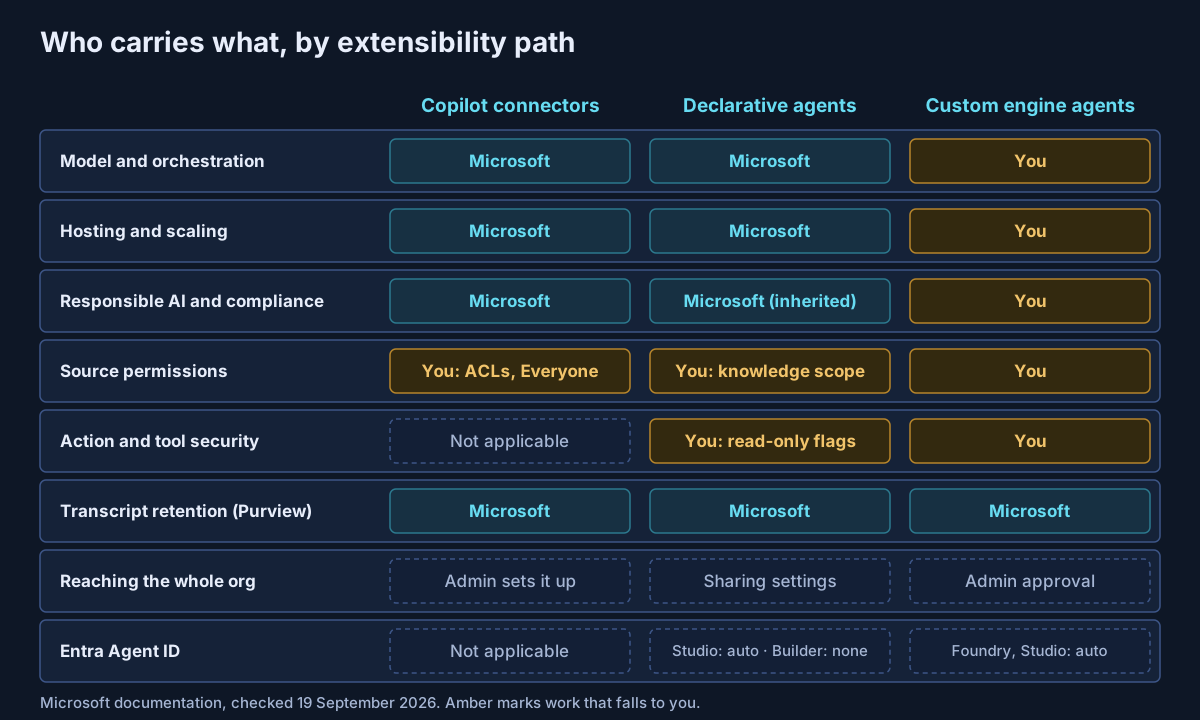
Compliance. Microsoft states that declarative agents inherit Microsoft 365 compliance, responsible AI and security standards. For custom engine agents, the conversation transcript in Copilot Chat and Teams is retained under Microsoft 365 terms and can be searched in Purview. But the model, the orchestrator and the hosting are yours, and so is the evidence an auditor will ask for.
Approval. Custom engine agents must be approved by the organization, usually an admin, before they reach everyone. Declarative agents built in Agent Builder can be shared person to person unless an admin restricts sharing, which is set to all users, no users or specific users. Even "no users" still allows direct sharing with named individuals. If your policy says every agent is reviewed before use, check that your sharing settings actually enforce it.
Identity. For agents created after May 2026, Copilot Studio creates an Entra Agent ID automatically, and Foundry creates one when an agent is published. Microsoft's Copilot Studio documentation states that Agent Builder agents "currently don't use or require app registration IDs or Agent IDs." So the easiest agents to create are the ones without their own identity in your directory. Plan your inventory around that gap.
The control plane. Microsoft Agent 365, generally available since 1 May 2026 at $15 per user per month (or included in Microsoft 365 E7), is the registry and control plane across agent types. It is where I would anchor an agent inventory. It does not remove the differences above, but it gives you one place to see them.
A decision ladder you can put in a standard
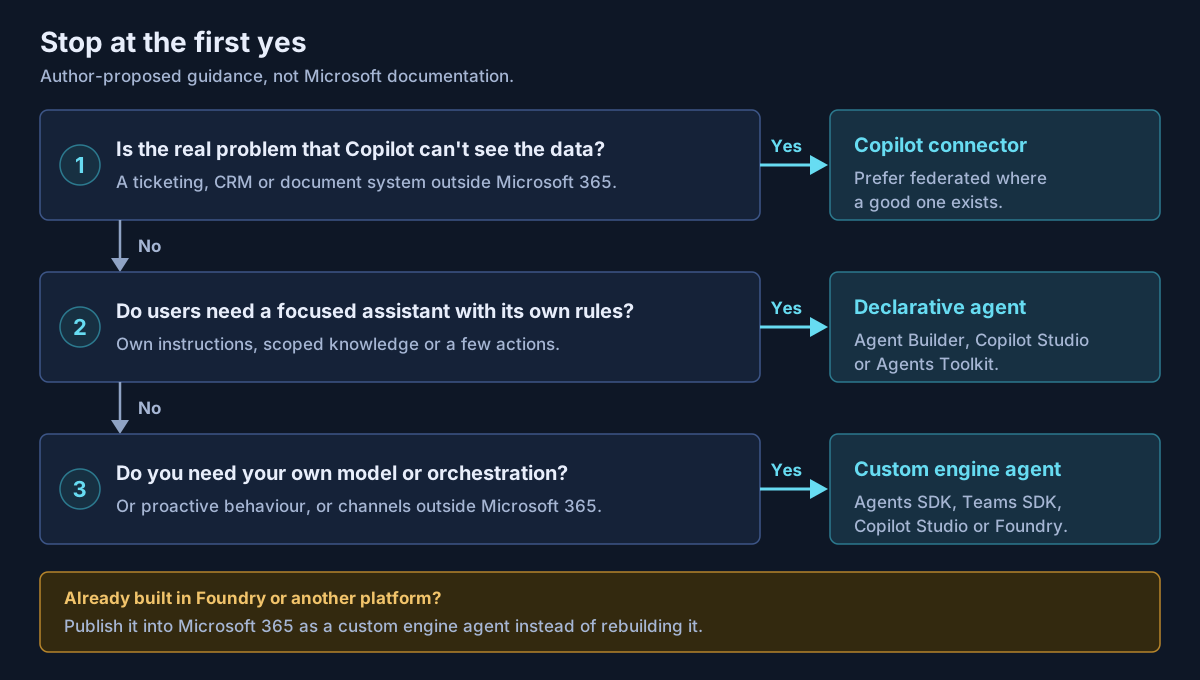
This section is my own construct: guidance I propose, not Microsoft documentation. It is the order of questions I use in architecture reviews, and it stops at the first "yes."
| Workload signature | Path | Why |
|---|---|---|
| "Copilot doesn't know about our ticketing or CRM system" | Copilot connector | It is a data gap, not a behaviour gap |
| Policy or HR assistant over SharePoint content, owned by a business team | Declarative agent (Agent Builder or Copilot Studio) | Copilot's controls for free; no engineering dependency |
| Assistant that reads and also updates a line-of-business system | Declarative agent with an MCP or API action | Actions are GA; review read-only flags and prompt-injection exposure |
| Needs a specific model, multi-step orchestration or a regulated reasoning chain | Custom engine agent | The engine is the requirement |
| Must act without a user prompt, or serve a website or mobile app | Custom engine agent | Declarative agents cannot do either |
| Already built and running in Foundry | Custom engine agent via Foundry publishing | Publish, don't rebuild, but check the citation and streaming gaps |
| Most users are unlicensed and need tenant data | Any path, cost-modelled first | Metering, not the build path, decides the budget |
Two rules go with it. Write down which path each agent uses and why, because the path determines its governance, not just its build effort. And test licensing with an unlicensed account before any rollout that includes one, because Microsoft's own pages disagree on what works.
What I would actually do
Fix the data first. Deploy the connectors your users are missing, prefer federated ones where a good one exists, and treat any "Everyone" setting on a synced connector as a finding.
Then make declarative agents the default for everything that fits inside Copilot's engine. They cost the least to build and govern, and they inherit the controls you already evidence to auditors. Put an owner on every action, and review read-only flags like firewall rules.
Keep custom engine agents for the cases that need them, and staff them like software, with source control, evaluation and on-call support. In a custom engine agent, the risk Microsoft carries for a declarative agent becomes yours to carry.
The most common failure I see is a team building a custom engine agent to solve what was really a connector problem. That costs a quarter of engineering time and leaves a compliance burden that never goes away.
If you are deciding how to extend Microsoft 365 Copilot, or already have agents and connectors in production without a written standard for them, that is work Avalon does: extensibility path assessments, connector permission reviews, licensing and Copilot Credit cost models, and governance standards that account for the differences between agent types. It sits at the centre of my enterprise AI and security practice, and the contact page is the best way to start a conversation.
For the platform decision that comes before this one, see Copilot Studio vs Microsoft Foundry. For how these pieces fit the wider Microsoft portfolio, see the Microsoft AI stack explained.
Sources
All checked on 19 September 2026. Where two Microsoft pages disagree, the text names the disagreement.
Choosing a path — Agents for Microsoft 365 Copilot overview (opens in a new tab) · Choose a Microsoft 365 Copilot extensibility path (training) (opens in a new tab) · Extensibility cost considerations (opens in a new tab) · Extensibility prerequisites (opens in a new tab) · Knowledge sources (opens in a new tab)
Copilot connectors — Connectors overview (opens in a new tab) · Federated connectors overview (opens in a new tab) · Connector licensing (opens in a new tab) · Manage access permissions (opens in a new tab) · Deployment overview (opens in a new tab) · Connectors gallery (opens in a new tab) · Rename announcement, June 2025 (opens in a new tab)
Declarative agents — Declarative agents overview (opens in a new tab) · Manifest 1.8 reference (opens in a new tab) · What's new (opens in a new tab) · MCP support GA, December 2025 (opens in a new tab) · Plugin authentication (opens in a new tab) · Confirmation prompts (opens in a new tab) · Agent Builder (opens in a new tab) · Data, privacy and security (opens in a new tab)
Custom engine agents — Custom engine agents overview (opens in a new tab) · Custom engine agents GA, July 2025 (opens in a new tab) · Microsoft 365 Agents SDK (opens in a new tab) · Publish Foundry agents to Microsoft 365 Copilot (opens in a new tab) · Foundry publishing limitations (opens in a new tab) · Retrieval API (opens in a new tab) · Retrieval API pay-as-you-go (preview) (opens in a new tab) · Copilot APIs overview (opens in a new tab)
Governance and billing — Manage agents in the Microsoft 365 admin center (opens in a new tab) · Agent settings (opens in a new tab) · Agent 365 overview (opens in a new tab) · Agent 365 licensing FAQ (opens in a new tab) · Entra Agent IDs in Copilot Studio (opens in a new tab) · Foundry agent identity (opens in a new tab) · Copilot Credit rates (opens in a new tab) · Microsoft 365 Copilot pricing (opens in a new tab) · Copilot Studio pricing (opens in a new tab)
Published 19 September 2026; all sources checked on that date. Licensing and availability for Microsoft 365 Copilot extensibility change monthly, so check Microsoft Learn before making a commitment. The decision ladder is guidance I propose, not Microsoft documentation. No client, employer or engagement is named in this article, and the workload examples are illustrative rather than descriptions of specific customer work.
- #Microsoft 365 Copilot
- #Declarative Agents
- #Custom Engine Agents
- #Copilot Connectors
- #Microsoft Graph Connectors
- #Copilot Extensibility
- #Model Context Protocol
- #Microsoft 365 Agents SDK
- #Copilot Credits
- #Agent 365
- #AI Governance
- #Enterprise Architecture
Related articles
Microsoft Copilot Studio vs Microsoft Foundry: Which AI Agent Platform Should Your Business Choose?
Copilot Studio and Microsoft Foundry are not competitors — they sit at different levels of abstraction, and three changes in 2026 have quietly retired most of the advice written about choosing between them. A decision framework built on who owns the runtime, where the data already lives, and who operates the agent on day ninety, with the cost shapes, governance asymmetries and interop paths verified against Microsoft's own documentation.
15 min read
The Microsoft AI Stack Explained: Copilot, Copilot Studio, Foundry, Agent 365 and Security Copilot
Microsoft's AI portfolio is not five versions of the same product — it is a layered enterprise architecture with an experience layer, two build platforms, a control plane, and the identity, data and threat controls underneath. A practical architecture guide to what each platform is for, which workloads belong where, how agent identity and authority actually flow, and what has to be true before an organization scales any of it.
47 min read
Microsoft Foundry Explained: Enterprise Architecture for Production-Grade AI Agents
Microsoft Foundry is no longer a place to call models — it is a platform for hosting, grounding, governing and operating agents. A working architecture guide to prompt and hosted agents, Foundry IQ, Toolbox, MCP and A2A, model choice and Claude, agent identity and RBAC, private networking, evaluation and Agent 365 — with every capability marked GA, Preview or retiring, and the places Microsoft's own documentation contradicts itself named rather than smoothed over.
41 min read