Microsoft Licensing for Architects: How EA, MCA, CSP and E3 vs E5 Shape Security Design
Licensing is an architecture input, not a procurement detail. The agreement you buy through decides where Azure commitments, cost allocation and billing scopes can sit, and the Microsoft 365 plan decides which identity, endpoint, email and data controls you can design with. This guide maps EA, MCA and CSP to Azure billing structure, and E3, E5, the $12 suites and E7 to the security designs each one unlocks, checked against Microsoft's documentation in September 2026.
Published 30 September 2026. Every product claim, price and availability status below was checked against Microsoft's own documentation on 19 September 2026. Where sources disagree, I say so rather than pick one. Licensing changes more often than any other part of the Microsoft stack, so treat the prices as list prices on that date and confirm them before you budget.
In Designing Zero Trust beyond a product checklist I argued that Zero Trust is a set of design decisions, not a shopping list. This article is about the uncomfortable half of that argument: some design decisions are only available if someone bought the right licence, through the right agreement.
Architects often find this out late. The design says "block risky sign-ins" and "just-in-time admin access", and procurement has bought E3 through a partner on a monthly term. Neither decision was wrong on its own. They were made in different rooms.
The one idea that organizes this
The agreement decides where your commitments and cost controls can sit. The plan decides which security controls you are allowed to design with.
Both belong in the architecture record, next to the network and identity decisions, because both are hard to change once they are in place.
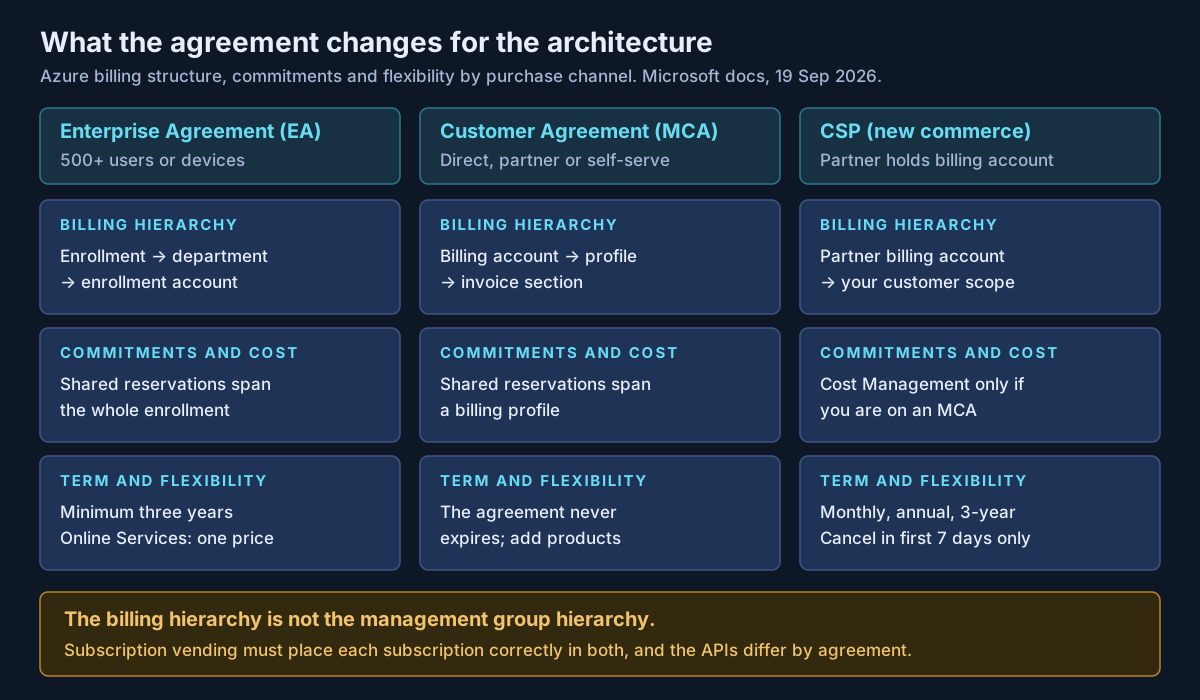
Three ways to buy, as of September 2026
| Enterprise Agreement | Microsoft Customer Agreement | CSP (new commerce) | |
|---|---|---|---|
| Who it is for | 500 or more users or devices | Anyone; direct, via partner, or self-serve in some regions | Customers buying through a partner |
| Term | Minimum three years | "The MCA never expires" | Monthly, annual or three-year terms for many products |
| Flexibility | Payments can be spread over three annual instalments | Buy new products as needs change | Cancel only in the first seven days of a term, with a prorated refund |
| Price behaviour | Online Services at one price across levels A to D from 1 Nov 2025, at renewal | List price, adjusted by your contract | Price fixed for the term; annual term billed monthly is one twelfth each month |
| Azure billing scope | Enrollment, department, enrollment account | Billing account, billing profile, invoice section | Partner's billing account and billing profile, then your customer scope |
The seven-day window in CSP is stricter than it looks. For license-based subscriptions it does not reopen until the subscription renews, and a subscription created by a partial upgrade inherits its parent's window. If a pilot might shrink, buy it on a term you can live with.
On the Enterprise Agreement itself: trade press widely reports that Microsoft stopped renewing some EAs from January 2025 and moved those customers to the MCA or to CSP. I could not find a current Microsoft page that states the scope, and Microsoft's EA page still describes the program. Ask your account team directly what applies to you at renewal, and get the answer in writing.
What the agreement changes in Azure
Four things change with the agreement, and each one belongs in a landing zone design.
The billing hierarchy is not the management group hierarchy. Management groups organize policy and access. The billing hierarchy (enrollment accounts under an EA, invoice sections under an MCA) organizes who pays. Microsoft describes an MCA billing profile as the functional equivalent of an EA enrollment. Subscription vending has to place each new subscription correctly in both, and the subscription creation APIs differ by agreement.
Commitments follow billing scope. A shared reservation applies across the enrollment under an EA, or across the billing profile under an MCA. A management-group-scoped reservation only covers subscriptions that are in both that management group and that billing scope. Savings plans can be bought under EA, MCA and the Microsoft Partner Agreement, for one or three years, and Microsoft states they "can't be canceled or refunded." Reservation refunds are capped at USD 50,000 in a rolling 12 months.
Cost Management depends on the agreement. Microsoft states that Cost Management supports CSP customers only if they are on an MCA; classic CSP subscriptions are not supported. Cost allocation rules, which split shared costs across subscriptions, resource groups or tags, are documented for EA and MCA only.
Roles differ. EA uses enterprise administrator, department administrator and account owner. MCA uses owner, contributor, reader, invoice manager and Azure subscription creator. Your privileged access design should cover these roles as well as Azure RBAC.
E3 to E5: where the design changes
Microsoft 365 E3 lists at $39 and E5 at $60 per user per month, paid yearly, after the global price update on 1 July 2026. That update also added Defender for Office 365 Plan 1 to E3, so older comparisons that say E3 has no Defender for Office 365 are out of date.
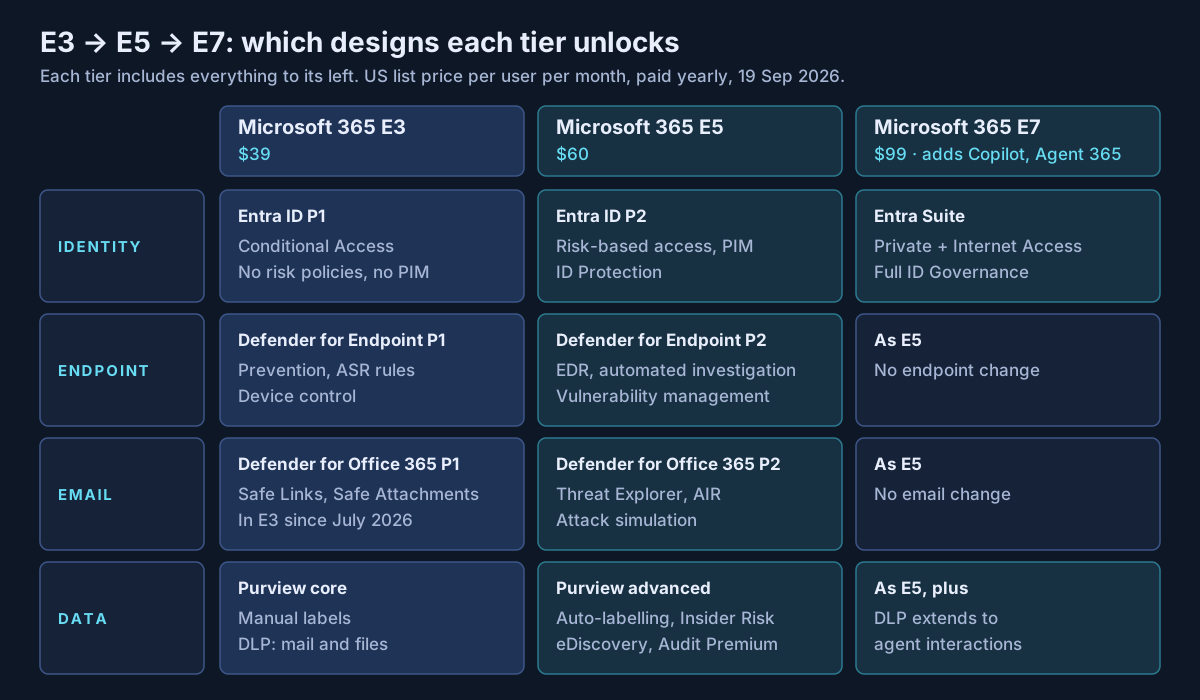
| Design capability | Minimum licence (per Microsoft docs) |
|---|---|
| Conditional Access | Entra ID P1 (in E3) |
| Sign-in and user risk policies, risk-based Conditional Access | Entra ID P2 (in E5, E7, Defender Suite) |
| Just-in-time admin roles with PIM | Entra ID P2 or Entra ID Governance |
| Access reviews, entitlement management | Entra ID Governance (some capabilities with P2) |
| Attack surface reduction, device control, network protection | Defender for Endpoint P1 (in E3) |
| EDR, automated investigation and remediation, vulnerability management | Defender for Endpoint P2 (in E5, Defender Suite) |
| Safe Links, Safe Attachments, impersonation protection | Defender for Office 365 P1 (in E3 since 1 July 2026) |
| Threat Explorer, automated investigation, attack simulation training | Defender for Office 365 P2 (in E5, Defender Suite) |
| Manual sensitivity labels, DLP for Exchange, SharePoint, OneDrive | E3 |
| Automatic labelling, client-side or service-side | E5, Purview Suite, or E5 Information Protection and Governance |
| DLP for Teams and endpoints | E5 or Purview Suite |
| Insider Risk Management | E5, Purview Suite, or E5 Insider Risk Management |
| eDiscovery Premium | E5, Purview Suite, or E5 eDiscovery and Audit |
| Audit Premium, one-year log retention | E5, Purview Suite, or E5 eDiscovery and Audit |
| Private Access, Internet Access, full ID Governance | Entra Suite (in E7) |
Sources: Entra, Defender and Purview service descriptions and licensing pages, checked 19 September 2026.
Licensing follows the user who benefits
This is the caveat that breaks the "license only the admins" plan. Microsoft ties most of these licences to the users who benefit from the feature, not to the people who configure it.
- PIM needs P2 or ID Governance for users with eligible or time-bound role assignments, PIM for Groups members and owners, approvers, and people who perform or are subject to access reviews. Microsoft notes licences need not be assigned to each user, but you must own enough to cover everyone in scope.
- Defender for Office 365 covers "any user that accesses a mailbox that benefits" from its protections, shared mailboxes that benefit, and every user of SharePoint, OneDrive or Teams if Safe Attachments is turned on for them.
- Insider Risk Management users "benefit by having their activities monitored for risk", so the monitored population needs licences.
- Audit Premium gives one-year retention only for activity by licensed users.
Microsoft also states that "some tenant services aren't currently capable of limiting benefits to specific users." A feature that switches on for the whole tenant does not reduce what you owe. I am not giving licensing advice here; confirm your counts with your licensing partner or Microsoft.
The $12 suites and E7
| Offer | List price, paid yearly | What it adds | Prerequisite |
|---|---|---|---|
| Microsoft Defender Suite (was E5 Security) | $12 | MDE P2, MDO P2, Defender for Identity, Cloud Apps, IoT | Microsoft 365 E3, or O365 E3 with EMS E3 |
| Microsoft Purview Suite (was E5 Compliance) | $12 | DLP, information protection, insider risk, audit, eDiscovery, records | Same as above |
| Microsoft Entra Suite | $12 | Private Access, Internet Access, ID Governance, ID Protection, Verified ID | Entra ID P1 |
| Microsoft 365 E7 | $99 ($90.45 without Teams) | E5 plus Microsoft 365 Copilot, Agent 365, Entra Suite | Full suite; GA 1 May 2026 |
Two Microsoft pages disagree on points that matter:
- Entra ID P2 in Defender Suite. The Entra licensing page lists Defender Suite as including P2. The Defender Suite product page lists five Defender products and does not mention P2. If your risk-based Conditional Access design depends on it, confirm before you buy.
- Agent 365 outside E7. Microsoft's E3, E5 and E7 comparison page says Agent 365 is "available exclusively" in E7. Microsoft's March 2026 announcement launched it separately at $15 per user. I read the announcement as the commercial position.
Also note that Microsoft's partner announcements say E7 promotional offers retire on 1 October 2026, the day after this article is published.
What I would actually do
This is my own practice, not Microsoft guidance.
Put a licensing section in every architecture decision record that depends on a paid capability, naming the licence, the population it must cover, and the agreement it will be bought under. Then the business case includes the real headcount, not the admin count.
Design the billing hierarchy alongside the management group hierarchy in the landing zone, and decide where shared commitments should apply before anyone buys a reservation.
For security, pick designs first, then compare E5 against E3 plus the specific $12 suites you need. The answer depends on which ladder rungs your design actually uses.
If your security design and your licence estate were decided separately, Avalon can help bring them together: mapping each planned control to the licence and user population it needs, reviewing Azure billing and management group structure before commitments are bought, and building cost models that compare E5 with E3 plus add-ons. It is part of my enterprise architecture and security practice, and the contact page is the best way to start.
Sources
All checked on 19 September 2026. Where two Microsoft pages disagree, the text names the disagreement.
Agreements and commerce — Enterprise Agreement (opens in a new tab) · Microsoft Customer Agreement (opens in a new tab) · Online Services pricing consistency update (opens in a new tab) · New commerce license-based overview (opens in a new tab) · New commerce cancellation policy (opens in a new tab) · Partner Center pricing and offers (opens in a new tab) · Partner Center announcements, August 2026 (opens in a new tab)
Azure billing and cost — Cost Management scopes (opens in a new tab) · Supported offers (opens in a new tab) · Cost allocation (opens in a new tab) · Savings plans (opens in a new tab) · Buying reservations (opens in a new tab) · Reservations overview (opens in a new tab) · Programmatic subscription creation (opens in a new tab)
Plans and prices — Microsoft 365 enterprise plans (opens in a new tab) · Microsoft 365 E7 (opens in a new tab) · Introducing the Frontier Suite (opens in a new tab) · Capabilities and pricing update, December 2025 (opens in a new tab) · E3, E5 and E7 comparison (opens in a new tab) · Security suites (opens in a new tab) · Microsoft Defender Suite (opens in a new tab) · Microsoft Entra pricing (opens in a new tab)
Capabilities and licensing rules — Microsoft Entra licensing (opens in a new tab) · ID Protection (opens in a new tab) · ID Governance licensing fundamentals (opens in a new tab) · Defender for Endpoint Plan 1 (opens in a new tab) · Defender for Office 365 (opens in a new tab) · Microsoft Defender service description (opens in a new tab) · Microsoft Purview service description (opens in a new tab) · Security and compliance licensing guidance (opens in a new tab)
Published 30 September 2026; sources checked on 19 September 2026. Prices are US list prices per user per month, paid yearly, on that date; your contract price may differ. This article is not legal or licensing advice: confirm entitlements and counts with your licensing partner or Microsoft. The recommendations are my own practice, not Microsoft documentation. No client, employer or engagement is named in this article, and any scenario described is an illustrative composite rather than a description of specific customer work.
- #Microsoft Licensing
- #Enterprise Agreement
- #Microsoft Customer Agreement
- #Cloud Solution Provider
- #Microsoft 365 E5
- #Microsoft 365 E7
- #Microsoft Entra ID P2
- #Privileged Identity Management
- #Microsoft Defender
- #Microsoft Purview
- #Azure Cost Management
- #Security Architecture
Related articles
FinOps for Microsoft 365 Copilot and Agents: Seats, Copilot Credits and Chargeback
Microsoft 365 Copilot and its agents are paid for in three different ways, and each one bills to a different place: per-user seats on the Microsoft 365 invoice, prepaid Copilot Credits allocated to Power Platform environments, and pay-as-you-go charges on an Azure subscription. This guide explains the three cost shapes, the controls Microsoft provides for each, and a chargeback model built on them, checked against Microsoft's documentation in September 2026.
10 min read
Declarative Agents, Custom Engine Agents or Copilot Connectors? Choosing a Microsoft 365 Copilot Extensibility Path
Once you have decided to extend Microsoft 365 Copilot, there are three ways to do it, and they are not interchangeable. Copilot connectors change what Copilot knows, declarative agents change how it behaves, and custom engine agents replace its engine. This guide compares the three on licensing, governance and who carries the risk, with every claim checked against Microsoft's documentation in September 2026.
15 min read
Seven Azure Cost Leaks I Keep Finding (and How to Close Each One)
Most Azure waste is not a bad architecture decision. It is a meter that kept running after its reason ended: a disk left behind by a deleted VM, a public IP nobody released, an empty App Service plan, a reservation nobody watches. This list covers seven common leaks, with how to find each one, how to fix it, and whether policy can stop it coming back, checked against Microsoft's documentation in September 2026.
10 min read