Seven Azure Cost Leaks I Keep Finding (and How to Close Each One)
Most Azure waste is not a bad architecture decision. It is a meter that kept running after its reason ended: a disk left behind by a deleted VM, a public IP nobody released, an empty App Service plan, a reservation nobody watches. This list covers seven common leaks, with how to find each one, how to fix it, and whether policy can stop it coming back, checked against Microsoft's documentation in September 2026.
Published 1 October 2026. Every product claim, price and availability status below was checked against Microsoft's own documentation on 19 September 2026. Where two Microsoft pages disagree, I say so rather than pick one. Billing rules change, so check the linked source before you act on anything here.
This is a short, practical list. Most Azure waste I see is not a bad architecture decision. It is something small that kept billing after the reason for it ended.
A cost leak is a meter that outlives its purpose. Finding it is usually one query. Keeping it closed is a policy or a habit.
For each leak below you get why it happens, how to find it, how to fix it, and whether policy can stop it coming back. The Resource Graph queries are trimmed from Microsoft's own FinOps best-practice pages. There are no dollar figures here: the answer to "how much" is in your own bill.
1. Disks and snapshots left behind by deleted VMs
Why it happens. Microsoft states it plainly: "After a VM is deleted, you will continue to pay for unattached disks." The VM delete page says disks, NICs and public IPs "are persisted" by default. The same page then says the portal defaults the OS disk to "Delete with VM." Both are true: templates and scripts keep everything unless deleteOption says otherwise, and the portal only cleans up some of it.
Find it.
resources
| where type =~ 'microsoft.compute/disks' and managedBy == ""
| where tostring(properties.diskState) != 'ActiveSAS'
| where tags !contains 'ASR-ReplicaDisk' and tags !contains 'asrseeddisk'
| project name, resourceGroup, SKU = tostring(sku.name),
    SizeGB = toint(properties.diskSizeGB), Created = tostring(properties.timeCreated)
The tag filters matter. Azure Site Recovery replica disks look unattached and are not waste. For snapshots, filter microsoft.compute/snapshots on properties.timeCreated < ago(30d). Advisor also flags both.
Fix it. Confirm ownership, then delete. For snapshots you keep, use incremental snapshots, which are "billed for the used size only" and stored on Standard HDD whatever the source disk type.
Preventable by policy? Partly. Set deleteOption to Delete in your templates. There is no rule that stops someone detaching a disk and forgetting it.
2. Public IPs that no longer point at anything
Why it happens. Basic SKU public IPs were retired on 30 September 2025, and Standard SKU IPs are static only. Azure's pricing page says a static public IP is charged "irrespective of the associated resource," from the second hour until the resource is deleted. Every Standard public IP bills whether or not anything uses it.
Find it.
resources
| where type =~ 'microsoft.network/publicipaddresses'
| where isempty(properties.ipConfiguration) and isempty(properties.natGateway)
| project name, resourceGroup, SKU = tostring(sku.name), location
Microsoft's full version also catches IPs attached to a NIC whose VM is gone.
Fix it. Delete the IP, unless something external depends on that address, such as a DNS record or a partner's firewall allow list. Check before you release it.
Preventable by policy? Partly, with the same deleteOption discipline on VM templates.
3. App Service plans with no apps
Why it happens. Microsoft: "App Service plans that have no apps associated with them still incur charges because they continue to reserve the configured VM instances." By default, deleting the last app deletes the plan too. Leaks come from people who chose to keep it, and from apps moved to another plan.
Find it.
resources
| where type =~ 'microsoft.web/serverfarms'
| where toint(properties.numberOfSites) == 0 and sku.tier !~ 'Free'
| project name, resourceGroup, SKU = tostring(sku.name), location
Advisor raises the same finding as "Unused/Empty App Service plan."
Fix it. Delete the plan, or move it to the Free tier if you need to keep the name.
Preventable by policy? Mostly by the platform default. Treat any plan kept empty for more than a sprint as a finding.
4. Idle and oversized VMs
Why it happens. Sizes are chosen at build time for a load estimate, and nobody revisits them.
Find it. Advisor does the metrics work. It recommends shutdown when the 95th percentile of maximum CPU is below 3%, average CPU over the last three days is at or below 2%, and outbound network is below 2%. It recommends a resize when the load fits a cheaper size within its targets: 40% CPU and 60% memory for user-facing workloads, 80% for both otherwise. The default lookback is 7 days. I set it to 30 or longer so month-end jobs are not mistaken for idle time.
Fix it. Resize, or shut down after asking the owner. Advisor sees utilization, not purpose.
Preventable by policy? Partly. The built-in "Allowed virtual machine size SKUs" policy, with Deny, keeps oversized families out of subscriptions that should never need them.
5. Non-production running around the clock
Why it happens. Development and test VMs are needed during working hours and billed for all of them. There is a subtler version too: a VM can look stopped and still be allocated. Microsoft lists Stopped (allocated) as billed. Only Stopped (deallocated) stops compute charges, and disks and networking still bill after that.
Find it.
resources
| where type =~ 'microsoft.compute/virtualmachines'
| extend power = tostring(properties.extended.instanceView.powerState.code)
| where power == 'PowerState/stopped'
| project name, resourceGroup, power
That lists VMs that look off but still bill for compute. For always-on non-production, filter running VMs by environment tag.
Fix it. Auto-shutdown is built into every Azure VM, with an optional warning by email or webhook. After the first scheduled shutdown, check the power state to confirm the VM shows as deallocated. Starting VMs again needs something else. Start/Stop VMs v2 is still documented, but Microsoft says it gets no further development, so I would not build anything new on it.
Preventable by policy? Largely. Auto-shutdown is a deployable resource (Microsoft.DevTestLab/schedules, task type ComputeVmShutdownTask) that can target any VM. A custom deployIfNotExists policy on non-production subscriptions can add it to every VM.
6. Log Analytics data on the wrong table plan
Why it happens. The Analytics plan is right for data you alert on and query often. Verbose logs kept only for troubleshooting or audit often sit on it too, at the same ingestion rate.
Azure Monitor has three table plans, all generally available:
| Plan | Built for | Queries | Commitment tiers |
|---|---|---|---|
| Analytics | Alerting, detection, frequent queries | Included | Yes, from 100 GB/day |
| Basic | Troubleshooting and incident response | Charged per GB scanned | No |
| Auxiliary | Verbose, audit and compliance data | Charged, and slower | No |
Microsoft's pages disagree on one detail: the table-plans page gives 30 days of default Analytics retention, while the cost page says ingestion includes 31 days.
Find it. Run this in the workspace, not in Resource Graph:
Usage
| where TimeGenerated > ago(32d)
| where IsBillable == true
| summarize BillableGB = sum(Quantity) / 1000. by DataType
| sort by BillableGB desc
Quantity is in MB. Advisor also suggests Basic logs for eligible tables and commitment-tier changes.
Fix it. Move low-value tables to Basic or Auxiliary, filter at ingestion with transformations, and review commitment tiers once volume is steady. Microsoft is clear that the daily cap is a safety net for spikes, not a way to save money: it stops collection, and your alerts with it.
Preventable by policy? Partly. Policy can enforce diagnostic settings to a standard destination. Whether a table is worth its plan is a review question.
7. Commitments nobody watches
Why it happens. Reservations and savings plans are bought against a forecast, and then the workload changes. Microsoft: "You can't carry forward unused reserved hours," and for savings plans, "Unused commitment for an hour expires and does not roll over." Savings plans cannot be cancelled or refunded. The same pattern applies to AI capacity: a Microsoft Foundry provisioned deployment is billed per PTU per hour "regardless of the number of tokens consumed," until the deployment is deleted.
Find it. Utilization is shown per reservation in the portal. Set reservation utilization alerts, which email when utilization falls below a target percentage. For provisioned AI deployments, list them and ask who uses each one.
Fix it. Move reservation scope so another matching resource can use it, exchange it, or trade it in for a savings plan. Know the deadline: reservations bought after 1 February 2027 for services covered by savings plans cannot be exchanged, and older ones keep "one final exchange." Refunds are capped at 50,000 USD of cancelled commitment in a rolling 12 months.
Preventable by policy? No. This is a purchasing process: an owner per commitment, and a quarterly review.
The seven on one page
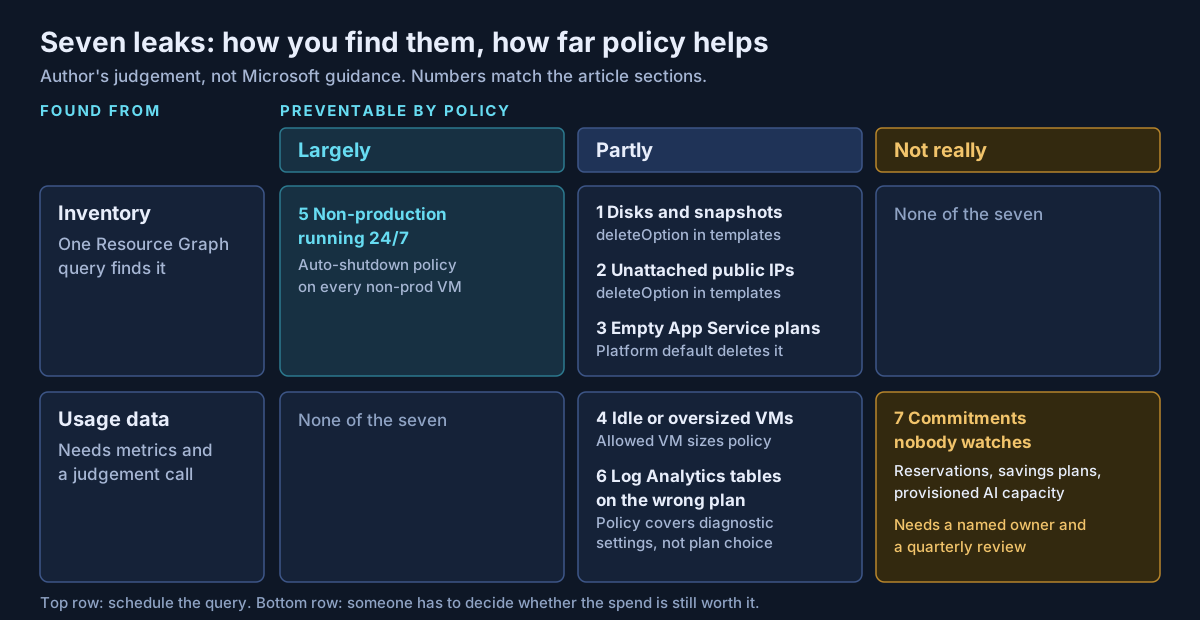
The top row is the cheap win. The bottom row needs usage data and someone who can say whether the spend is still worth it.
What I would actually do
This is my own routine, not Microsoft guidance.
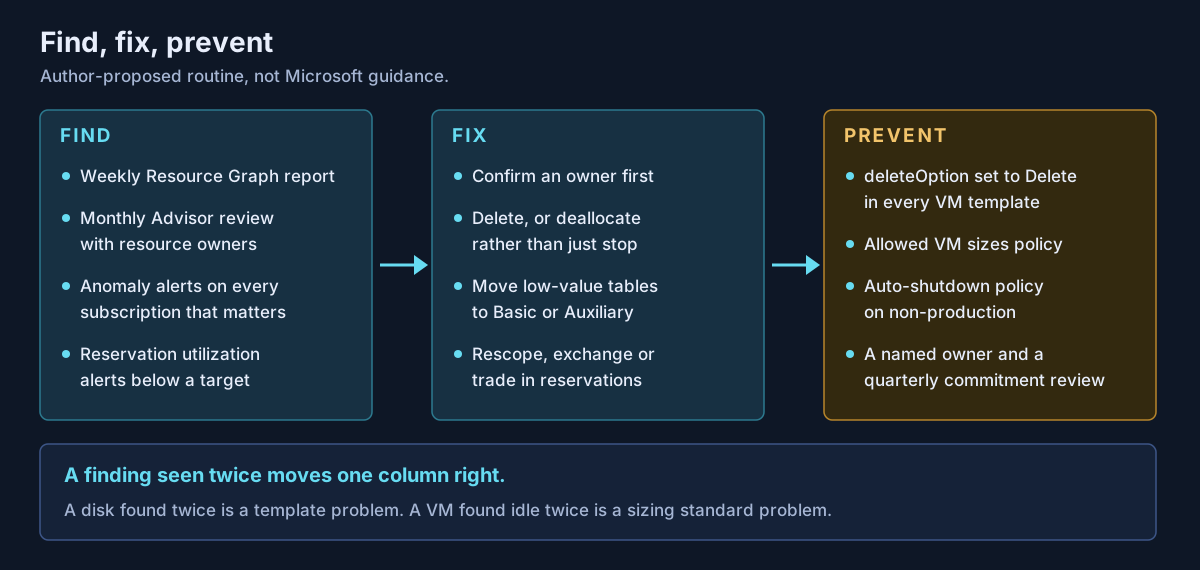
Put the Resource Graph queries into a weekly report. Review Advisor's cost recommendations monthly with resource owners, not just the platform team. Turn on anomaly alerts for every subscription that matters; detection runs daily and catches the leak nobody has named yet.
Then move each repeat finding one column right, from fix to prevent. A disk found twice is a template problem. A VM found idle twice is a sizing standard problem. Most of these controls belong in the landing zone, not in a clean-up project; I covered where they sit in practical cloud landing zone security considerations.
Finally, give every commitment a named owner. Reservations and provisioned capacity are the only leaks here that policy cannot stop.
If your Azure bill has grown faster than your workloads, or you have commitments nobody is sure are being used, that is work Avalon does: cost-leak reviews using the queries above, Azure Policy baselines for non-production, Log Analytics table-plan reviews, and commitment ownership and review processes. It sits within my cloud architecture and governance practice, and the contact page is the best way to start a conversation.
Sources
All checked on 19 September 2026. Where two Microsoft pages disagree, the text names the disagreement.
Disks, IPs and App Service — Find unattached disks (opens in a new tab) · Delete a VM and its resources (opens in a new tab) · Incremental snapshots (opens in a new tab) · Public IP addresses (opens in a new tab) · IP address pricing (opens in a new tab) · Manage an App Service plan (opens in a new tab) · App Service plans overview (opens in a new tab)
Queries and recommendations — FinOps best practices: storage (opens in a new tab) · FinOps best practices: networking (opens in a new tab) · FinOps best practices: web (opens in a new tab) · Resource Graph samples for VMs (opens in a new tab) · Advisor cost recommendations (opens in a new tab) · Advisor cost recommendation reference (opens in a new tab)
VM power and schedules — VM states and billing (opens in a new tab) · Auto-shutdown a VM (opens in a new tab) · Microsoft.DevTestLab/schedules template reference (opens in a new tab) · Start/Stop VMs v2 overview (opens in a new tab) · Allowed virtual machine size SKUs policy definition (opens in a new tab)
Log Analytics — Table plans (opens in a new tab) · Azure Monitor Logs cost calculations (opens in a new tab) · Analyze usage (opens in a new tab) · Daily cap (opens in a new tab)
Commitments and alerts — Reservation charges (opens in a new tab) · Savings plan for compute (opens in a new tab) · Exchanges and refunds (opens in a new tab) · Reservation utilization (opens in a new tab) · Reservation utilization alerts (opens in a new tab) · Provisioned throughput in Microsoft Foundry (opens in a new tab) · Anomaly detection and alerts (opens in a new tab)
Published 1 October 2026; sources checked on 19 September 2026. Azure billing rules and Advisor thresholds change, so check Microsoft Learn before acting. The leak placement in Figure 1 and the routine in Figure 2 are my own guidance, not Microsoft documentation. No client, employer or engagement is named in this article, and any scenario described is an illustrative composite rather than a description of specific customer work.
- #Azure Cost Management
- #FinOps
- #Azure Advisor
- #Azure Resource Graph
- #Azure Policy
- #Managed Disks
- #Public IP Addresses
- #App Service Plans
- #Log Analytics
- #Azure Reservations
- #Savings Plans
- #Cloud Governance
Related articles
Azure Cost Guardrails That Work: Budgets, Policy, Tags and Anomaly Alerts Before the Spending Starts
Azure budgets alert, they do not stop spending, and every cost alert in Azure works on data that is hours or days old. This guide separates preventive guardrails (Azure Policy, quotas, subscription vending) from detective ones (budgets, anomaly alerts, Advisor), shows the latency gap between them, and proposes a baseline that puts each control at the right scope. Checked against Microsoft's documentation in September 2026.
10 min read
Why Your Azure OpenAI Bill Surprised You: Tokens, Provisioned Throughput and Pay-As-You-Go
Azure OpenAI in Microsoft Foundry Models has three billing shapes: pay per token, reserve capacity in provisioned throughput units, or accept a 24-hour target turnaround for half price with Batch. This guide explains where tokens come from in an agent turn, how PTU sizing and reservations work, when spillover helps, and how to monitor spend, with every claim checked against Microsoft's documentation in September 2026.
10 min read
An Azure Landing Zone for AI Workloads: Networking, Private Endpoints, Identity and Policy Before the First Model
Microsoft's guidance is clear that AI workloads belong in ordinary application landing zones. What changes is the order of work. Some Foundry networking choices are fixed the moment the resource is created, so they have to be settled before the first model is deployed. This guide covers placement, private endpoints and DNS, agent network isolation, keyless identity, the renamed Foundry roles, policy, the AI gateway, quotas and regions, checked against Microsoft's documentation in September 2026.
11 min read