Oversharing Is the Real Copilot Risk: Fix Permissions and Labels Before You Roll Out AI
Microsoft Copilot respects existing permissions, which means it finds existing oversharing faster than any user ever did. This guide explains where excess access comes from, what SharePoint Advanced Management and Microsoft Purview actually do about it, why Restricted SharePoint Search is retiring, and a phased remediation plan, with every status checked against Microsoft's documentation in September 2026.
Published 23 September 2026. Every product claim, licence and availability status below was checked against Microsoft's own documentation on 19 September 2026. Where Microsoft's pages disagree, I say so rather than pick one. One of the controls below is retiring, so check the linked source before you plan around anything here.
Most Copilot security conversations start with the model: prompt injection, data leaving the tenant, hallucinated answers. Those are real questions. But the risk that shows up first in a pilot is usually older and more ordinary. In a typical pattern (an illustrative composite, not a specific case), someone asks Copilot a reasonable question and the answer quotes a board paper or an HR case they were technically allowed to open all along.
The one idea that organizes the work
Copilot does not create oversharing. It removes the obscurity that was hiding it.
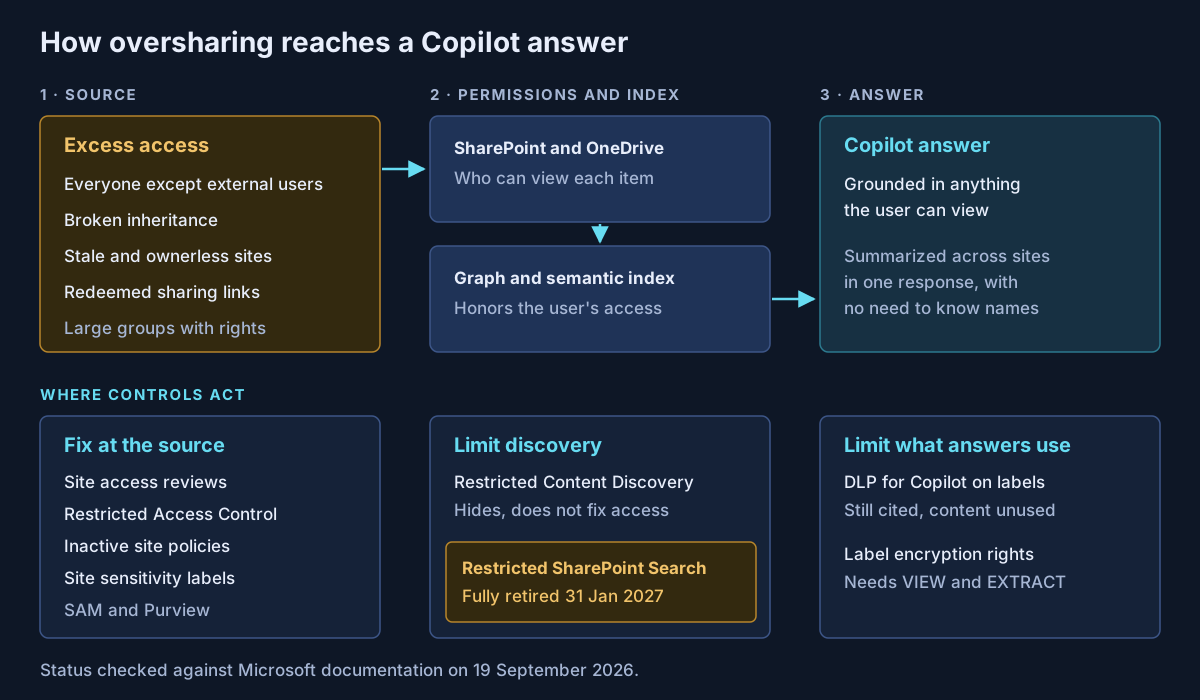
Microsoft is clear on the mechanics. Copilot "only surfaces organizational data to which individual users have at least view permissions," and the semantic index "honors the user identity-based access boundary." Both statements are reassuring, and both mean the same thing: if your permissions say everyone can read a file, Copilot agrees.
Before Copilot, an overshared site was protected by the fact that nobody knew its name. Copilot reasons across everything a user can reach and summarizes it in one answer. Obscurity does not survive a good retrieval system.
Where excess access comes from
| Source | Why it matters to Copilot |
|---|---|
| "Everyone except external users" (EEEU) on sites, groups or folders | Grants access to every employee at once, with no action from them |
| Broken permission inheritance | Libraries and folders drift from the site's model and nobody reviews them |
| Stale and ownerless sites | Old content with old permissions, and no one to ask |
| Large groups with edit or read rights | Membership grows faster than anyone removes it |
| Widely redeemed sharing links | Each click adds a person with real access |
One correction to a common claim. Creating a People in your organization link does not, by itself, expose a file to Copilot. Microsoft states that such a link "doesn't make the associated file or folder appear in search results or make it accessible through Copilot." Access starts when someone clicks it. The same applies to Anyone links. The risk is a link pasted into a large channel and opened by hundreds of people. EEEU is different: it gives everyone access immediately.
What Microsoft now recommends
Microsoft published "Address oversharing in Microsoft 365 Copilot," described as "a Microsoft deployment blueprint," in January 2025. That guidance now lives on Microsoft Learn as Secure and govern Microsoft Copilot: Foundational deployment guidance, updated in August 2026. It has three pillars: remediate oversharing, set up guardrails, and meet regulations.
The order within the first pillar is the part I would copy: find high-risk sites, apply interim protections, fix access, then "remove interim Copilot protections once access and permissions are remediated." That last step is the one programs skip.
A naming note: Microsoft's privacy page now says Microsoft 365 Copilot "is now named Microsoft Copilot," while many admin pages still use the old name. They are the same product.
The SharePoint Advanced Management toolkit
SharePoint Advanced Management (SAM) used to be a separate purchase. Microsoft now states that if an organization assigns at least one Microsoft Copilot licence, SharePoint admins get the SAM features. It is also available as the SAM Plan 1 add-on and in Microsoft 365 E7. One feature, restricted site creation by apps, still needs Plan 1.
| Feature | What it does | Worth knowing |
|---|---|---|
| Data access governance reports | Snapshot of site permissions, EEEU and "Everyone" exposure, labels; 28-day sharing-link and EEEU activity | Microsoft suggests snapshots quarterly, activity monthly |
| Content management assessment | Guided assessment of oversized audiences, EEEU, broken inheritance, inactive and ownerless sites | Where I start discovery |
| Site access reviews | Sends the site owner a review tailored to the issue found | Up to 100 sites from the report view, PowerShell beyond that; 1,000 a month from the org-wide report |
| Restricted Content Discovery | Hides a site from org-wide search and Copilot | Does not change permissions; up to 20,000 sites; not OneDrive |
| Restricted Access Control | Only members of up to 10 groups can reach the site | Overrides prior permissions and links; Copilot honors it |
| Inactive site policies | Notify owners, then read-only or archive | Microsoft 365 Archive keeps content out of Copilot |
Status as of 19 September 2026: none of these carries a preview label in Microsoft's documentation.
The distinction that matters most is between hiding and fixing. Restricted Content Discovery hides. People with access can still open the files directly and still see content they own or recently used. Microsoft itself calls it "a temporary governance control." Restricted Access Control and site access reviews fix. Budget the program around fixing.
Restricted SharePoint Search is retiring
Restricted SharePoint Search was the first emergency brake: an allow list of up to 100 sites that search and Copilot could draw from. Microsoft always said it "isn't a security boundary." It is now retiring.
- 31 July 2026: new enablement blocked.
- 31 January 2027: full retirement, "no extensions or exceptions," according to message center post MC1395311.
- Not migrated: Microsoft will not move RSS settings to Restricted Content Discovery, and warns that "restricted content may become discoverable after RSS retirement."
The Learn page, last updated in July, mentions only the July date. If your tenant still relies on an allow list, treat January 2027 as the day your temporary control disappears.
Where Purview fits
SAM works on sites. Purview works on the content itself, which is what you want once remediation reaches file level.
Sensitivity labels carry protection with the file. When a label applies encryption, users need both VIEW and EXTRACT usage rights for Copilot to return the data. Copilot in Word, PowerPoint and Outlook passes a source file's label to new content it creates. Manual labelling is in E3. Default labels, auto-labelling and site labels are listed for E5.
DLP for Copilot can stop Copilot using files and emails with chosen labels. That is generally available. The item still appears in citations, but its content is not used. Policy changes can take up to four hours to apply.
Data Security Posture Management (the current version; the older one is now "DSPM for AI (classic)") runs a default data risk assessment weekly over your top 100 sites by usage, and offers remediation from there: label, restrict, notify the owner, or start a site access review. A hundred sites is a sample, not an inventory.
Microsoft's own pages disagree on one point. The deployment guidance lists a DLP policy for sensitive information in prompts as a standard guardrail. The DLP documentation marks that capability as preview. Plan for it, but do not write it into a control statement yet.
A phased remediation plan
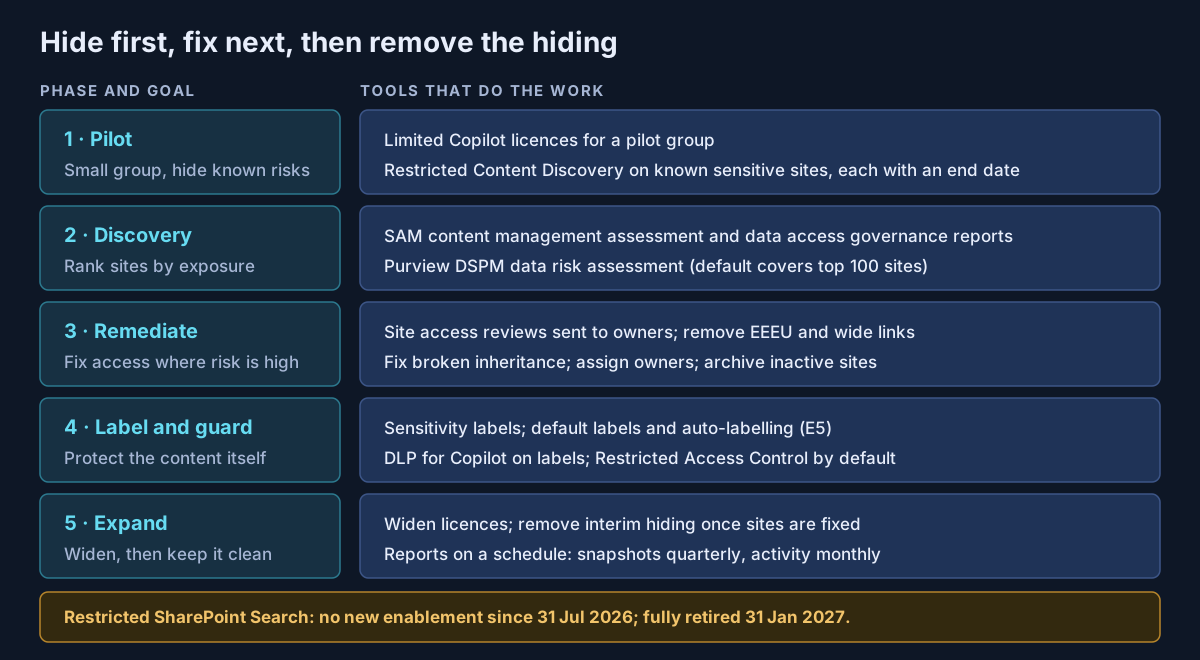
This plan is my own construct, built on Microsoft's guidance but not Microsoft documentation.
| Phase | Goal | Exit test |
|---|---|---|
| 1. Pilot | Learn with a small group; hide the obvious risks | Known sensitive sites under Restricted Content Discovery |
| 2. Discovery | Rank sites by exposure and sensitivity | Top sites listed with owner and finding |
| 3. Remediate | Fix access where the risk is highest | EEEU and broken inheritance cleared on those sites |
| 4. Label and guard | Protect content, not only sites | Labels and DLP for Copilot live for regulated data |
| 5. Expand | Widen licences; remove interim controls | Reports run on a schedule; hidden sites fixed and restored |
What I would actually do
Run the content management assessment and the EEEU report before buying another licence. The results tell you how long the program will take.
Put Restricted Content Discovery on the sites you already know are sensitive, and log each one with a date for its removal. A hiding control with no end date becomes permanent.
Send the fixing work to site owners through site access reviews. IT cannot judge whether a finance folder should be open to everyone. The owner can.
Retire any Restricted SharePoint Search allow list now, not in January. For how the same "Everyone" risk appears in Copilot connectors, see choosing a Microsoft 365 Copilot extensibility path. For the wider principle of treating access as a continuous decision, see designing Zero Trust beyond a product checklist.
If you are preparing a Copilot rollout, or already have one and are unsure what it can see, that is work Avalon does: oversharing assessments with SharePoint Advanced Management and Purview, remediation programs run with site owners, sensitivity label and DLP design, and plans to move off Restricted SharePoint Search before it retires. It is part of my enterprise AI and security practice, and the contact page is the best way to start a conversation.
Sources
All checked on 19 September 2026. Where two Microsoft pages disagree, the text names the disagreement.
Copilot and permissions — Data, privacy and security for Microsoft Copilot (opens in a new tab) · Microsoft Purview for Microsoft 365 Copilot (opens in a new tab) · How shareable links work (opens in a new tab)
Microsoft deployment guidance — Address oversharing in Microsoft 365 Copilot (blueprint, January 2025) (opens in a new tab) · Secure and govern Microsoft Copilot: foundational deployment guidance (opens in a new tab) · Configure a secure and governed foundation (opens in a new tab) · E3, E5 and E7 feature comparison (opens in a new tab)
SharePoint Advanced Management — SAM features in Copilot licences (opens in a new tab) · SAM prerequisites (opens in a new tab) · Get ready for Copilot with SAM (opens in a new tab) · Data access governance reports (opens in a new tab) · Site access reviews (opens in a new tab) · Restricted Content Discovery (opens in a new tab) · Restricted Access Control (opens in a new tab) · Site lifecycle management (opens in a new tab)
Restricted SharePoint Search — Restricted SharePoint Search (opens in a new tab) · MC1395311 retirement notice (message center archive) (opens in a new tab)
Purview — DLP for Microsoft 365 Copilot (opens in a new tab) · Data Security Posture Management (opens in a new tab) · DSPM data risk assessments (opens in a new tab)
Published 23 September 2026; sources checked on 19 September 2026. Licensing and availability for Copilot data controls change often, so check Microsoft Learn before making a commitment. The remediation plan is guidance I propose, not Microsoft documentation. No client, employer or engagement is named in this article, and any scenario described is an illustrative composite rather than a description of specific customer work.
- #Microsoft Copilot
- #Microsoft 365 Copilot
- #Oversharing
- #SharePoint Advanced Management
- #Restricted Content Discovery
- #Restricted SharePoint Search
- #Microsoft Purview
- #Sensitivity Labels
- #Data Loss Prevention
- #DSPM
- #Data Governance
- #AI Security
Related articles
Agentic AI Security Architecture: Securing Autonomous Agents in the Enterprise
A research-grounded enterprise reference architecture for autonomous AI agents: agent identity, task-bound authorization, tool and MCP gateways, memory security, runtime containment, observability, and incident response — with an OWASP agentic Top 10 mapping, a bounded-autonomy model, and a 38-control matrix.
71 min read
Inside an AI-Driven Security Operations Platform: An Interactive Reference Architecture
Can agentic AI actually run security operations? The interesting problem is not the triage decision — it is everything around it: authority, tenant isolation, evidence, approval, and audit. This is the full target architecture, published as something you can click through.
4 min read
MCP Servers in the Enterprise: How to Vet, Host and Govern Model Context Protocol Tools
Every MCP server is two things at once: text your model will read, and code that acts with someone's credentials. This guide covers the current MCP specification and its OAuth 2.1 authorization model, five risk classes, a vetting checklist, where Microsoft's MCP hosting and gateway options stand in September 2026, and an allow-list model that holds up in an audit.
10 min read