MCP Servers in the Enterprise: How to Vet, Host and Govern Model Context Protocol Tools
Every MCP server is two things at once: text your model will read, and code that acts with someone's credentials. This guide covers the current MCP specification and its OAuth 2.1 authorization model, five risk classes, a vetting checklist, where Microsoft's MCP hosting and gateway options stand in September 2026, and an allow-list model that holds up in an audit.
Published 21 September 2026. Every product claim and availability status below was checked against the Model Context Protocol specification, Microsoft's own documentation and GitHub's documentation on 19 September 2026. Where sources disagree, I say so rather than pick one. MCP and the platforms around it change monthly, so check the linked source before you rely on anything here.
The Model Context Protocol has become the default way to give an AI agent tools. Microsoft supports it in Copilot Studio, Microsoft 365 Copilot declarative agents, Microsoft Foundry and Azure API Management, and Windows support is in preview. That makes the governance question urgent. A developer can install an MCP server from a public package registry in minutes, so servers can be in use long before anyone writes a rule for which ones are allowed.
In agentic AI security architecture I argued that an agent's tools define its blast radius. This article is about the tools themselves.
The one idea that organizes the problem
Every MCP server is two things at once: text your model will read, and code that acts with someone's credentials. Vet it as both.
Traditional integration reviews look only at the second half. The first half is new. A server's tool descriptions go straight into the model's context, so a server can influence the agent before any tool is called.
What MCP is, as of September 2026
MCP is an open protocol built on JSON-RPC 2.0. The specification defines three roles. Hosts are the AI applications, clients are the connectors inside the host, and servers provide tools, resources and prompts. The current revision is 2026-07-28. It made the protocol stateless, deprecated the Roots, Sampling and Logging features, and deprecated OAuth Dynamic Client Registration in favour of Client ID Metadata Documents.
There are two standard transports, and they have very different security models.
| Local server (stdio) | Remote server (Streamable HTTP) | |
|---|---|---|
| What it is | A subprocess the host launches on the user's machine | A service reached over HTTP |
| Credentials | Spec: "retrieve credentials from the environment" | OAuth 2.1; the server is a resource server |
| Token rules | Not applicable | Must accept only tokens issued for itself; passthrough is forbidden |
| Main exposure | Runs with the same privileges as the client | Scopes, audience validation, what the server does downstream |
| Where you can put a control | The endpoint and the client configuration | A gateway, the identity provider, the network |
The specification is candid about its limits. It says tools "represent arbitrary code execution," that hosts must get user consent before invoking any tool, and that "MCP itself cannot enforce these security principles at the protocol level." Enforcement falls to the host, the gateway and you.
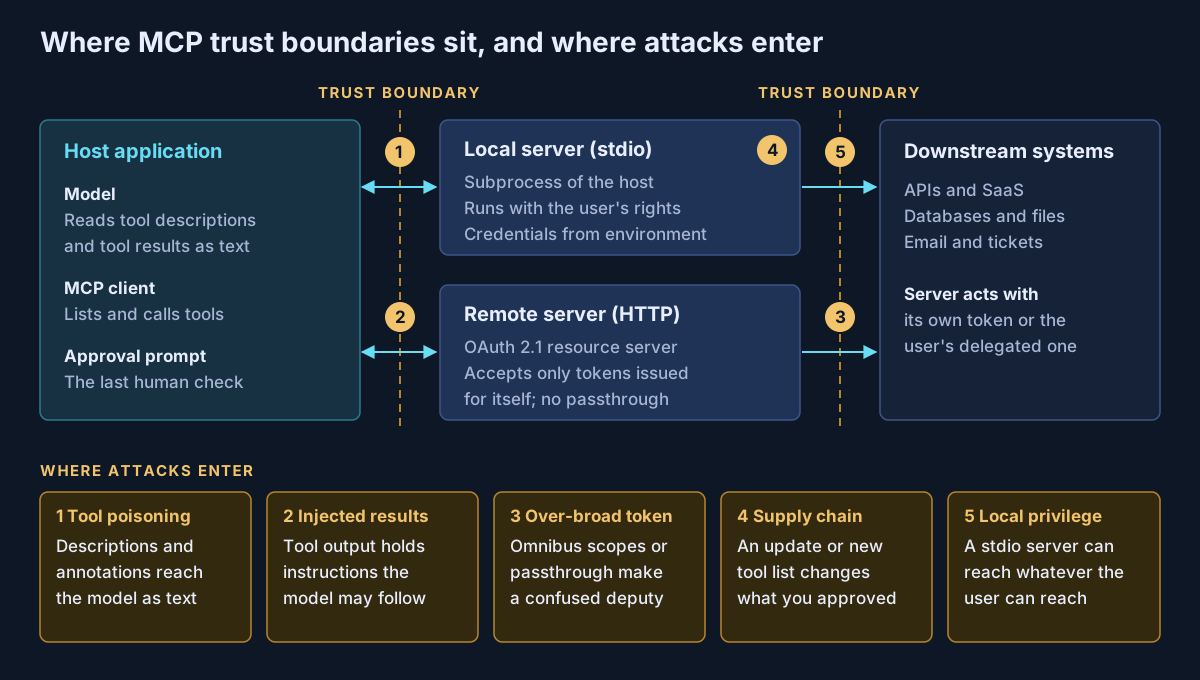
Five risk classes worth naming in a standard
These map to the MCP project's own security guidance and to the OWASP MCP Top 10, which is still in beta.
| Risk | How it enters | What the primary source says |
|---|---|---|
| 1. Tool poisoning | Instructions hidden in tool names, descriptions or annotations | Spec: clients "MUST consider tool annotations to be untrusted unless they come from trusted servers" |
| 2. Injection via results | Tool output that contains instructions | Foundry: results "can contain indirect prompt injection instructions" |
| 3. Over-broad tokens and confused deputy | Omnibus scopes, token passthrough, proxy servers with a static client ID | Spec forbids passthrough and lists "wildcard or omnibus scopes" as a common mistake |
| 4. Supply chain | A package update or a changed tool list after approval | The official MCP Registry delegates security scanning to package registries and aggregators |
| 5. Local privilege | A stdio server running as the user | Security guidance: clients should "warn that MCP servers run with the same privileges as the client" |
The fourth one deserves attention. The protocol lets a server's tool list change over time, and the server can notify clients when it does. A server you vetted last month may not be the server you are running today. Microsoft's Foundry documentation says to review again when the server operator, the exposed tools or the server's behaviour changes.
A vetting checklist
This is my own checklist, not vendor documentation. I would not approve a server until each question has a written answer.
| Question | Evidence to ask for |
|---|---|
| Who publishes it, and who owns it internally? | A verified publisher or namespace, and a named internal owner |
| What does every tool description actually say? | The full tools/list output, read by a person, stored with the approval |
| Which tools write, delete or send? | A tool-by-tool list; confirm write tools are not marked readOnlyHint |
| What scopes does it request? | A minimal scope set, not the whole catalogue |
| Does it validate token audience? | Test evidence that tokens for other resources are rejected |
| Where does it send data? | The data flow, retention and location of the operator's service |
| Can you pin it? | A version and hash for packages, or a versioned endpoint for remote servers |
| Local or remote? | If local, why it cannot be remote, and how it is contained |
The readOnlyHint row matters in Microsoft 365. After a user's first approval, Microsoft 365 Copilot lets tools marked readOnlyHint: true skip the confirmation prompt. The MCP specification says the same annotation is untrusted unless the server is trusted. Both can be right only if vetting is what makes the server trusted.
Where Microsoft's options stand
Status as of 19 September 2026, from Microsoft's own pages.
| Capability | What it does | Status |
|---|---|---|
| Copilot Studio MCP | Connects agents to MCP servers; SSE dropped after August 2025 | GA since May 2025 |
| Declarative agents with MCP | MCP servers as actions in Microsoft 365 Copilot | GA since December 2025 |
| Foundry MCP tool | Remote MCP only; approval defaults to always; allowed_tools allow-list | Listed without a preview label; long-running operations in preview |
| Foundry Toolboxes | One managed MCP endpoint with central credentials and policy | GA |
| Foundry AI gateway for MCP tools | Routes MCP tool traffic through API Management | Preview |
| Foundry private tool catalog | Organization-only tool catalog backed by Azure API Center | Preview |
| Azure API Management | Exposes REST APIs as MCP servers or fronts existing ones; tools only | Documented across classic and v2 tiers, no preview label |
| Azure API Center | Inventories remote, local and partner MCP servers; registry endpoint for IDEs | Status not stated on the page |
| Windows on-device agent registry | Runs packaged MCP servers under a separate agent account | Preview |
Four points from these pages belong in any design review.
- Microsoft does not vet third-party servers for you. Foundry's documentation says "Microsoft doesn't test or verify these servers."
- Copilot Studio inherits your connector data policies. Its MCP access runs through Power Platform connectors, so a data policy on connectors "also regulates access to the MCP server and its tools."
- The Foundry gateway path has gaps. It applies only to new MCP tools created in the portal without managed OAuth, existing tools are not mediated automatically, and the gateway does not log tool traces.
- Platforms lag the specification. Two of Copilot Studio's three OAuth options for MCP rely on dynamic client registration, which the 2026-07-28 specification has just deprecated. It still works, and the specification promises a deprecation window of at least twelve months, but it is worth tracking.
A registry is an inventory, not a control
The sections that follow are my own construct: a pipeline I propose, not Microsoft documentation.
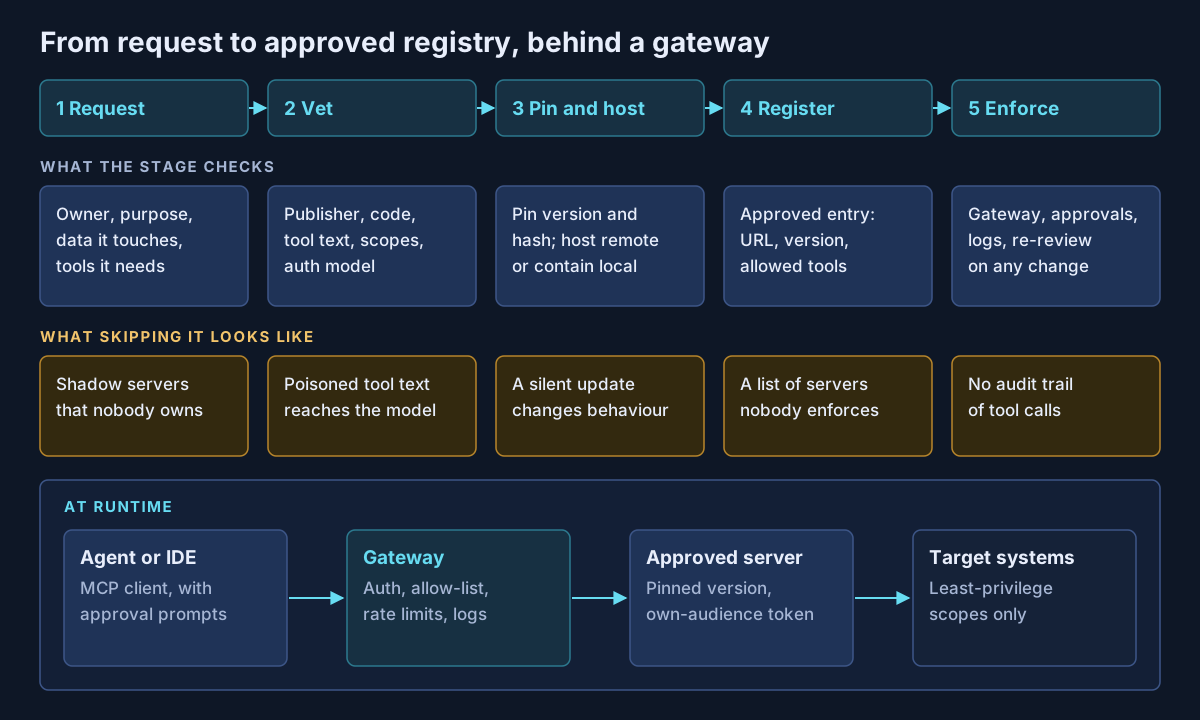
GitHub's documentation makes the point better than I can. Its registry-only enforcement for Copilot is in public preview, "is not the recommended method for restricting access to MCP servers," and "can be bypassed by editing configuration files." GitHub recommends URL-based allow-lists in managed settings instead. The same logic applies everywhere: the registry says what is approved, and something else has to block what is not.
For remote servers, that something is a gateway. For local servers, it is managed client settings plus endpoint controls, and I would treat any local server that touches production data as an exception needing sign-off.
What I would actually do
Make remote the default. Foundry already requires it, and a remote server can sit behind OAuth, a gateway and your logging.
Put every approved server in one inventory, such as Azure API Center, and route remote traffic through API Management or a Foundry toolbox. Keep approval on for every tool that writes, sends or deletes, and treat a readOnlyHint on a write tool as a finding.
Re-vet on change, not on a calendar. Pin versions, watch for tool-list changes, and re-read the descriptions when they change.
For the wider Microsoft picture, including how MCP actions fit declarative agents, see Microsoft 365 Copilot extensibility paths.
If your teams are already using MCP servers without a written standard, that is work Avalon does: MCP server inventories, vetting reviews of tool descriptions and scopes, gateway and registry designs on Azure API Management and API Center, and approval policies for Copilot Studio, Microsoft 365 Copilot and Foundry agents. It sits within my enterprise AI and security practice, and the contact page is the best way to start a conversation.
Sources
All checked on 19 September 2026. Where two sources disagree, the text names the disagreement.
MCP specification — Specification overview (2026-07-28) (opens in a new tab) · Changelog for 2026-07-28 (opens in a new tab) · Authorization (opens in a new tab) · Transports (opens in a new tab) · Tools (opens in a new tab) · Security best practices (opens in a new tab) · About the MCP Registry (opens in a new tab)
Microsoft Foundry — Connect agents to MCP servers (opens in a new tab) · MCP authentication (opens in a new tab) · Tools catalog and toolboxes (opens in a new tab) · Govern MCP tools with an AI gateway (opens in a new tab) · Private tool catalog (opens in a new tab) · What's new, July and August 2026 (opens in a new tab)
Azure API Management and API Center — MCP servers in API Management (opens in a new tab) · Content safety policy (opens in a new tab) · Inventory MCP servers in API Center (opens in a new tab)
Copilot Studio and Microsoft 365 Copilot — MCP GA in Copilot Studio, May 2025 (opens in a new tab) · Connect an existing MCP server (opens in a new tab) · MCP in declarative agents GA, December 2025 (opens in a new tab) · Confirmation prompts and readOnlyHint (opens in a new tab)
Windows, GitHub and OWASP — MCP on Windows (opens in a new tab) · Containing MCP servers on Windows (opens in a new tab) · GitHub MCP private registry enforcement (opens in a new tab) · OWASP MCP Top 10 (opens in a new tab) · OWASP GenAI: securely using third-party MCP servers (opens in a new tab)
Published 21 September 2026; sources checked on 19 September 2026. MCP and the Microsoft features around it change monthly, so check the specification and Microsoft Learn before making a commitment. The vetting checklist and the onboarding pipeline are guidance I propose, not vendor documentation. No client, employer or engagement is named in this article, and any scenario described is an illustrative composite rather than a description of specific customer work.
- #Model Context Protocol
- #MCP Security
- #Agentic AI
- #Tool Poisoning
- #Prompt Injection
- #OAuth 2.1
- #Azure API Management
- #Microsoft Foundry
- #Copilot Studio
- #Azure API Center
- #AI Governance
- #Supply Chain Security
Related articles
Who Approved That? Human-in-the-Loop Patterns for AI Agents That Act
Once an AI agent can write to systems, send email or move money, "a human approves it" is not a design. This guide classifies agent actions by consequence and reversibility, maps each class to an approval pattern, and sets out what the audit record must hold to survive a review, grounded in what Microsoft 365 Copilot, Copilot Studio, Microsoft Foundry and Purview actually provide as of September 2026.
9 min read
Agentic AI Security Architecture: Securing Autonomous Agents in the Enterprise
A research-grounded enterprise reference architecture for autonomous AI agents: agent identity, task-bound authorization, tool and MCP gateways, memory security, runtime containment, observability, and incident response — with an OWASP agentic Top 10 mapping, a bounded-autonomy model, and a 38-control matrix.
71 min read
The Microsoft AI Stack Explained: Copilot, Copilot Studio, Foundry, Agent 365 and Security Copilot
Microsoft's AI portfolio is not five versions of the same product — it is a layered enterprise architecture with an experience layer, two build platforms, a control plane, and the identity, data and threat controls underneath. A practical architecture guide to what each platform is for, which workloads belong where, how agent identity and authority actually flow, and what has to be true before an organization scales any of it.
47 min read