Agent Sprawl: An Inventory and Lifecycle Model for Enterprise AI Agents
Most organizations can now build AI agents faster than they can say who owns them. This article proposes a twelve-field inventory record and a seven-stage lifecycle from proposal to retirement, and maps each stage to what the Microsoft 365 Agent Registry, Microsoft Agent 365, Entra Agent ID and Power Platform inventory actually do as of September 2026, including where the tooling stops.
Published 22 September 2026. Every product claim, price and availability status below was checked against Microsoft's own documentation on 19 September 2026. Where sources disagree, I say so rather than pick one. Agent administration is changing month by month, so check the linked page before you build a process on it.
Two years ago the hard question about enterprise agents was whether to build one. Now any licensed user can build and share one in an afternoon, and the harder question is which agents already exist. Most organizations I talk to cannot answer that with confidence, and they cannot say who would switch a given agent off.
That is agent sprawl. It is not a security incident. It is an accountability gap, and it grows quietly.
The one idea that organizes the problem
An agent is governed only when you know it exists, a named person answers for it, and it has a date on which it must justify itself again or be retired.
Inventory, ownership and an end date. Most programs I review have the first, part of the second, and none of the third.
Why sprawl happens
Three things drive it, and all three are features, not bugs.
No-code builders. Agent Builder in Microsoft 365 Copilot and Copilot Studio let business users create agents without an engineering team. That is the point of them. It also means agents appear without passing through any intake step.
Sharing that spreads person to person. An Agent Builder agent can be shared with named users as Can edit or Can chat, or made discoverable to the whole organization. Admins can restrict org-wide sharing, but Microsoft's own page notes that "changes to admin controls apply only to new sharing actions." Tightening the setting today does not recall what was shared last quarter.
Agents without their own identity. Copilot Studio now creates an Entra Agent ID for every new agent, and Foundry creates one when an agent is published. But Microsoft's Copilot Studio documentation states that Agent Builder agents "currently don't use or require app registration IDs or Agent IDs." The easiest agents to create are the ones that Entra's identity controls cannot see. I made the same point about extensibility choices in choosing a Microsoft 365 Copilot extensibility path, and it matters even more for inventory.
What Microsoft gives you, as of September 2026
There is now more tooling than there was a year ago, spread across four admin surfaces.
| Surface | What it lists | Ownership features | Notes |
|---|---|---|---|
| Microsoft 365 admin center, Agents > All agents | Microsoft, partner, org-published and user-shared agents | "Missing an owner" filter; assign new owner for Agent Builder and Copilot Studio agents | CSV export; AI Reader role to view |
| Microsoft Agent 365 | Registry across Microsoft and partner agents; discovers unmanaged agents | Ownership attribution; start, stop, delete | GA 1 May 2026; $15 per user per month, or in Microsoft 365 E7 |
| Entra admin center, Entra ID > Agents > Agent identities | Agents that have an Entra Agent ID | Owners, and required sponsors | Time-limited access through access packages |
| Power Platform admin center, Manage > Inventory | Copilot Studio and Agent Builder agents, apps, flows | Owner field; API to reassign orphaned agents | Updates within 15 minutes; CSV export |
Microsoft's pages do not agree on what to call the first surface. The admin guide calls it the Agent inventory tab. The Agent Registry page puts it at Agents > All agents > Registry, with a count of "agents without owners," which the page explains as shared agents that "become ownerless when you delete the user who created them from the organization." The Agent 365 overview calls it "a single, centralized registry." Microsoft has also said it is converging the registry previously shown in Entra into Agent 365, with Entra keeping identity and access. Expect the menu labels to move again.
The practical point: no single view is complete. Entra sees only agents with an Agent ID. Power Platform sees only what was built on Power Platform. The Microsoft 365 registry is the widest, and Agent 365 adds discovery beyond Microsoft 365, but the risk signals in that view are limited to tenants with Microsoft 365 E7 or Agent 365.
A minimum inventory record
The tooling records technical facts well: platform, publisher, channels, knowledge and actions. It does not record why the agent exists or who pays for it. This record is my own construct, not a Microsoft schema.
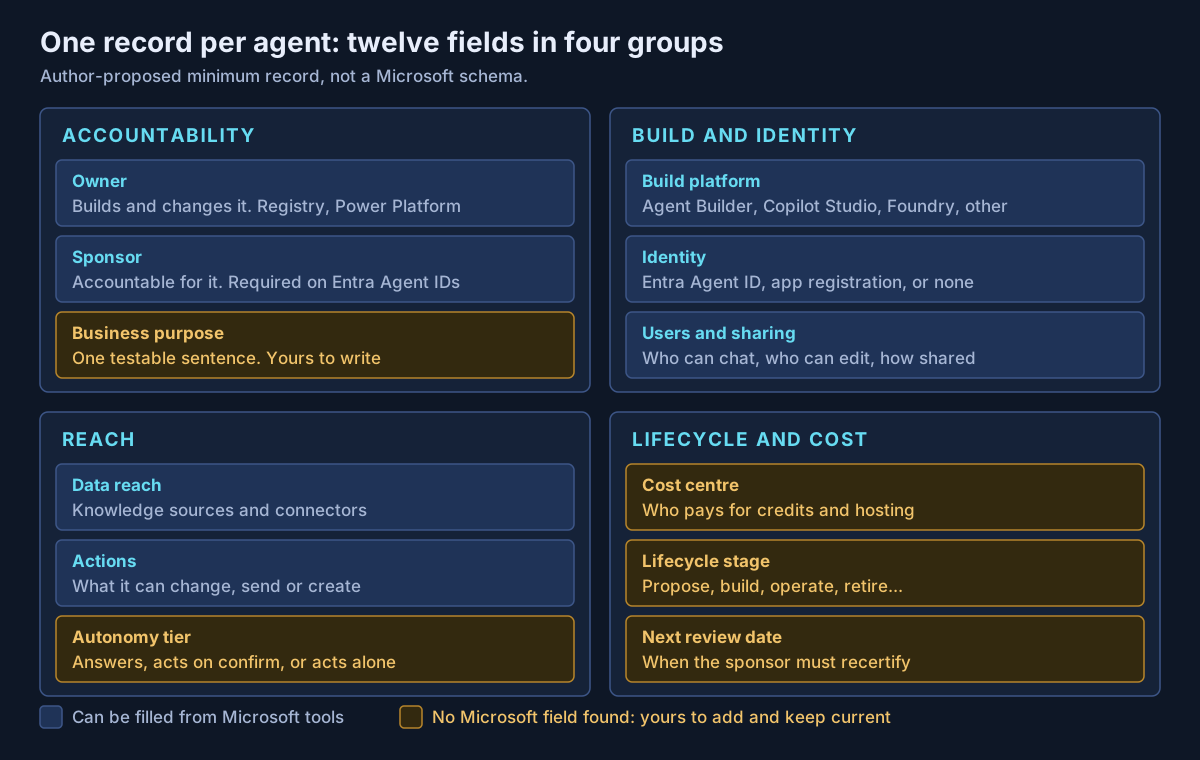
Three fields deserve a word.
Sponsor, not just owner. Entra already makes the distinction. Owners are technical administrators and are optional. Sponsors are "business representatives accountable for the agent's purpose and lifecycle decisions," and at least one is required for every agent identity. I would apply the same rule to every agent in the inventory, with or without an Agent ID.
Autonomy tier. Record whether the agent only answers, acts after the user confirms, or acts on its own. The tier sets the depth of review. I described a fuller set of autonomy levels in agentic AI security architecture.
Identity. Record "none" where it applies. An agent without an Entra Agent ID has no sponsor rule, no access packages and no agent-specific Conditional Access, so the other fields in the record are the only governance it gets.
A lifecycle that ends
Most programs have a start and no finish. This seven-stage model is my own proposal, mapped to what Microsoft tools do today.
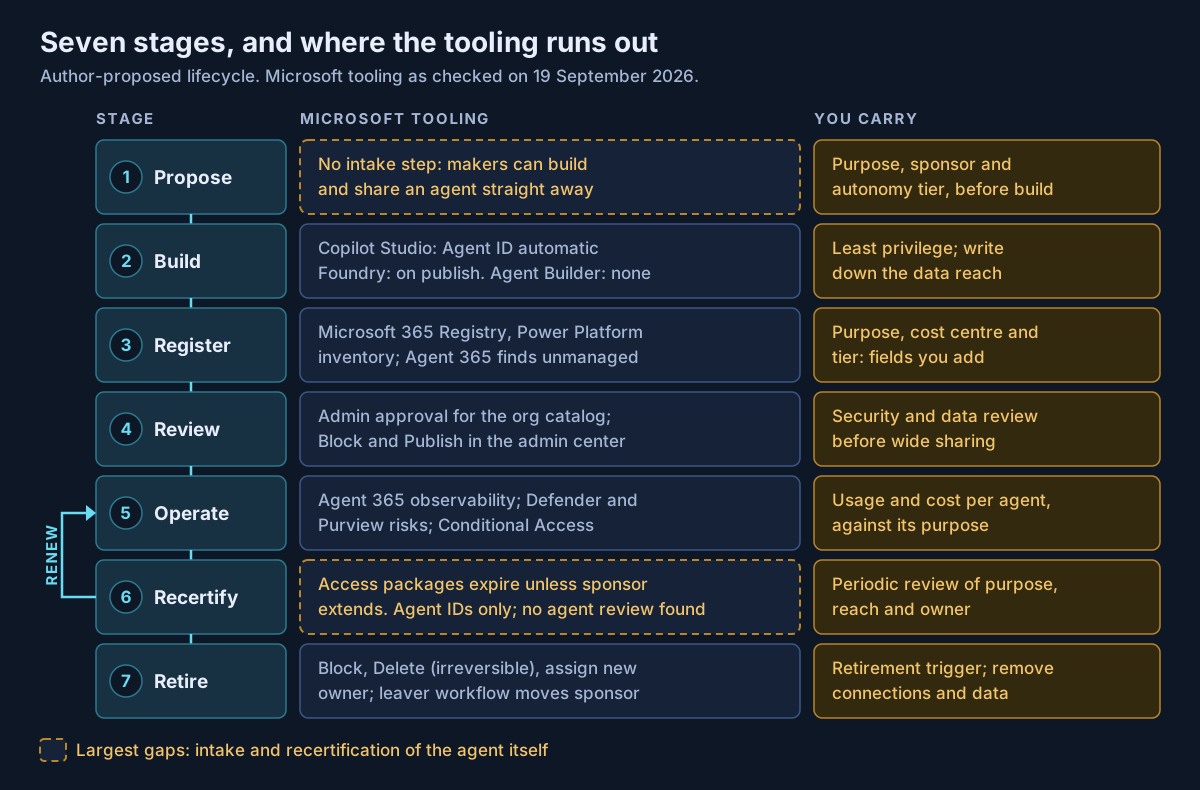
| Stage | Exit condition | Microsoft support |
|---|---|---|
| Propose | Purpose, sponsor and tier written down | None found |
| Build | Least-privilege access; identity recorded | Agent ID for Copilot Studio and Foundry |
| Register | Record complete, including your fields | Registry, Power Platform inventory, Agent 365 |
| Review | Security and data review passed | Admin approval, Block and Publish |
| Operate | Usage and cost match the purpose | Agent 365, Defender, Purview |
| Recertify | Sponsor confirms purpose, reach and owner | Access package expiry, Agent IDs only |
| Retire | Access removed, agent deleted, record closed | Block, Delete, reassign owner |
Recertification is the weakest stage. Entra access packages give agent identities time-limited access, and the sponsor is notified before expiry and must request an extension or let it lapse. That is real recertification of access. I could not find a Microsoft feature that recertifies the agent, meaning its purpose and continued need, and access packages apply only to agents with an Agent ID. Until one exists, put a review date on every record and run the review yourself.
Retirement needs a trigger. Deleting from the Microsoft 365 admin center is irreversible and takes up to 24 hours to reach all users. Decide in advance what ends an agent: no use for 90 days, a missed recertification, or its sponsor leaving without a successor. Those thresholds are my suggestion, not Microsoft guidance.
Orphaned agents
The owner leaving is the most common way an agent becomes ungoverned. The tooling here is better than most people assume, and less consistent than it should be.
- Microsoft 365 admin center: filter for agents missing an owner, then assign a new owner. Microsoft's own guidance is to "consider removing agents that no longer have an owner."
- Copilot Studio: a Power Platform API reassigns orphaned agents. Microsoft defines an orphan as an agent whose owner "leaves the organization or changes roles," which is broader than a deleted account.
- Entra Agent ID: the governance overview says that if a sponsor leaves, sponsorship "is automatically transferred to their manager." The Lifecycle Workflows page lists "Transfer agent identity sponsorships to manager" as a task you add to a mover or leaver workflow, which needs Microsoft 365 E7, or Agent 365 with Entra P1 or Microsoft 365 E3. Those two statements do not describe the same mechanism. Test it with a leaver in your tenant before relying on either.
A manager inheriting sponsorship is a safe default, not an answer. The recertification step should ask whether they want it.
What I would actually do
Export the Microsoft 365 registry and the Power Platform inventory this week and join them on agent name and owner. That is your baseline, and it will be larger than expected.
Add the four accountable fields to every row: purpose, sponsor, autonomy tier and review date. Anything nobody will sponsor goes on a retirement list.
Then close the intake gap. Restrict org-wide sharing of Agent Builder agents to a group that has passed a short proposal step, and remember that the restriction applies only to new sharing. Set a review date on everything, and treat a missed review as a retirement trigger rather than a reminder.
If your organization already has more agents than it can account for, that is work Avalon does: agent inventory baselines across the Microsoft 365 and Power Platform admin centers, ownership and sponsor models, lifecycle and recertification standards, and the Entra Agent ID and Agent 365 configuration that supports them. It sits within my enterprise AI and security practice, and the contact page is the best way to start a conversation.
Sources
All checked on 19 September 2026. Where two Microsoft pages disagree, the text names the disagreement.
Microsoft 365 admin center — Agents admin guide (Agent inventory) (opens in a new tab) · Agent Registry (opens in a new tab) · Governance and lifecycle actions (opens in a new tab) · Share and manage Agent Builder agents (opens in a new tab)
Microsoft Agent 365 — Agent 365 overview (opens in a new tab) · General availability announcement, 1 May 2026 (opens in a new tab) · Agent 365 licensing FAQ (opens in a new tab) · Agent Registry convergence (opens in a new tab)
Microsoft Entra Agent ID — What is Entra Agent ID (opens in a new tab) · Owners, sponsors and managers (opens in a new tab) · Manage agent identities (opens in a new tab) · Access packages for agent identities (opens in a new tab) · Governing agent identities (opens in a new tab) · Sponsor tasks in Lifecycle Workflows (opens in a new tab)
Build platforms — Entra Agent IDs in Copilot Studio (opens in a new tab) · Copilot Studio agent identities overview (opens in a new tab) · Foundry agent identity (opens in a new tab) · Power Platform inventory (opens in a new tab) · Reassign orphaned agents (opens in a new tab)
Published 22 September 2026; sources checked on 19 September 2026. Agent administration features and their menu names change frequently, so check Microsoft Learn before building a process on them. The inventory record, lifecycle model and retirement thresholds are guidance I propose, not Microsoft documentation. No client, employer or engagement is named in this article, and any scenario described is an illustrative composite rather than a description of specific customer work.
- #Agent Sprawl
- #AI Agents
- #AI Governance
- #Agent Inventory
- #Agent Lifecycle
- #Microsoft Agent 365
- #Microsoft Entra Agent ID
- #Agent Registry
- #Copilot Studio
- #Agent Builder
- #Power Platform
- #Agentic AI
Related articles
The Microsoft AI Stack Explained: Copilot, Copilot Studio, Foundry, Agent 365 and Security Copilot
Microsoft's AI portfolio is not five versions of the same product — it is a layered enterprise architecture with an experience layer, two build platforms, a control plane, and the identity, data and threat controls underneath. A practical architecture guide to what each platform is for, which workloads belong where, how agent identity and authority actually flow, and what has to be true before an organization scales any of it.
47 min read
Who Approved That? Human-in-the-Loop Patterns for AI Agents That Act
Once an AI agent can write to systems, send email or move money, "a human approves it" is not a design. This guide classifies agent actions by consequence and reversibility, maps each class to an approval pattern, and sets out what the audit record must hold to survive a review, grounded in what Microsoft 365 Copilot, Copilot Studio, Microsoft Foundry and Purview actually provide as of September 2026.
9 min read
MCP Servers in the Enterprise: How to Vet, Host and Govern Model Context Protocol Tools
Every MCP server is two things at once: text your model will read, and code that acts with someone's credentials. This guide covers the current MCP specification and its OAuth 2.1 authorization model, five risk classes, a vetting checklist, where Microsoft's MCP hosting and gateway options stand in September 2026, and an allow-list model that holds up in an audit.
10 min read